Hello,
Is there a way to to add an Information Object Addresses lower than 1000? As my first tests of the package I did not find a way to make custom objects with smaller address, suppose they are reserved. It would be great if this is possible.
Hello,
I’ve forwarded this question to our R&D department. We’ll let you know as soon as we receive an answer.
Kind regards,
Z.
Thank you, Z! I am looking forward to their response.
Hello,
To further clarify your specific requirement, could you please provide the following information:
Device model and current RutOS version
Whether you are configuring the IEC 60870-5 Server or Client
The exact IOA value below 1000 that you need to use
The IEC 60870-5 Type ID associated with this IOA
This information will allow us to verify whether the requested configuration is supported and investigate further with our R&D team if necessary.
Kind regards,
V.
Hello, @n0r3k ,
As a workaround you can create an information object via the webui, using addresses higher than 1000 and afterwards edit the io_address in the cli (vi /etc/config/iec60870_server)
Afterwards restart the service: /etc/init.d/iec60870_server restart
Test resposnse:
Just make sure to not use addresses that are used internally.
If the you want us to change the allowed address range in the WebUI, could you please clarify whether there is a specific reason for that, before forwarding this to R&D.
Kind regards,
V.
Hello, Vilius!
Here is the information you’ve asked:
Will try this approach and inform you with my results.
Also where can I find the defaults internal IOA that are used.
Hi, you can find the IOAs here RUT145 IEC 60870-5 - Teltonika Networks Wiki
but i think some of them may be not used by rut145, maybe generic
you can set up IEC 60870-5-104 client to loopback address when server is enabled and you will be able to get all of the information objects with values and addresses
Hello @n0r3k,
Thank you for providing the requested details.
Based on the information provided, we understand that you are using:
Device: RUT145
RutOS: 00.07.24.2
IEC 60870-5-104: Server
Required IOAs: 500-530 with type M_ME_TD_1
Required IOAs: 800-810 with type M_ME_TF_1
The documentation lists the configurable Information object address range for IEC 60870-5 Server data sources as 1000-16777215. Therefore, IOAs below 1000 cannot currently be entered through the WebUI configuration field.
At the same time, the RUT145 documentation lists built-in IEC 60870-5 Server information objects using lower IOAs, including addresses 1-53. The documented availability of some of these objects depends on the capabilities of the device.
This means that we should distinguish between the built-in information objects and custom information objects. The documentation does not state that the entire 0-999 IOA range is reserved, nor does it document custom server information objects below 1000 as a supported WebUI configuration option.
As discussed above, you can test the following workaround:
Create the required information object through the WebUI using an address within the allowed range.
Edit the corresponding io_address value in /etc/config/iec60870_server.
Restart the IEC 60870-5 Server with:
/etc/init.d/iec60870_server restart
Verify from the IEC 60870-5 client/SCADA side whether the configured IOA is available and operates correctly.
OpenWrt documentation confirms that UCI configuration changes are stored in /etc/config, and that affected services must be reloaded or restarted for the updated configuration to be applied.
Please test the workaround with both of your required ranges and let us know the result. In particular, please confirm whether IOAs 500-530 and 800-810 are correctly presented and usable by your IEC 60870-5 client after the service restart.
Regarding the question about the internally used IOAs: the complete list of the built-in RUT145 IEC 60870-5 Server information objects and their addresses is available in the official RUT145 Wiki documentation here:
Please also post an update in this topic once you have completed the testing, including the test result. This will allow us to determine whether further investigation with our R&D team is required and will also help other users following the discussion.
Kind regards,
V.
Hello @Vilius
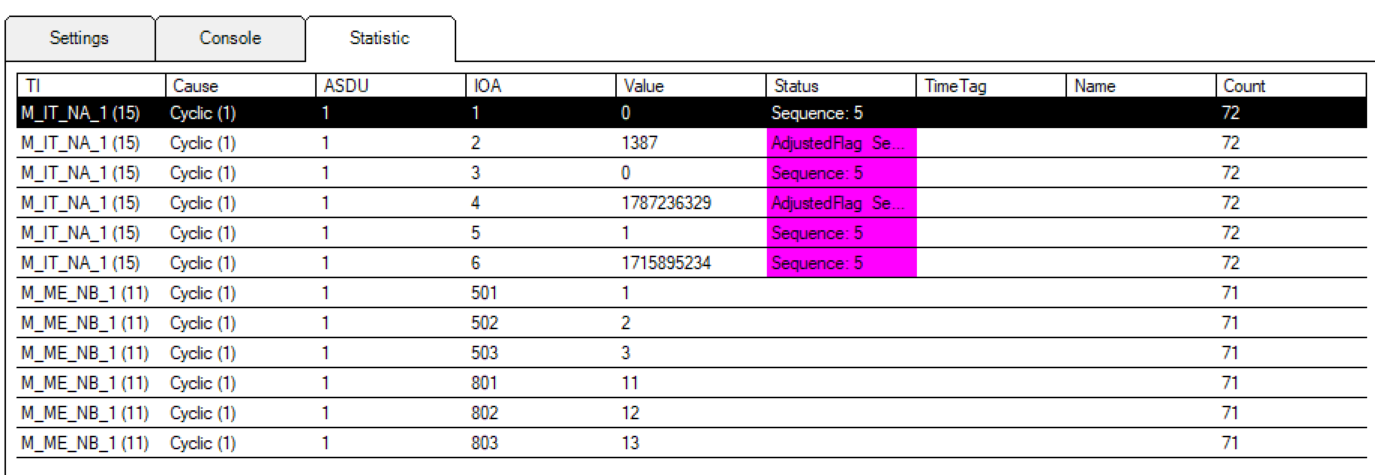
Thank you for your cooperation, I would like to inform you with my results. The solution you proposed works. My testing involves the following:
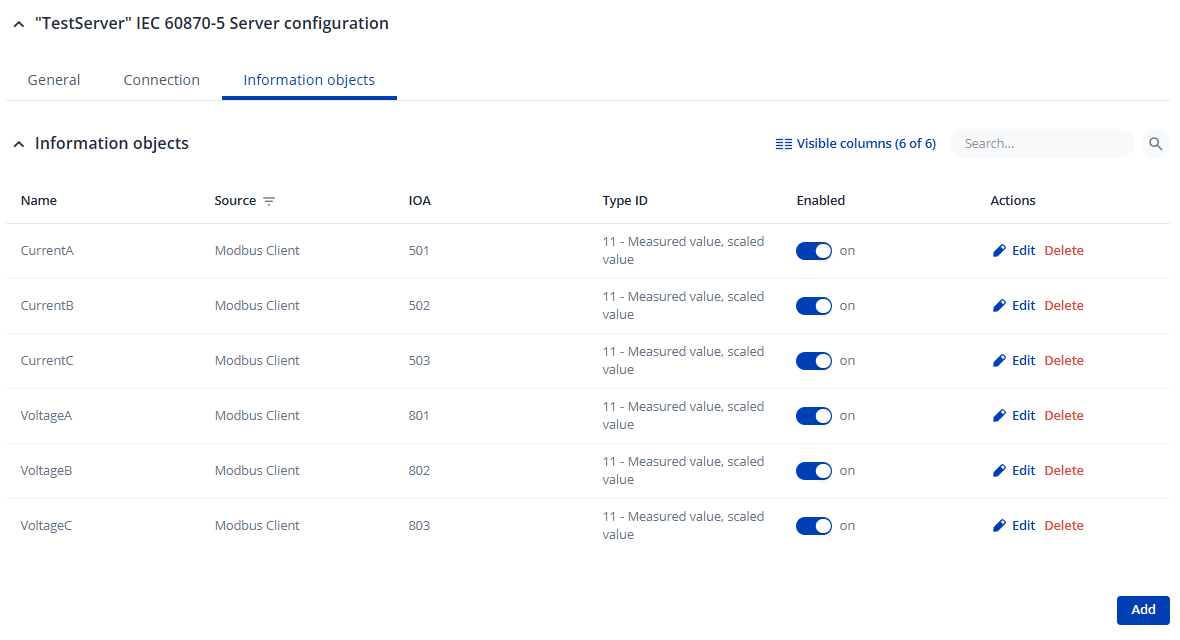
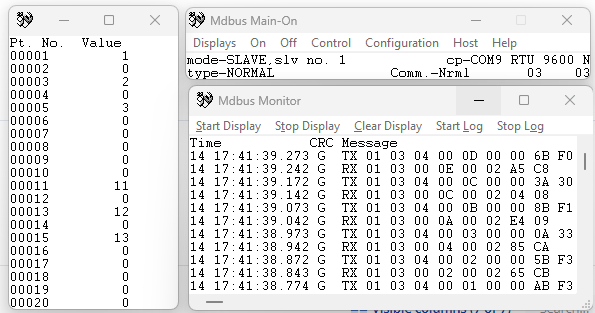
Note that for simplicity I have tried only addresses 501-503 and 801-803 all type 11 M-ME_TD_1. I did not perform a general interrogation, everything is cyclic data.
I have followed your guide:
/etc/config/iec60870_server with vi editorconfig main 'main'
option enabled '1'
config instance '1'
option common_address '1'
option connection_type 'iec104'
option spontaneous_enabled '0'
option port '2404'
option enabled '1'
option name 'TestServer'
option time_tag 'none'
option cyclic_period '5000'
option cyclic_enabled '1'
config tag '2'
option instance_id '1'
option tag_id '2.3'
option tag_source 'modbus_client'
option enabled '1'
option tag_type 'int16'
option tag_start '0'
option io_type '11'
option tag_permissions 'r'
option io_address '501'
option tag_name 'CurrentA'
option tag_count '1'
config tag '3'
option instance_id '1'
option tag_permissions 'r'
option tag_name 'CurrentB'
option tag_id '2.4'
option tag_source 'modbus_client'
option io_address '502'
option tag_count '1'
option tag_type 'int16'
option io_type '11'
option tag_start '0'
option enabled '1'
config tag '4'
option instance_id '1'
option io_address '503'
option tag_type 'int16'
option tag_id '2.5'
option tag_start '0'
option tag_count '1'
option tag_permissions 'r'
option tag_name 'CurrentC'
option io_type '11'
option tag_source 'modbus_client'
option enabled '1'
config tag '5'
option instance_id '1'
option io_address '801'
option tag_type 'int16'
option tag_id '2.6'
option tag_start '0'
option tag_count '1'
option tag_permissions 'r'
option tag_name 'VoltageA'
option io_type '11'
option tag_source 'modbus_client'
option enabled '1'
config tag '6'
option instance_id '1'
option io_address '802'
option tag_type 'int16'
option tag_id '2.7'
option tag_start '0'
option tag_count '1'
option tag_permissions 'r'
option tag_name 'VoltageB'
option io_type '11'
option tag_source 'modbus_client'
option enabled '1'
config tag '7'
option instance_id '1'
option io_address '803'
option tag_type 'int16'
option tag_id '2.8'
option tag_start '0'
option tag_count '1'
option tag_permissions 'r'
option tag_name 'VoltageC'
option io_type '11'
option tag_source 'modbus_client'
option enabled '1'
and I this is the configuration of /etc/config/modbus_client:
config main 'main'
        option enabled '1'
        option debug '0'

config rtu_device '1'
        option device '/dev/rs485'
        option name 'Configuration-01'
        option full_duplex_enabled '0'
        option flowcontrol 'none'
        option stopbits '1'
        option parity 'none'
        option databits '8'
        option baudrate '9600'
        option inter_device_delay '50'
        option enabled '1'

config rtu_server '2'
        option server_id '1'
        option timeout '1'
        option rtu_device '1'
        option frequency 'period'
        option skip_on_many_tmos '0'
        option period '5'
        option name 'TestReadings'
        option enabled '1'

config request_2 '3'
        option broadcast '0'
        option store_on_change_only '0'
        option no_brackets '0'
        option data_type '16bit_int_hi_first'
        option first_reg '1'
        option enabled '1'
        option function '3'
        option reg_count '2'
        option name 'register01'

config request_2 '4'
        option data_type '16bit_int_hi_first'
        option broadcast '0'
        option no_brackets '0'
        option store_on_change_only '0'
        option reg_count '2'
        option first_reg '3'
        option function '3'
        option enabled '1'
        option name 'register02'

config request_2 '5'
        option data_type '16bit_int_hi_first'
        option broadcast '0'
        option no_brackets '0'
        option store_on_change_only '0'
        option reg_count '2'
        option first_reg '5'
        option name 'register03'
        option function '3'
        option enabled '1'

config request_2 '6'
        option data_type '16bit_int_hi_first'
        option broadcast '0'
        option no_brackets '0'
        option store_on_change_only '0'
        option reg_count '2'
        option first_reg '11'
        option name 'register11'
        option function '3'
        option enabled '1'

config request_2 '7'
        option data_type '16bit_int_hi_first'
        option broadcast '0'
        option no_brackets '0'
        option store_on_change_only '0'
        option reg_count '2'
        option name 'register12'
        option function '3'
        option enabled '1'
        option first_reg '13'

config request_2 '8'
        option data_type '16bit_int_hi_first'
        option broadcast '0'
        option no_brackets '0'
        option store_on_change_only '0'
        option reg_count '2'
        option name 'register13'
        option function '3'
        option enabled '1'
        option first_reg '15'
/etc/init.d/iec60870_server restartWorks even after a power cycle of the router. Although not everything is tested meaning that type M_ME_TF_1 is not tested and a general interrogation command is not initiated, which might lead to overlap with the desired IOA, everything looks okay.
Question: What is the maximum number of simultaneous clients?
After a test of type M_ME_TF_1 and test General Interrogation will post again in this thread.
Thank You!
Hello, @n0r3k ,
Thank you for confirmation,
And thank you for sharing your setup.
The underlying IEC 60870-5-104 library defines a default limit of 100 simultaneous client connections.
I hope this helps!
Kind regards,
V.