Hi, I was speaking to first line support Vilius, -We have HTTPS Proxy enabled, and users are being randomly disconnected at various intervals, resulting in a loss of internet access.
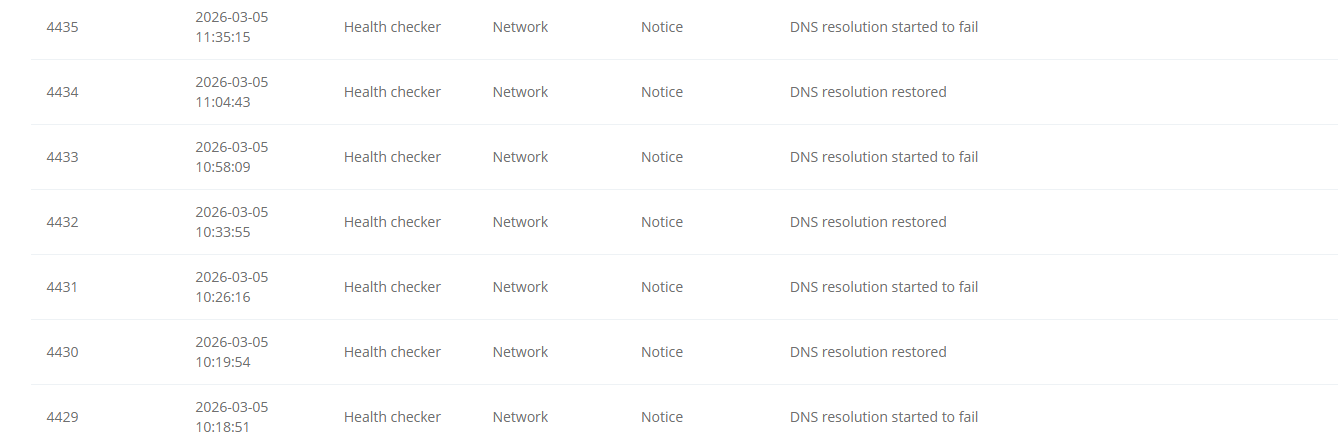
When we check the event logs on the Teltonika device, they indicate that DNS resolution starts to fail, and after some time it reports that DNS resolution has been restored.
Thank you for your detailed description of the issue.
From the information shared, the connectivity loss appears to be caused by the HTTPS DNS Proxy (DNS-over-HTTPS) failing to receive valid responses from the upstream DoH server. The logs show repeated errors such as curl response code: 400 and “Unable to get response from DNS server” , which indicates the proxy is unable to successfully query the configured DoH provider. When this happens, DNS resolution on the router stops, which results in a loss of internet connectivity until the service is restarted.
To further troubleshoot the issue, please try the following steps:
Verify the DoH server configuration
Ensure the configured DoH URL is correct and complete.
Confirm that the selected CleanBrowsing DoH endpoint is valid.
Check bootstrap DNS configuration
Make sure a reliable bootstrap DNS server is configured (for example 1.1.1.1 or 8.8.8.8).
The router uses this to resolve the DoH server hostname before the proxy can operate.
Test connectivity from the router
If possible, access the router via SSH and verify connectivity to the DoH endpoint using a curl test.
Restart related services
Instead of rebooting the device, restart the DNS services to confirm whether the proxy is the cause:
/etc/init.d/openvpn restart dnsmasq
Test with a different DoH provider
Temporarily switch to another provider (e.g., Cloudflare or Google DoH) to determine whether the issue is specific to the current upstream server.
Check firmware and configuration state
If the issue began after a firmware upgrade, test after performing a configuration reset (after backing up settings) and reconfigure the DoH settings manually.
If the issue persists, please provide:
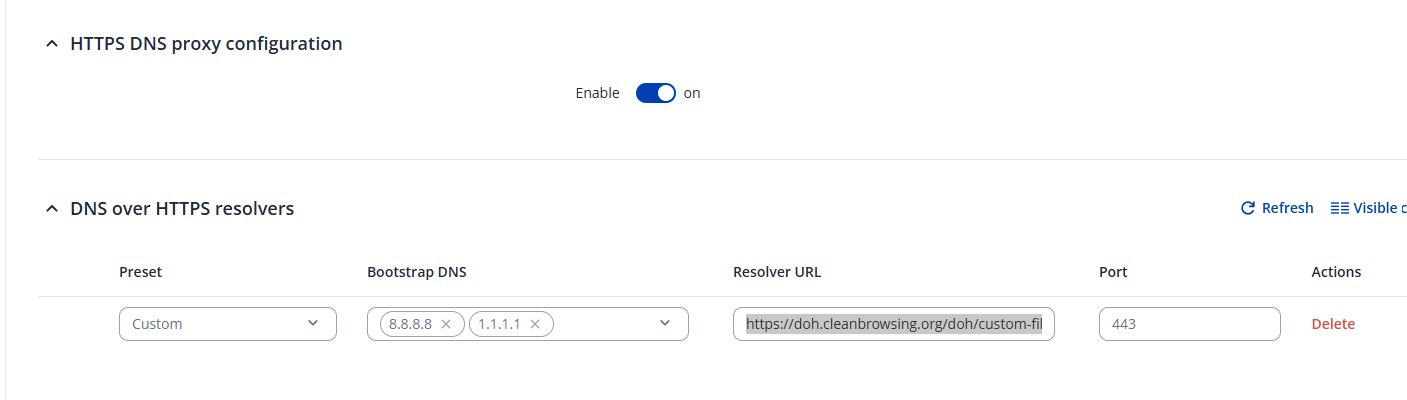
A screenshot of the HTTPS DNS Proxy configuration
Confirmation of the configured DoH URL and bootstrap DNS servers
This information will help determine whether the issue originates from the proxy configuration, connectivity to the upstream DoH server, or the service itself.
We have verified the DoH server configuration and everything appears to be correct. However, we have a few sites where DNS resolution has started failing without showing any specific errors.
I also tried running the following command, but it does not work: /etc/init.d/openvpn restart dnsmasq
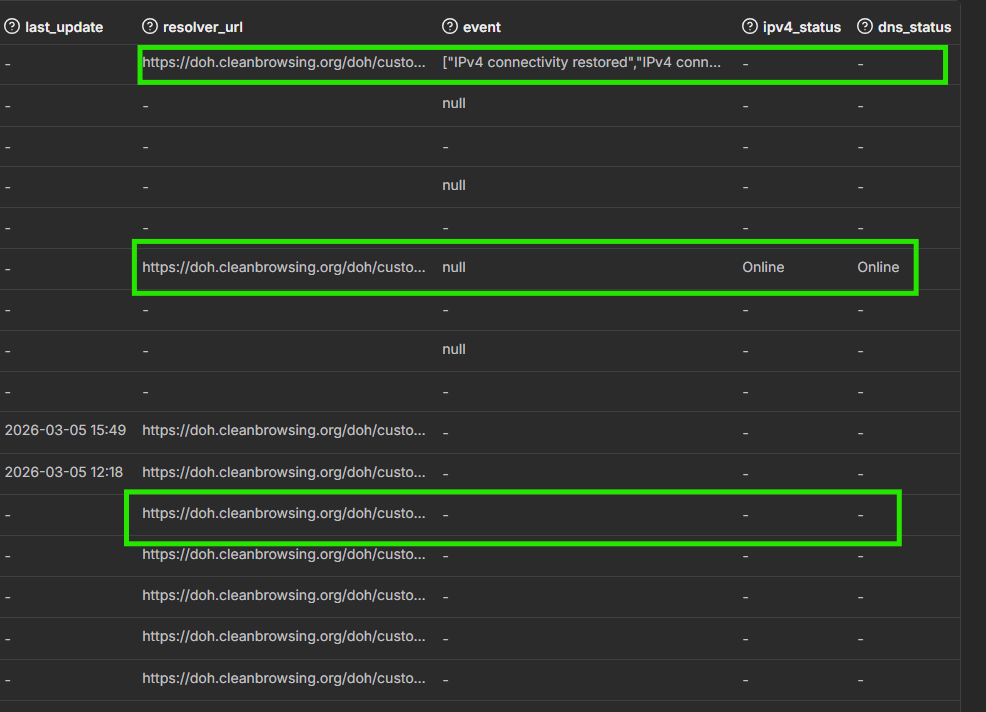
Furthermore, we attempted to configure DNS Status and Event Logs on the dashboard, but it does not seem to be working properly. It detects some sites, while most others appear blank. Could this be a bug?
Also, is there a way to trigger an alert whenever there is a change in DNS status? When we try to set up an alert, we receive an error indicating that some fields are not supported.
Do you have any update on the DNS Status and Event Logs on the dashboard, We have 38 online and 65 still no reporting status update in RMS. We can see the internet status is online on the device itself.
Also, is there a way to trigger an alert whenever there is a change in DNS status? When we try to set up an alert, we receive an error indicating that some fields are not supported
Regarding the commands, I am sorry that I provided with a faulty command. Correct syntax of the command to restart the service is:
Example: /etc/init.d/<service> restart
Regarding the DNS Status and Event Logs in RMS, currently this feature does not always report consistently for all devices. If a router shows internet connectivity locally but RMS displays “no reporting status”, it usually means the device is still connected to RMS but the DNS monitoring data is not being collected or forwarded correctly. This can happen when:
DNS-over-HTTPS (DoH) is enabled, since DNS queries are handled by https-dns-proxy and are encrypted. RMS may therefore receive limited DNS visibility.
The router still has internet connectivity, but the DNS status metric itself is not updated or supported by the firmware/RMS combination.
Because you are seeing this across multiple firmware versions, it is more likely related to RMS reporting limitations rather than the router losing connectivity.
For confirmation, check:
RMS connection status (device should show Online)
Whether DNS monitoring works when standard DNS (without DoH) is used.
DNS status alerts
At the moment, RMS does not support a direct alert trigger for DNS status changes, which is why the alert configuration returns the message about unsupported fields.
Workaround
A practical approach is to use Connectivity Monitoring with a hostname (for example google.com):
The router periodically resolves and pings the host.
If DNS resolution fails, the connectivity check fails.
This can then trigger an RMS alert.
This indirectly alerts you when DNS resolution stops working.
However, it is still unclear to us why this feature is working on some sites but not on others. The network design and configuration are the same across all of our locations, so technically we would expect it to behave consistently at every site.
Could you please clarify whether this is a known limitation or bug within RMS, or if it is related to the Teltonika device firmware or functionality? Any additional insight into why this discrepancy occurs would be appreciated.
Thank you for the information provided so far. And apologies for the delayed response.
Based on the logs, the HTTPS DNS Proxy is receiving an HTTP 400 response from the configured CleanBrowsing DoH server, followed by an error indicating that a response could not be obtained from the DNS server.
At this stage, however, the available information is not sufficient to determine whether the issue is related to the DoH server, the network path to it, the DNS bootstrap configuration, or the HTTPS DNS Proxy itself.
To investigate this further, could you please provide the following information from an affected device?
The current HTTPS DNS Proxy configuration, preferably as a screenshot from the WebUI and/or the output of: uci show https-dns-proxy
The exact CleanBrowsing Resolver URL and Bootstrap DNS configured.
Please test the configured DoH server directly from the router while the issue is occurring. If possible, run: curl -s -H "accept: application/dns-json" "https://<configured-DoH-URL>/?name=example.com&type=A"
Please provide the complete output.
While DNS resolution is failing, please run: nslookup example.com localhost
and provide the result.
Please provide the relevant logs from the time of the failure: logread -e dnsmasq logread -e https-dns
Ideally, include several minutes before and after the first occurrence of the HTTP 400 error.
Please confirm whether restarting only the HTTPS DNS Proxy restores DNS functionality: /etc/init.d/https-dns-proxy restart
If this does not resolve the issue, please confirm whether restarting dnsmasq is required as well.
As an additional isolation test, could you temporarily disable HTTPS DNS Proxy and verify whether the issue still occurs when using standard DNS?
If possible, please also test a different documented DoH provider, such as Cloudflare or Google, and let us know whether the issue persists.
These tests will help us determine whether the failure is specific to the configured CleanBrowsing resolver, the connection to the DoH server, or the HTTPS DNS Proxy service itself.
At this point, we do not want to attribute the issue to a firmware defect without the additional evidence above.