How to add a second Subnet to RUT950

I have a RUT950 router. LAN is in the 192.168.1.x range. I have a single networked device that has a hard coded IP address of 10.0.175.133 that I need to communicate with devices on the LAN. Is there any way I can set up a second subnet and allow that to route to the 192.168.1 devices?

If so, how do I go about doing this? I have tried ChatGPT with no luck - I keep getting instructions to action that I can’t see in my webUI.

RUT950
Firmware RUT9_R_00.07.02.4
In Advanced view mode

Any help would be much appreciated.

Hi,

Yes, that is possible.

Before that, I would suggest updating your device’s firmware due to security reasons. You can download newer firmware from here:

If you will decide to make the update - do that without keeping any previous settings.


To create a second LAN interface:

  • Navigate to “Network → VLAN” menu, add a new line, and indicate over which LAN port your 10.0.175.133 device will be connected. Example:
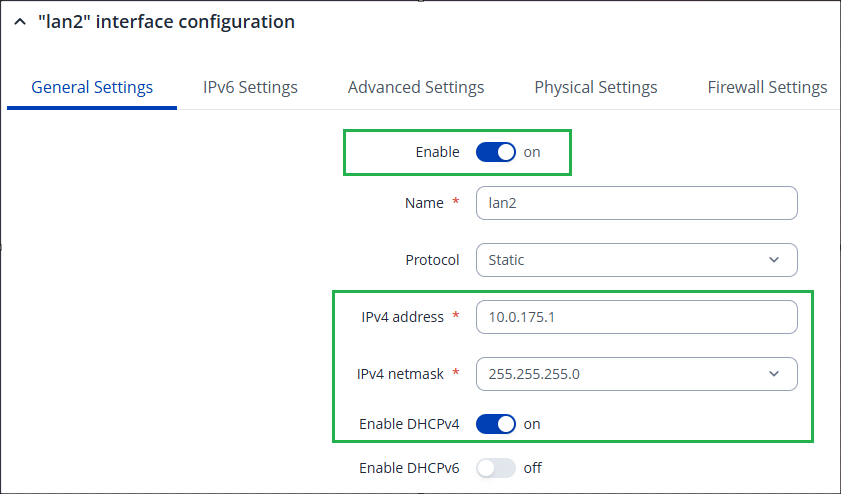
  • Navigate to the “Network → LAN” menu, and create a new LAN interface. Specify its IP address to be from the desired 10.0.175.0/24 network. Optionally enable DHCP. Example:
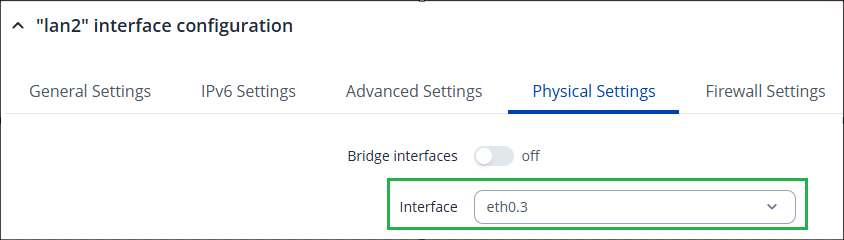
  • Lastly, before saving the settings, navigate to the “Physical Settings” tab, and here select the eth0.3 option:

Greetings,

Please follow the instructions @Unknown provided for setting up the VLAN., For VLAN to VLAN communication, follow this configuration example: VLAN Inter-Zone accessibility control configuration example - Teltonika Networks Wiki
You can set up one firewall zone or use inter-zone forwarding.

Let me know if everything works out.

Best Regards,
Justinas

This topic was automatically closed after 60 days. New replies are no longer allowed.