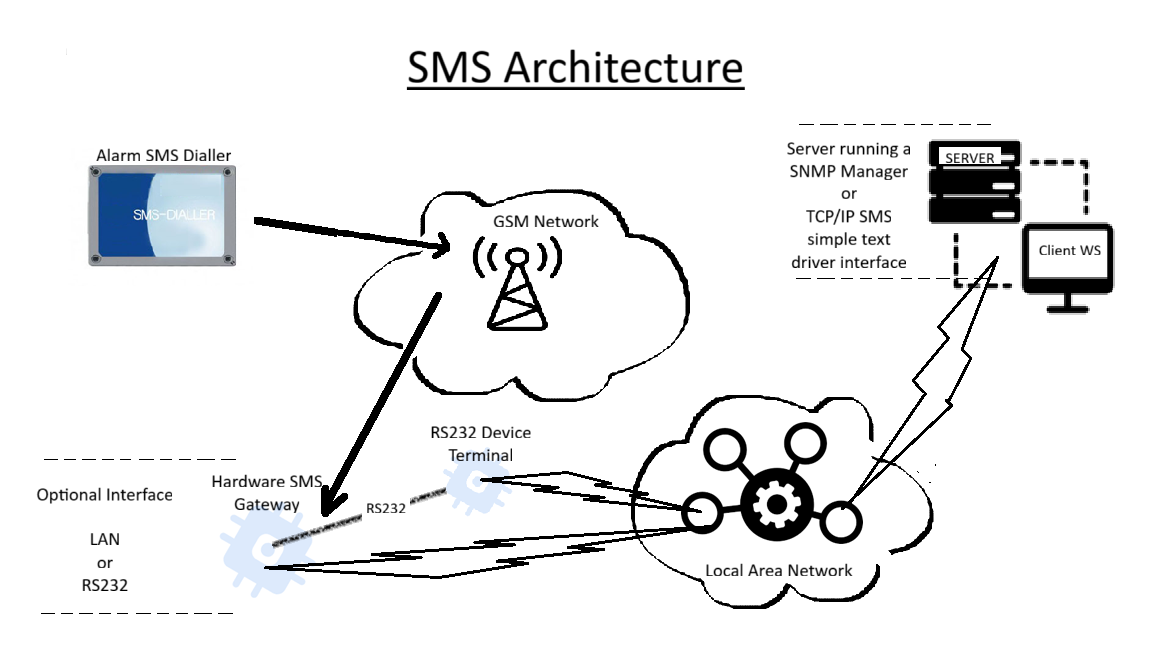
I would like you to provide some help of how to pick up data from a TRB245 unit.
The system setup is as follows. An Alarm SMS Dialler would transmit to the GSM Network which would then be picked up by the TRB245 unit (Hardware SMS Gateway). Some applications are running on a LAN (Clients and Server).
Thank you for reaching out. Could you please clarify a few details so we can better understand your setup?
What type of data is being sent to the TRB245 via SMS from the Alarm SMS Dialler?
Will the SMS content always be different (non-persistent), and will the sender’s number vary each time?
To note, by default, received SMS messages on the TRB245 are stored in the SIM card’s internal memory, and received data is not automatically forwarded to the RS232 serial port or to TCP/UDP clients.
Could you confirm if your main goal is to forward the received SMS data from the TRB245 directly to the RS232 serial terminal for further processing?
From the initial description of your setup, achieving this specific behavior would likely require a custom script to read incoming SMS messages and push them out through the RS232 interface. While we can’t develop custom scripts directly, I could only provide some guidelines and technical insights on how such a configuration could be implemented.
What type of data is being sent to the TRB245 via SMS from the Alarm SMS Dialler? A very simple bit of text such as ‘AFire ’ or ‘AFault ’ with the description (same for both) being the location.
Will the SMS content always be different (non-persistent), and will the sender’s number vary each time? So far we are looking at 1 bit of equipment sending out the SMS with the senders’s number being the same and data as that in point 1. With another bit of equipment, the sender’s number will be different but the the SMS format will remain the same with a different description to distingush where the SMS came from.
To note, by default, received SMS messages on the TRB245 are stored in the SIM card’s internal memory, and received data is not automatically forwarded to the RS232 serial port or to TCP/UDP clients.
Could you confirm if your main goal is to forward the received SMS data from the TRB245 directly to the RS232 serial terminal for further processing? Yes, as you mention we need some way of pushing the SMS data once received to RS232 or LAN.
I hope you don’t mind me asking for an update to our support question. Our client has asked us for an update and would like to get back to them with a meaningful response.
Reiterating some the points you outlined below for clarification.
1. The data being sent to the TRB245 via SMS from the Alarm SMS Dialler consists of short text-based alarm notifications (e.g., status updates, alerts, and fault codes).
2. Yes, the SMS content will vary with each message, and the sender’s number may also differ depending on which alarm unit is sending the alert.
3. Understood regarding the default SMS storage behavior.
4. The main goal is to have each received SMS automatically forwarded from the TRB245 to the RS232 serial terminal for processing by an external system.
Thank you for clarifying that and for outlining the details. I appreciate your note regarding the need for a custom script and the technical guidance you can provide.
Could you please share more details or an outline of how such a script could be structured? Specifically, I’d like to understand the key components involved in reading incoming SMS messages and transmitting them via the RS232 interface. Any example workflows, recommended tools, or references related to implementing this on the TRB245 would also be very helpful.
Apologies for the delay. Thank you for your follow up and for providing additional context regarding your intended setup.
After further review of your requirements, it appears that this is a more complex use case which would likely require a Custom Development Project (CDP). Natively, the TRB245 does not support direct SMS forwarding via the serial (RS232) interface to a server on the LAN.
Additionally, after reviewing similar past cases, it seems that implementing this through a custom script would not be a viable solution for this particular setup. As it goes beyond our standard technical support knowledge scope, we’re unfortunately unable to provide detailed guidance on how such a script could be structured.
If you would like to explore the possibility of a CDP, please reach out to your sales manager (if you have one assigned), or if you don’t have one, submit a request through the Contact Us form available on page here.
In some instances, maybe there are other users that have implemented similar setups who may be able to share their practical insights.
It may also be worthwhile to check relevant forum threads like this one: