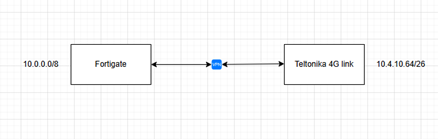
I have successfully created a IPsec VPN between a fortigate and the rutx50. The problem is that although traffic is passing across from the rutx50 to the fortigate I can’t really connect to anything. On the fortigate the policies and traffic look good. I can ping from the fortigate to the rutx50 lan ip.
I changed the LAN ip to a corporate one, when I take down the VPN, I can access internet, but when I bring up the VPN, I cannot connect to anything.
As soon at the VPN is up, client on Teltonika side cannot access anything across the VPN, or on internet, nor can it reach the LAN IP of the teltonika
If you take down the VPN, internet works, and you can reach the LAN IP of the teltonika.
So it tell me that the LAN IP range is not the issue. I am happy to leave the default 192.168.1.1/24, but I do need the 10.4.10.64/26 on the Teltonika side in order to access corporate resources.
Fortigate shows logs of traffic from clients connected to Teltonika
Fortigate can also ping LAN IP of Teltonika
Clients behind Fortigate cannot reach clients on Teltonika, even though Fortigate is passing traffic across to VPN.
For troubleshooting purposes, we will require more sensitive information from your end, such as the troubleshoot file, which may contain passwords, public IP addresses, serial numbers, and such. To avoid leaking this information, we have sent you a form to fill out, which you will receive in your e-mail inbox that you have registered your account with in the forums. In the Ticket ID field of the form, please enter the ID of this thread, which is 17604.