Hi,
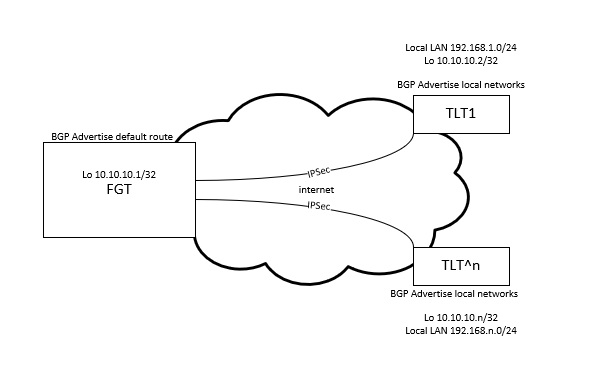
I would like to create hub and spoke kind of topology with Fortigate as hub, teltonikas as spokes, and teltonikas would be dialup. When that is done, then Teltonikas would advertise local networks to the fortigate with bgp.
This is because there is probably gonna be several teltonikas calling in, and Fortigates Static routing table can only hold so many static routes, which why dynamic routing is needed.
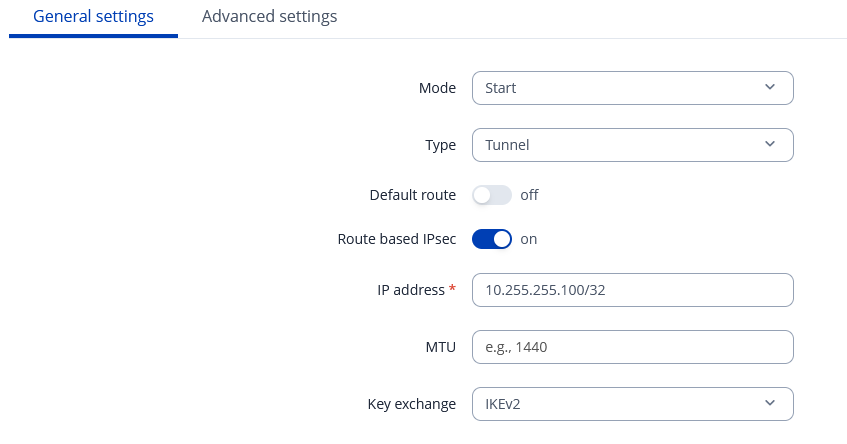
Proxy pairs is any-any, and I’m trying to enable route based with defaul route in the tunnel.
If I enable default route, the tunnel goes down and I cant seem to find any reason why; probably because then wan starts to direct its traffic to the tunnel? I added the wan-port to the passthrough interfaces, but it does not help.
Also tried adding remote and local ip addresses in advanced side. If I add those, tunnel goes down. I understood, that those ips would act as tunnel interface addresses?
Any advices where to start to debug this and how? Also, when tunnel is up, and I have configured BGP, it seems like teltonika is not even trying to connect to the other side.
Greetings,
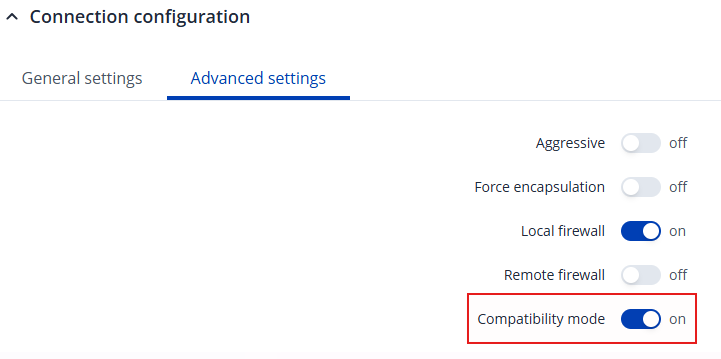
Could you please try enabling Compatibility mode under the Advanced settings of the connection configuration and check whether this resolves the issue?
Could you share a simple sketch of your network topology, including IP addresses (please exclude any public IPs)?
Also, could you provide the current BGP configuration?
Best Regards,
Justinas
Ill try those setting, here is simplified network topology. Teltonikas routes are mostly random pubplic IP’s, so the ipsec tunnel needs to be dialup on fortigates side:
It feels like Teltonika side it is not starting the BGP process at all. I manually created the neighbour on FGT side, and BGP is advertizing routes now. But if I remove direct neighbour from FGT side and use groups, it seems TLT is not starting the process at all. Is there somekind of log I could look in to this? Logread does not seem to reveal anything about starting bgp process.
Adding above mentioned ‘Compatibility mode’ does not seem to help at all. When adding default route tab on, it tries to connect to the fortigate, and there is data, but apparently fortigate does not understand it, as it feels like it is not responding to it at all. Also, no errors on fortigate side.
Thanks for this announce !
Greetings,
For troubleshooting purposes, we will require more sensitive information from your end, such as the troubleshoot file, which may contain passwords, public IP addresses, serial numbers, and such. To avoid leaking this information, we have sent you a form to fill out, which you will receive in your e-mail inbox that you have registered your account with in the forums. In the Ticket ID field of the form, please enter the ID of this thread, which is 17848.
Best Regards,
Justinas
Hi,
You can close this. We decided to go different route, and not use BGP after all. Thanks and sorry for the trouble.