J_Dev,
This is just side note(s) of your source json example is not valid json. The problem is that it contains wrong double quotation marks are not ASCII 32 (decimal) but instead appear to be UTF-8 various alternative quotation marks. And because json only ASCII quotation is allowed, that json you posted does not pass test.
Having your source.json in file on a linux box, here is what happens:
$ python3 -mjson.tool < source.json
Expecting property name enclosed in double quotes: line 2 column 1 (char 2)
$
Now that gives a hint what is wrong, but let’s see a bit another way using bash quick function found from one stackoverflow post.
$ nonascii() { LANG=C grep --color=always ‘[^ -~]+’; } # this adds function for this session
$ nonascii < source.json
“TESTING_MQTT_DATA”: [
“date”: “03\u002F02\u002F2026 10:53:12”,
“data”: “1.028216”,
“name”: “TEST_PRESSURE_Bara”
“date”: “03\u002F02\u002F2026 10:53:12”,
“data”: “6.224992”,
“name”: “TEST_Pressure_measured_kg_m3”
“date”: “03\u002F02\u002F2026 10:53:12”,
“data”: “1.026857”,
“name”: “TEST_Pressure_NORM_20C”
“date”: “03\u002F02\u002F2026 10:53:12”,
“data”: “20.376083”,
“name”: “TEST_Temperature_T_Measured_degrees_c”
“date”: “03\u002F02\u002F2026 10:53:12”,
“data”: “11.566125”,
“name”: “TEST_Dew_Frost_Point_Temperature_Td_f_Measured_dregees_c”
“date”: “03\u002F02\u002F2026 10:53:12”,
“data”: “11.344722”,
“name”: “TEST_Dew_Frost_Point_Temperature_Atmospheric_Measured_degrees_c”
“date”: “03\u002F02\u002F2026 10:53:12”,
“data”: “13432.592773”,
“name”: “TEST_H2O_Water_Content_measured_PPM”
$
Here in this chat you don’t see that all those quoatation marks are red highlighted and non ASCII characters. Now if you try to fix it, provided that this chat won’t mess up these here. But below I copied above a bit before and after string left and right leaning quotation marks to that sed first arguments and second is ASCII 32 quotation mark.
$ sed ‘s/[“”]/"/g’ source.json > fixed-source.json
$ python3 -mjson.tool < fixed-source.json
{
“TESTING_MQTT_DATA”: [
{
“date”: “03/02/2026 10:53:12”,
“data”: “1.028216”,
“name”: “TEST_PRESSURE_Bara”
},
{
“date”: “03/02/2026 10:53:12”,
“data”: “6.224992”,
“name”: “TEST_Pressure_measured_kg_m3”
},
{
“date”: “03/02/2026 10:53:12”,
“data”: “1.026857”,
“name”: “TEST_Pressure_NORM_20C”
},
{
“date”: “03/02/2026 10:53:12”,
“data”: “20.376083”,
“name”: “TEST_Temperature_T_Measured_degrees_c”
},
{
“date”: “03/02/2026 10:53:12”,
“data”: “11.566125”,
“name”: “TEST_Dew_Frost_Point_Temperature_Td_f_Measured_dregees_c”
},
{
“date”: “03/02/2026 10:53:12”,
“data”: “11.344722”,
“name”: “TEST_Dew_Frost_Point_Temperature_Atmospheric_Measured_degrees_c”
},
{
“date”: “03/02/2026 10:53:12”,
“data”: “13432.592773”,
“name”: “TEST_H2O_Water_Content_measured_PPM”
}
]
}
Now it’s valid json what we have. While getting this far, now I get to what I was trying first place show you how you can a bit cheat and ask LLM like Google search AI-mode how to modify JSON files when needed. Provided you have a manipulation tool available you can use of course. Fortunately in linux we have the “jq” with is a swiss army knife of json manipulator. It’s syntax is quite quirky but with a little bit of help from a LLM you usually find a nice solution.
So took that source.json (fixed) in editor and wrote in it
How can I change using jq transfer source json
{
“TESTING_MQTT_DATA”: [
{
“date”: “03\u002F02\u002F2026 10:53:12”,
“data”: “1.028216”,
“name”: “TEST_PRESSURE_Bara”
},
{
“date”: “03\u002F02\u002F2026 10:53:12”,
“data”: “6.224992”,
“name”: “TEST_Pressure_measured_kg_m3”
}
]
}
to following ?
{
{
“date”: “03\u002F02\u002F2026 10:53:12”,
“data”: “1.028216”,
“name”: “TEST_PRESSURE_Bara”
},
{
“date”: “03\u002F02\u002F2026 10:53:12”,
“data”: “6.224992”,
“name”: “TEST_Pressure_measured_kg_m3”
}
}
Then copied it to Google Search AI-mode prompt and it gave first sort answer:
bash
$ jq '.TESTING_MQTT_DATA[]' file.json
Looks good, let’s test how it goes:
$ jq ‘.TESTING_MQTT_DATA’ fixed-source.json
{
“date”: “03/02/2026 10:53:12”,
“data”: “1.028216”,
“name”: “TEST_PRESSURE_Bara”
}
{
“date”: “03/02/2026 10:53:12”,
“data”: “6.224992”,
“name”: “TEST_Pressure_measured_kg_m3”
}
{
“date”: “03/02/2026 10:53:12”,
“data”: “1.026857”,
“name”: “TEST_Pressure_NORM_20C”
}
{
“date”: “03/02/2026 10:53:12”,
“data”: “20.376083”,
“name”: “TEST_Temperature_T_Measured_degrees_c”
}
{
“date”: “03/02/2026 10:53:12”,
“data”: “11.566125”,
“name”: “TEST_Dew_Frost_Point_Temperature_Td_f_Measured_dregees_c”
}
{
“date”: “03/02/2026 10:53:12”,
“data”: “11.344722”,
“name”: “TEST_Dew_Frost_Point_Temperature_Atmospheric_Measured_degrees_c”
}
{
“date”: “03/02/2026 10:53:12”,
“data”: “13432.592773”,
“name”: “TEST_H2O_Water_Content_measured_PPM”
}
$ jq ‘.TESTING_MQTT_DATA’ fixed-source.json > output.json
$ python3 -mjson.tool < output.json
$
No errors, it seems to work fine. And for the bonus the Google LLM AI also gave nice explanation what that jq command line ‘script’ did its work.
OK, so even though this was bit more involved and the “jq” utility is not available at least as a package for my rutx50 I thought it would be useful perhaps for someone here that I bring forward following things:
-
Google LLM AI-mode seems be able to give quite useful code snippets how you can manipulate json and other common file formats using tools like jq. If you ever need to manipulate xml there is bit similar tool xmlstarlet which is very good in that.
-
JSON is very picky about file format and UTF-8 quotation mark problems are quite common, it’s good to know about these issues and how to fix if you encounter problems. I’ve found that most problems you get in with this is when used some general text editor which is not explicitly meant for programming. Apple iOS and macOS devices this is has happened to me more than once. Less with Linux editors. Windows I dunno, as I don’t use it.
-
And of course it’s good to know how to check your json is valid too, because if you don’t then you sooner or later end up wasting plenty of time figuring out what’s wrong with what you are doing and fight with hard to see with your plain eyes those double quote problems etc.
So once more, I wrote this in intent that information here perhaps would be useful for someone. And to someone If you already knew these, great – good for you.
Cheers,
 riku
riku
ps. Sorry about post became so long, didn’t intend but fixing that json first was important, so that jq would work with the file without spewing error.
e: typo and fixed reference to sed instead tr which I first had used and forgot to change before posting.
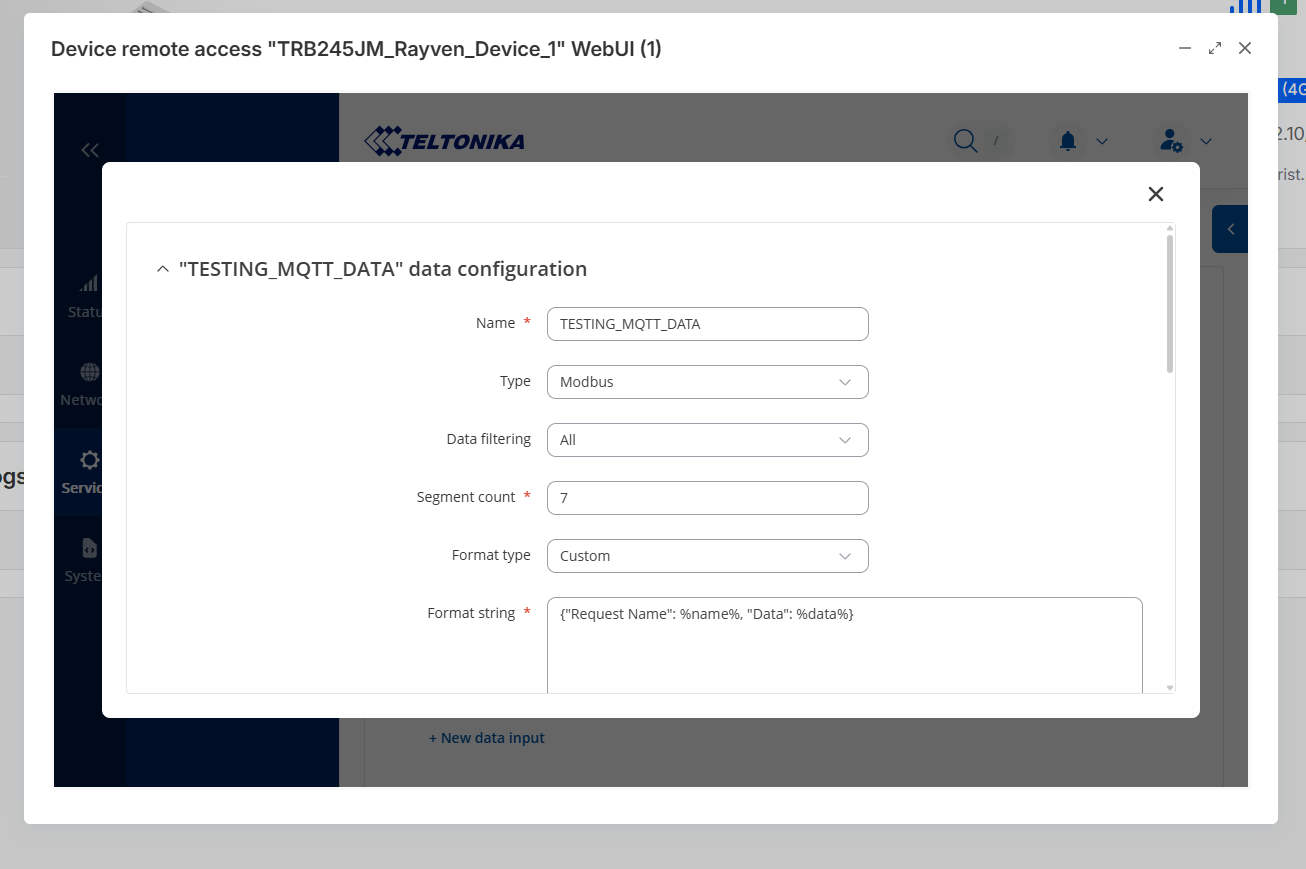
 ). I need to remove the collection name from the object and just have json with the selected parameters .