Additionally, for troubleshooting purposes, we will require more sensitive information from your end, such as the troubleshoot file, which may contain passwords, public IP addresses, serial numbers, and such. To avoid leaking this information, we have sent you a form to fill out, which you will receive in your e-mail inbox that you have registered your account with in the forums. In the Ticket ID field of the form, please enter the ID of this thread, which is 16657.
followed the Wiki instruction, but no success. Looks like something with thecertificate goes wrong. Please see router log:
5620 Mon Dec 1 15:01:48 2025 daemon.warn openvpn(inst1)[21278]: Use --help for more information.
5621 Mon Dec 1 15:01:53 2025 daemon.notice openvpn(inst1)[21294]: Note: ‘–allow-compression’ is not set to ‘no’, disabling data channel offload.
5622 Mon Dec 1 15:01:53 2025 daemon.err openvpn(inst1)[21294]: Options error: You must define CA file (–ca) or CA path (–capath) and/or peer fingerprint verification (–peer-fingerprint)
5623 Mon Dec 1 15:01:53 2025 daemon.warn openvpn(inst1)[21294]: Use --help for more information.n.
Config comes from ExressVPN manual configuration page after selecting VPN entry point. Username and password are provided from the same ExpressVPN website.
Here the exported configuration:
client
nobind
tls-client
auth sha512
cipher AES-256-GCM
dev tun_c_1
key-direction 1
proto udp
resolv-retry infinite
topology net30
nobind
fast-io
persist-key
persist-tun
remote germany-frankfurt-1-ca-version-2.expressnetw.com 1195
remote-random
pull
comp-lzo no
verify-x509-name Server name-prefix
ns-cert-type server
route-method exe
route-delay 2
tun-mtu 1500
fragment 1300
mssfix 1200
verb 3
sndbuf 524288
rcvbuf 524288
script-security 2
user deleted
password deleted
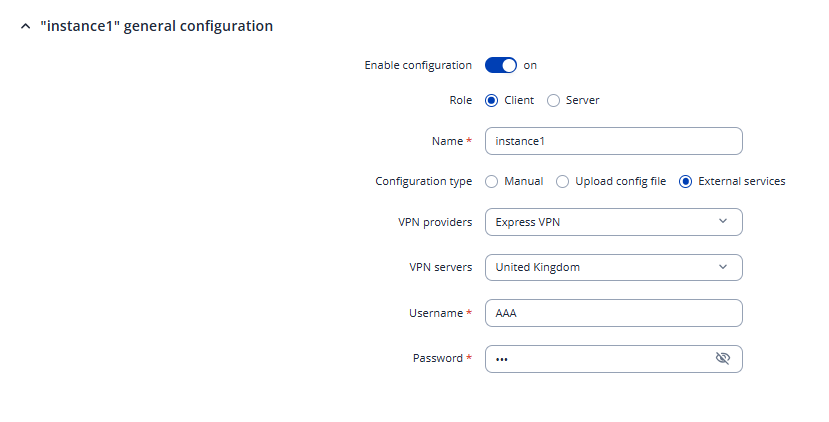
We can try a different approach. Could you please check whether you can use the built-in ExpressVPN option under the OpenVPN configuration? If it’s available, you should only need to select the VPN provider, choose the desired server, and enter your username and password, as shown in the screenshot below: