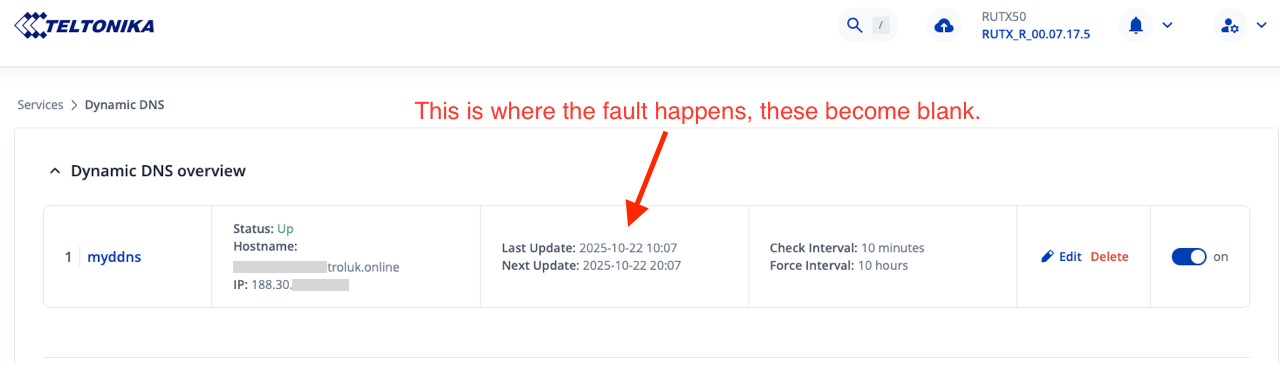
It may seem a basic question, and one that you have answered yourself, but have you checked that those particlar no-ip domain names are still valid and live, or haven’t been flagged by them as abusive?
Hi Mike, we have checked all of your suggestions. Even taken a known working router, SIM and dynamic host/DNS to one of the locations and the update fails
If you look at /tmp/log/ddns/{insert DDNS name}.log - does this give any insights. This log is written by /usr/lib/ddns/update_no-ip_com.sh … assuming you’re using the noip.com service, preconfigured in the router.
You could use SYSTEM > TROUBLESHOOT > DIAGNOSTICS > PING
If remote, then you’d have to access via A) open a remote session in RMS or B) attach via another VPN tunnel.
For option B, our standard configuration will always include a VPN authenticating to our own VPN Server sitting on a Public IP, irrespective if the ‘Use Case’ requires it or not. If we need to ‘get to’ the device, we just send it an SMS to ‘spin up’ the tunnel - this way will also deal with SIM’s that do not have a public IP. It is also handy, when RMS is ‘down’. This option is not viable if your SIM is a ‘Data Only’ plan.
Yes, you can host RMS on your premises. For more details, please contact us directly through our Contact Us form or via the Helpdesk system if you have access to it.