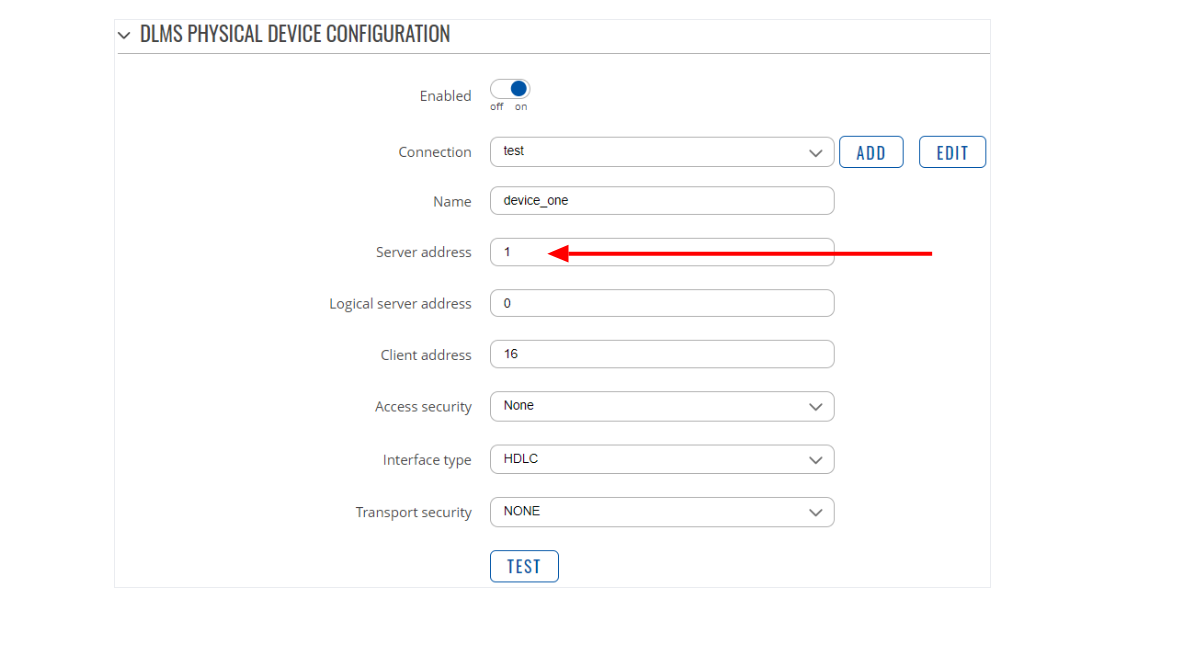
Firstly, please make sure your device firmware is updated to the latest stable release, as recent versions introduced important changes regarding DLMS server address specification.
To clarify, the Server Address is also commonly referred to as the Physical Device Address or Lower Address. For each physical DLMS device, there can only be one physical server address. This parameter is mainly used in serial connections where no other means of uniquely addressing a device are available.
If you want to address a DLMS server by its serial number, set the Server Address Type to Serial Number.
In the Serial Number field, enter the value calculated using the formula: Server address (Serial number) = (SN % 10000) + 1000
where SN is the actual serial number of the DLMS device.
For further reading and details, please refer to the relevant article here:
Thank you for the update. I’ve checked and clarified this serial number part with our DLMS developer. In your case, you would simply need to specify 77013123 in the Serial Number field, and that’s it.
The DLMS client will internally apply the required algorithm, so you can skip that formula calculation yourself and just enter the actual meter serial number directly.
The returned error message is a known issue and is not actually related to memory. It is most commonly caused by a faulty serial cable connection or an incorrect serial device configuration.
Please double-check and, if possible, reconnect the RS485 cable to ensure all wiring is correct. If the issue persists, could you please provide a photo of the RS485 wiring and screenshots from the DLMS client configurations?
yes, we checked RS485 cable all connection D+/D- okay. First time we got result is okay, next time trying to connect showing error. One Meter Model is working good, other model showing error.
Could you please confirm whether you have tried using the meter’s Serial Number instead of the Default Server Address when configuring this specific meter?
Also, can you confirm if the serial communication with this meter was working correctly on any previous firmware versions?
From your previous message, I understand that the meter communicates and reads all parameters correctly through Gurux DLMS Director via RS485, but on RUT it fails with the error code 260, right?
Furthermore, could you install the 7.18.1 firmware, as it includes several improvements related to the DLMS service? After the update, please check if the same issue persists.