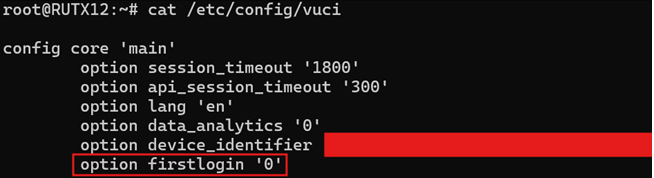
I’m provisioning routers using SSH and even if I’ve successfully changed the admin user’s password (using passwd or updating /etc/shadow), logging in to the WebGUI still displays the “You haven’t changed the default password for this device.” popup.
What’s the setting I can set via CLI / UCI?
I did not find anything in /etc/config.
I see a firstlogin key in /system/config REST API but it’s only for GET:
{
  "success": "boolean",
  "data": [
    {
      "id": "string",
      "lang_code": "string",
      "advanced": "string",
      "firstlogin": "string",
      "devicename": "string",
      "hostname": "string",
      "data_analytics": "string",
      "notifications_enabled": "string",
      "alerts_enabled": "string",
      "api_session_timeout": "string",
      "session_timeout": "string"
    }
  ]
}