I setup my RUTX50 (Firmware: RUTX_R_00.07.18.3 [going back from RUTX_R_00.07.20 because I experienced very unstable WLAN connections from devices to RUTX50]) for Multi-AP (see: 2.4GHz radio(s) already have one client or Multi AP ). So far so good – except that the Mercedes Benz MBUX in my Sprinter camper was/is no longer able to connect to the RUTX50.
Before the use of Multi-AP the MBUX connected via 2.4 GHz without problems (which meant that I could listen to Internet Radio via the MBUX). After the change due to the Multi-AP setup 2.4 GHz was not available anymore (it was used to connect to the internet provider via the sim card).
This should not have been a problem because Mike suggested to use the 5 GHz connection for smartphones, notebooks, tvs etc. So far so good: All devices see and connect using 5 GHz – only the MBUX does not. When scanning for access points the 5 GHz of the RUTX50 is not shown.
I expected this to be an MBUX issue, e.g. no 5 GHz support. MBUX does support 5 GHZ though. And I remember the MBUX could see my 5 GHz router at home.
I appreciate any ideas – maybe it is a missing setting in RUTX50?
If the MBUX does support 5 GHz, there may be other factors preventing it from discovering the RUTX50 WiFi network.
One possibility is that the current WiFi security protocol is not supported by the MBUX. As a test, please try the following:
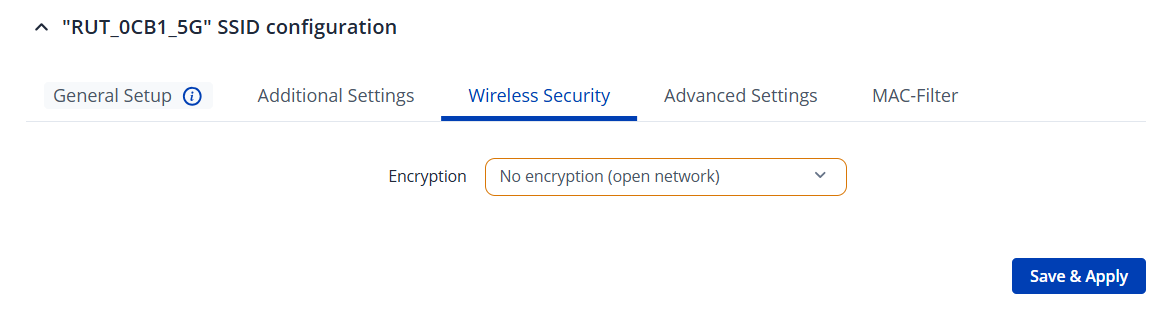
Navigate to Network → Wireless → SSIDs , edit the interface, and under Wireless Security , temporarily change the setting to No encryption (for testing purposes only).
If after this change the MBUX is able to discover the WLAN, you would have to test other security protocols out and see which one would work for you, please don’t leave it unsecured.
If the MBUX is able to discover the WLAN after this change, you can then test other security protocols to determine which one works best. Please ensure the network is not left unsecured.
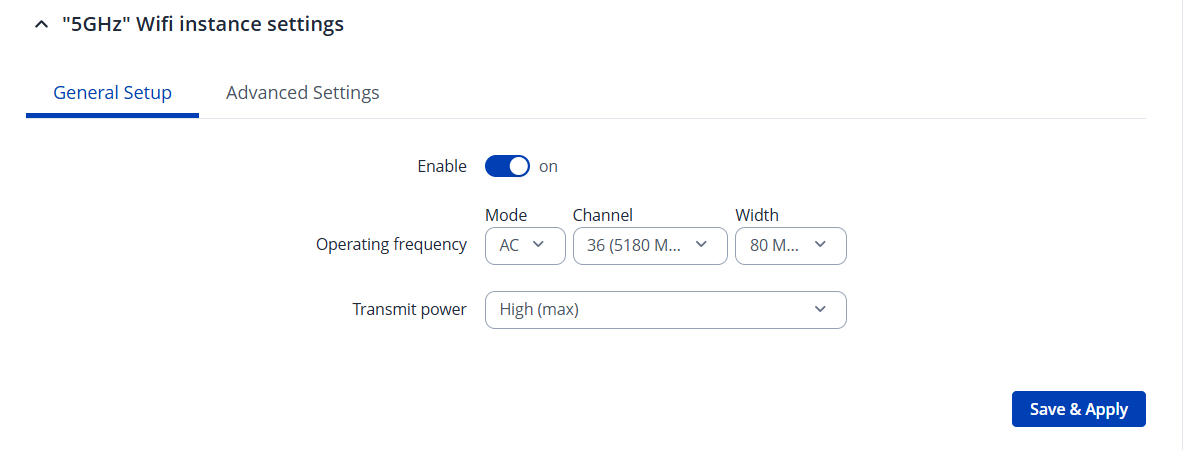
If the WiFi still cannot be discovered, another option is to lock the 5 GHz band to a specific channel, as the MBUX may not support all available channels.
Navigate to Network → Wireless → Radio , edit the 5 GHz settings, and try setting the channel to 36