Hello,
We are experiencing a configuration issue with the IPsec VPN routing on the Teltonika. Clients on my internal networks are correctly routed through the default IPsec VPN to access company services such as DNS, NTP, etc. However, my Teltonika RUT-241 is not using the IPsec VPN to connect to these networks. It is using its default route learned via its WAN interface.
Could you guide us through configuring this solution?
The technical settings configured on the Teltonika are listed below.
Here are the specific configuration settings:
WAN Interface :

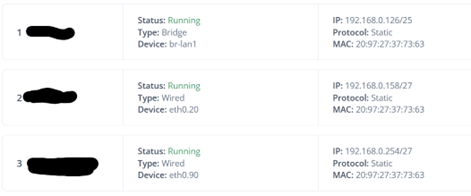
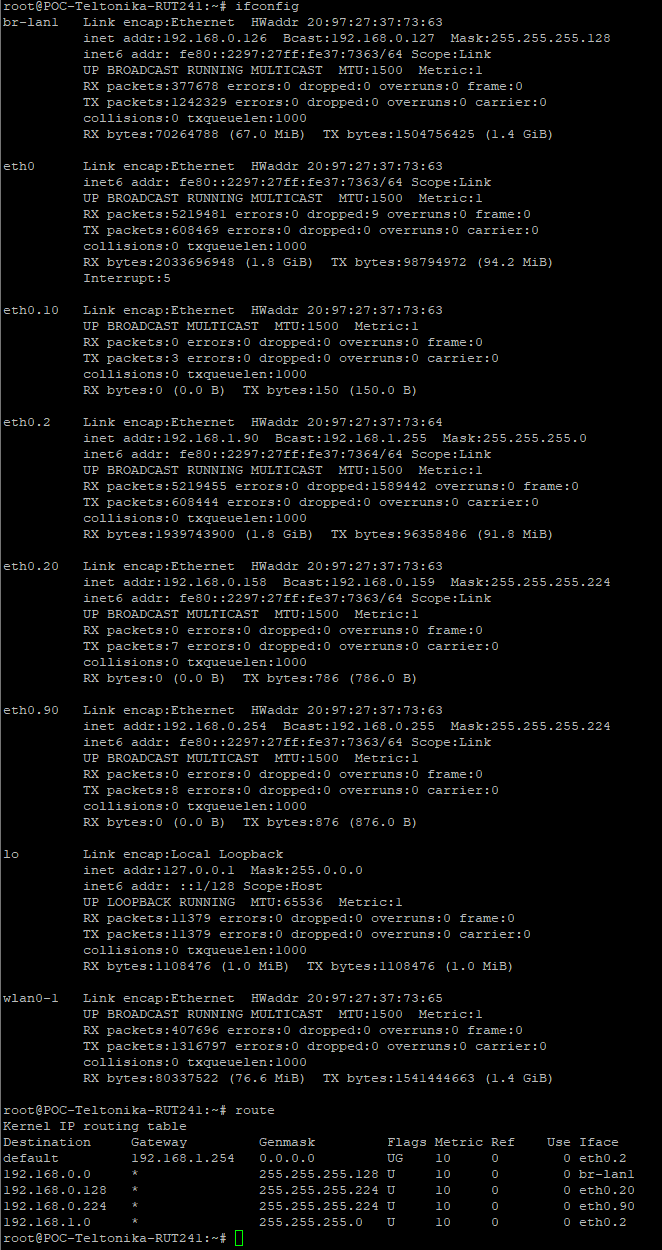
LAN Interfaces :
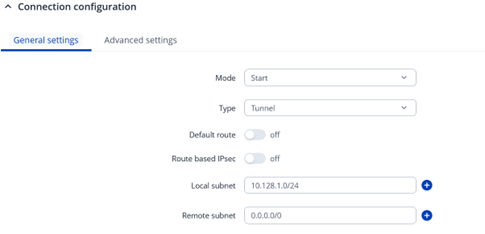
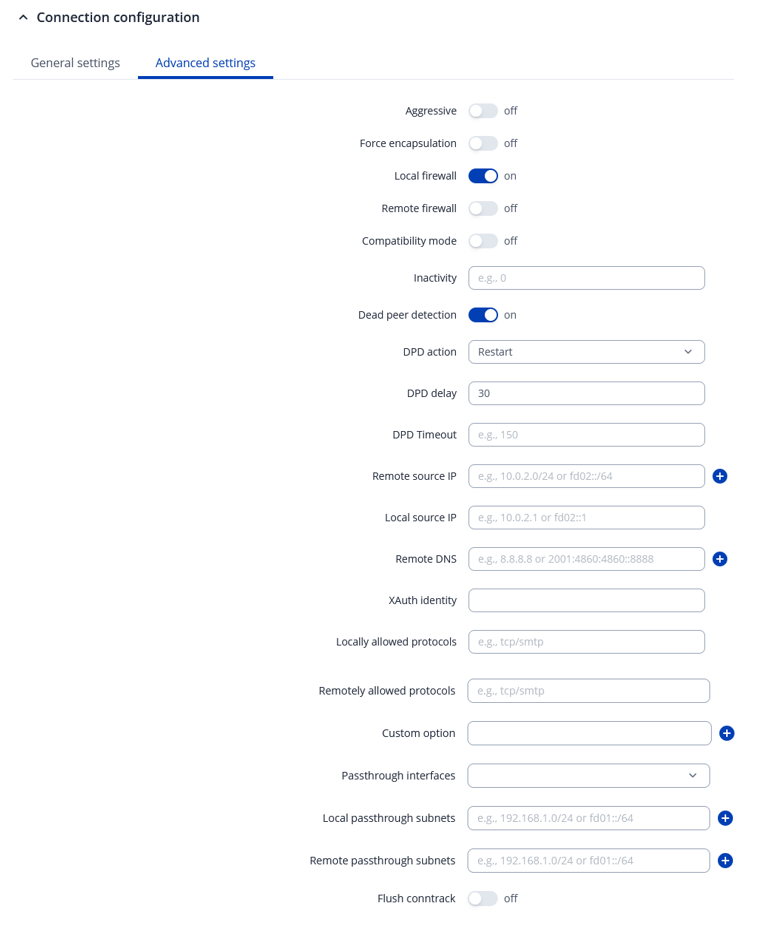
VPN IPsec configuration :
NAT 1-1 configuration :
iptables -t nat -I PREROUTING -d 10.128.1.0/24 -j NETMAP --to 192.168.0.0/24
iptables -t nat -I POSTROUTING -s 192.168.0.0/24 ! -d 192.168.0.0/24 -j NETMAP --to 10.128.1.0/24
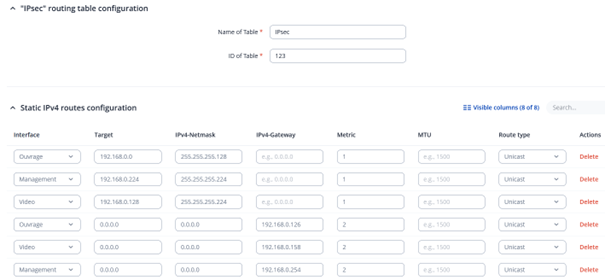
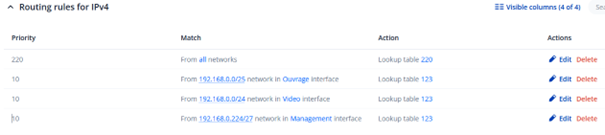
Policy Based Routing configuration :
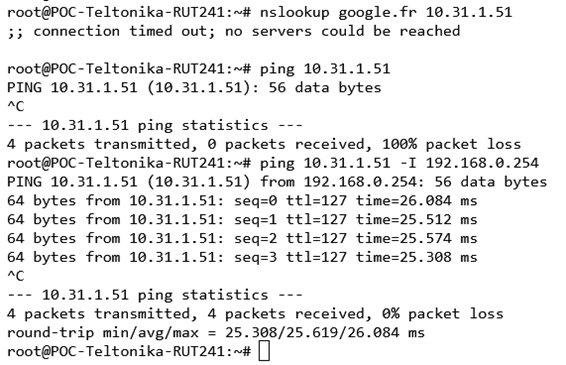
Tests based on Teltonika :
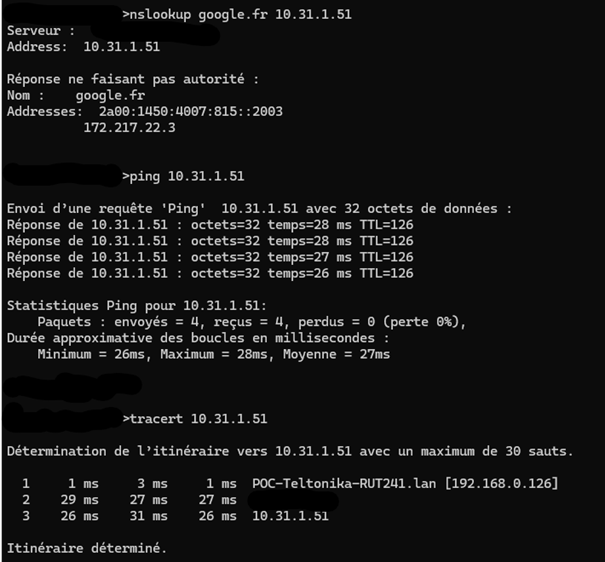
Tests based on Client :
Thank you very much for your help, best regards.
Hi…
Why you leave the remote network as 0.0.0.0/0 ?
You have two options…
Add the remote networks at Remote Subnet
OR
leave it and enable Default route option.
Thank you for your feedback.
I configure the remote network as 0.0.0.0/0 because my internal networks absolutely must access the internet via the IPsec VPN. Therefore, I cannot specify anything other than 0.0.0.0/0.
Regarding the Default Route option, I cannot use it because otherwise my virtual network 10.128.1.0/24 for my 1-to-1 NAT cannot be configured.
So…
You cannot use 0.0.0.0/0… I don´t think is this a correct ipsec setting to be used.
And..
You need to do a nat 1x1 between your rut local lan network and the remote network?
Are you talking / searching / trying to use D-NAT ?
0.0.0.0/0 works correctly for my machines located on the internal networks at Teltoonika, so that is a correct IPsec tunnel configuration.
I configured 1x1 NAT so I could reach my local machines from my corporate network. Please review the configuration details provided previously. This works perfectly.
What doesn’t work is that my RUT is using its default route learned by DHCP from its WAN interface. This makes it use its WAN interface instead of the IPsec VPN. Therefore, it cannot natively reach my corporate network.
As in the example: pinging 10.31.1.51 doesn’t work. However, ping 10.31.1.51 -I 192.168.0.254 works.
Regards,
maybe… because you have TWO 0.0.0.0/0 … AND the device don’t know where to send the packet.
Maybe, but it’s not clear. If I run `ifconfig`, there’s no IPsec VPN interface, and when I use the `route` command, I only get a default route, that of my WAN interface.
@wilfried.jacq Hello,
Looking above ifconfig screenshot you seem to have VLAN’s eth0.nn where that dot nn is a number. These are VLAN interfaces on Linux The other screenshots are bit too fuzzy and hard to read, besides some being hidden out.
Anyway, I’m thinking that because of those interfaces you could have VPN terminated VLAN interface. If that case and if ip route does not show VPN associated routes, you probably have another routing table with associated ip rules set up where those routes are.
You can find these tables issuing ip route show table all and then ip route show table followed by each table name one at time. But it’s quite hard to get proper outlook at once how system routing is set up. Therefore I did once small utility script helper show-routing.
I’m attaching it here .zip file and also inlining so it’s easier to see before downloading if you can’t trust scripts from anonymous sources and rather just pick what you need out of it.
Anyway, if you use script, copy it to device and while as root user at same directory you run
./show-routing an it will print you all routing information active that time. That script shows all routing tables and those associated ip rules ie. ACL’s telling which routing tables are used for which matching traffic.
Then if your VPN is terminated a VLAN interface which is not sharing routing main ie. router default routing table, but using another routing table. That will explain why your router by default when you ping or try connections outside will not be using that VPN tunnel interface. In that case you can try binding ping -I eth0.nn <destination-ip> and seeing if that works. It should if your VPN is working from other hosts as you mentioned and unless interface is also bound a yet separate VRF instance. If that is the case then, testing ping from there you would need to specify that also Linux ip vrf exec <vrf_name> ping <destination_ip>. If that doesn’t work then you need to check that iptables -L -n -v doesn’t have any rule blocking traffic from that interface source IP you did set while pinging.
But anyway, perhaps there is something for you to try. Linux networking is these days quite complicated and getting proper view of complete configuration quite tedious.
Cheers,  riku
riku
#!/usr/bin/env sh
#
# Linux PBR helper - mesrik, 2018
#

route_tables() {
	ip route show table all |\
        sed -n 's/.* table \([^ ]*\).*/\1/p' |\
	sort -u && echo main
}

verbose_cmd() {
    echo -e "#\n# $@ \n#"
    $@
}

verbose_cmd ip -4 rule list
verbose_cmd ip -6 rule list

for i in $(route_tables) ; do
    verbose_cmd ip -4 route show table $i
    verbose_cmd ip -6 route show table $i
done

echo "# eof"
# eof
show-routing.zip (414 Bytes)