Could you please share screenshots of your configuration (ensuring that no personal information is visible, as this is a public forum)?
Additionally, please clarify the firmware version that your RUTX50 is running, and if possible, provide a scheme or topology of your network. This information will help with further investigation.
I have deleted the 1st asset linked to the RUTX50 tracker and then re-added it using the RUT955 link in the +Asset section of GpsGate. RUT955 can be used to add the RUTX50.
In the Teltonika RUTX50
Enabled The GPS Configuration
Enabled NMEA forwarding, used the XXXX.Gpsgate.com as the Hostname
Used Port 12050 (TCP) & Contain connection – on
Then Save & Apply
Followed the process and used the same AVL settings for Hostname & port on the Teltonika RUTX50, mirroring the GSPgate settings in my new asset. Port should be 12050. I then used the “Saved & Apply” button.
Afterwards, my router was detected by GPSgate, and it showed my location in GPSgate.
If you want to use the GPSgate App, just do the following.
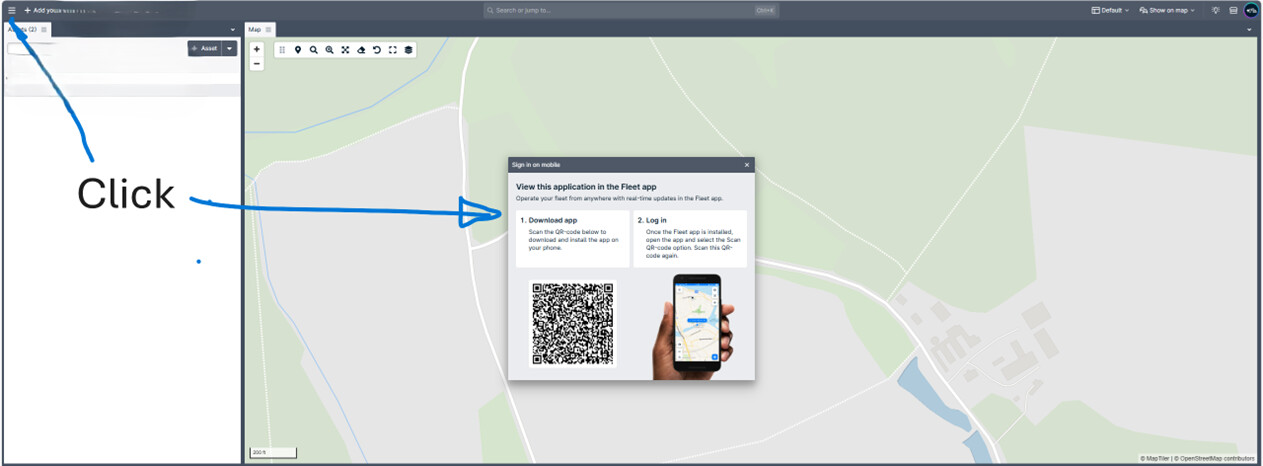
Go to the top-left of your GPSgate account: 3 horizontal lines, adjacent to the + Add your Logo.
Click on Sign in on mobile
Download the app: Scan the QR code below to install it on your phone.
Log in: Once the Fleet app is installed, open the app and select the Scan QR code option. Scan this QR code again. This auto-populates the app’s data.
For troubleshooting purposes, we will require more sensitive information from your end, such as the troubleshoot file, which may contain passwords, public IP addresses, serial numbers, and such. To avoid leaking this information, we have sent you a form to fill out, which you will receive in your e-mail inbox that you have registered your account with in the forums. In the Ticket ID field of the form, please enter the ID of this thread, which is 17628.