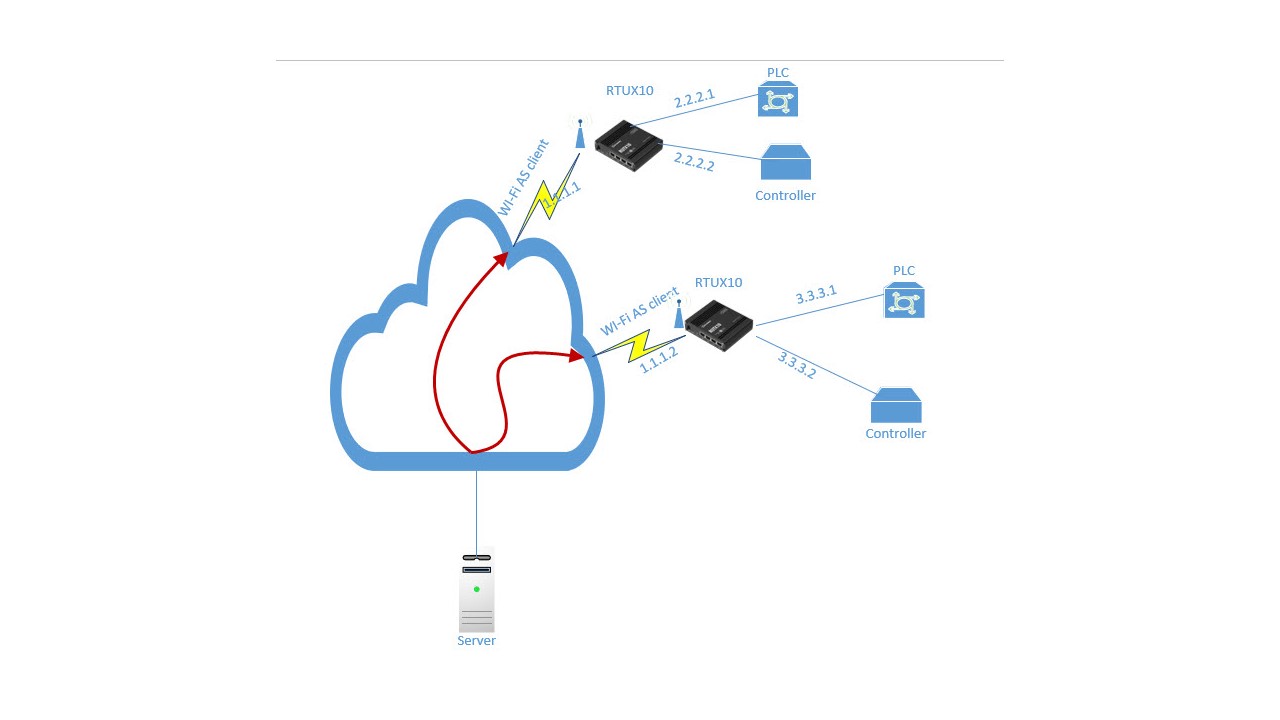
wi-fi - connected as client to RUTX10 and LAN 1 connected to PLC , Lan 2 connected to controller each have any Ip, i need to access the LAN1 and LAN 2 from the wi-fi ( AS WAN)
Hello,
I’m currently reviewing this case and will get back to you as soon as possible.
Regards,
M.
Hello,
I will try to break this down a little in a way that I understood your request and your current network configuration.
- You have a server that connects via Wi-Fi to either of the two RUTX10 devices.
- Each RUTX10 device has a PLC and a Controller connected to them
- You’d like to be able to reach these PLCs/Controllers from the server when you’re connected to the respective Wi-Fi network of one of the two RUTX10 devices.
If this is the case - I’d like more information about the addresses of the devices:
- Do the RUTX10s have Public IP addresses? To see the difference between Public and Private, you can find information in this Wiki: Private and Public IP Addresses - Teltonika Networks Wiki
- What are the addresses of the PLCs and the Controllers? Are these set up to receive the leased IP from the RUTX10 (DHCP Server)? For example, if your RUTX10 has the LAN IP of 192.168.1.1, are your PLC & Controller both getting an IP under the 192.168.1.0/24 network? For example, 192.168.1.111.
You have 2 options to reach your end-devices, which are:
- Setting up a VPN (the VPN can be of your choice, but depends on whether you have a Public IP or not)
- Setting up a port forward, if the connection is going to be local (I’d assume it will be, judging by your description). Full guide here: Port Forwarding - Teltonika Networks Wiki
Hopefully this helps, if you have any more questions, don’t hesitate to ask.
Regards,
M.
This topic was automatically closed after 60 days. New replies are no longer allowed.