Purchased the RUTX50 Plugged it in and also installed the SIM card (T-Mobile) and flawless perfect results. 2 weeks later I have no internet. Call T-Mobile. They issue a new SIM card. RUTX50 seems connected to the 5G Wireless T-Mobile Network. Computer seems to not want to connect to the RUTX50 or maybe although the lights and bars appear OK maybe I am actually not connected to t-Mobile.
Is your computer a laptop or a desktop? Is it a MS PC or a mac?
Is it connected wirelessly or via an ethernet cable to the RUT?
If you’re connecting to the RUT via wifi for the purpose of troubleshooting your problem further, do you have an ethernet cable so that you can connect your PC to the router directly?
If it’s not possible to use an ethernet cable, is the PC in the same room as the RUT?
Trying to establish if the issue is an internal WiFi issue or an external Mobile signal issue to get started.
Have you tried switching the RUT off for 10 mins then back on again?
Greetings,
@akwe-xavante thank you for your input. You’re right, for troubleshooting purposes, it would be very helpful to connect using an ethernet cable if possible.
Could you please confirm whether you’re able to access the router’s WebUI at 192.168.1.1 (unless you’ve changed the default IP address)?
If you can access the WebUI, please provide a screenshot of Status → Network → Mobile (make sure not to include any sensitive information).
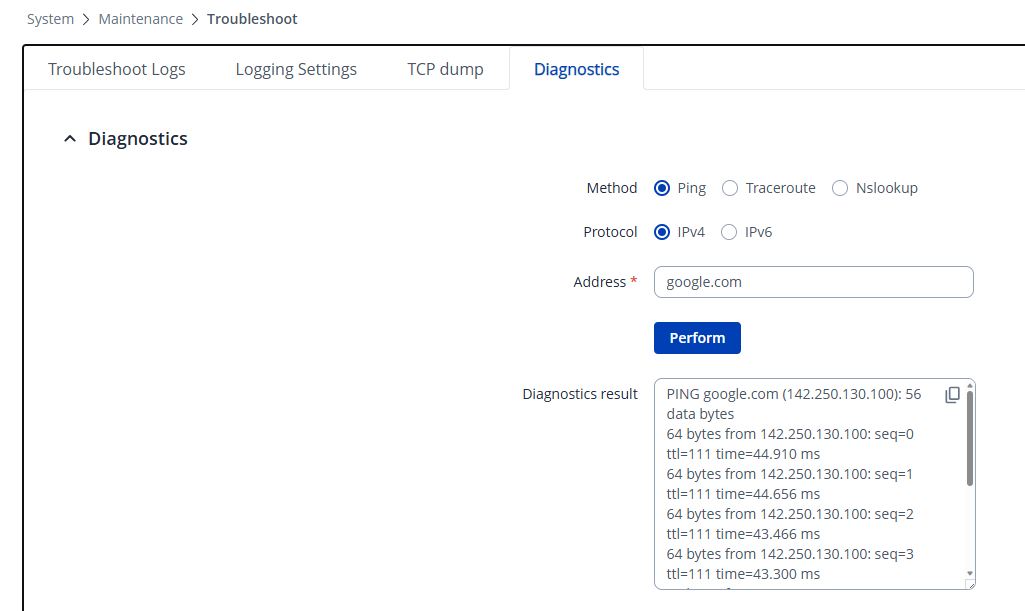
Next, go to System → Maintenance → Troubleshoot → Diagnostics and try the following:
- Ping 8.8.8.8
- Ping google.com
This will help us determine whether the router itself has an internet connection and whether DNS is functioning properly.
If you can’t reach the WebUI, do you have a static IP address set on our computer?
Best Regards,
Justinas
Is your computer a laptop or a desktop? Is it a MS PC or a mac?
Is it connected wirelessly or via an ethernet cable to the RUT?
If you’re connecting to the RUT via wifi for the purpose of troubleshooting your problem further, do you have an ethernet cable so that you can connect your PC to the router directly?
If it’s not possible to use an ethernet cable, is the PC in the same room as the RUT?
Trying to establish if the issue is an internal WiFi issue or an external Mobile signal issue to get started.
Have you tried switching the RUT off for 10 mins then back on again?
Do You have any more questions