I would be also quite interested getting device config in plain text, so this is in interest of mine too.
Plain text configs are great for so many reasons. Backing up automatically and then keeping track of changes in VCS like git, verifying that config matches what it should be, observing diffs even over longer period and multiple config revisions, when needing reorganize things in config, migrating to new devices without need to hunt changes via menus what has been configured, adapting parts of other devices configs to new devices, just to mention few I’ve needed over decades on duty.
But now while someone from Teltonika has time to answer I took a quick look RutOS REST API which could be at least workaround if nothing more. The API looks nice, see following page, select our device model and see yourselves. Examples are quite terse and in python.
I wrote just a simple test for my case (certificate issues) while I’m waiting solution. I’m including it here. Python isn’t my strengths, but got it working OK just in few minutes.
And of course it’s worth checking if someone has done Ansible playbook work that you might find useful. So it seems, though I do not have now time to test it.
I’m aware of both Teltonika API’s, but it is quite a task to make a functional system. The main issue is the stuff installed with storrage expansion enabled, but it might be doable using SSH automation.
I’ve never tried Ansible but guess it will require some knowledge about file setup in the device and what to change to get the correct result.
I agree, that it would be quite bit of work via current API, yes.
My comment on that it would be immensely useful to able to download and later upload whole device config via REST API in pure JSON format. Now there is just way of invoking backup and you get a binary blob (tar.gz) and while just backup & recovery use that’s fine.
But for building configuration management system it doesn’t help much. However if all of that could be exported and uploaded plain JSON that would make much more easier all that I described above. Storing configs to git, making changes where needed, uploading using simple python script etc.
But it’s up to Teltonika to add that kind of complete config JSON download and upload feature to that REST API, which now allows only do that in smaller snippets.
I agree there is a learning curve going Ansible route. I don’t like it either because it’s yaml use. Regardless it’s become so popular that it became unavoidable to avoid many places where devops set rules.
Anyhow if you end up willing to try. I recommend you check Jeff Geerlings (Youtube Raspberry Pi etc. ARM affiniado fame) has written good, short and affordable books learning and using Absible. And check his GitHub also, he has great collection all kinds of real world working ansible scripts he has made as he loves it.
Both of these steps will require a custom script to be used with our device, which we, as technical support, are unable to provide assistance with. Basically, all of your steps that you’ve provided in the list can be written in code, which could then be executed, for example, from the same USB stick that you mount onto your device, or by uploading the saved script onto the device and then running it. More information on custom user scripts can be found here: User Scripts examples - Teltonika Networks Wiki
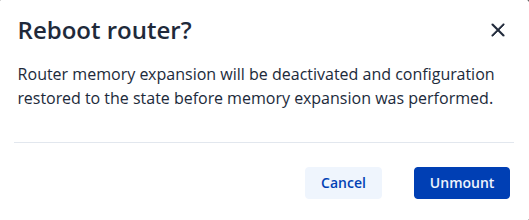
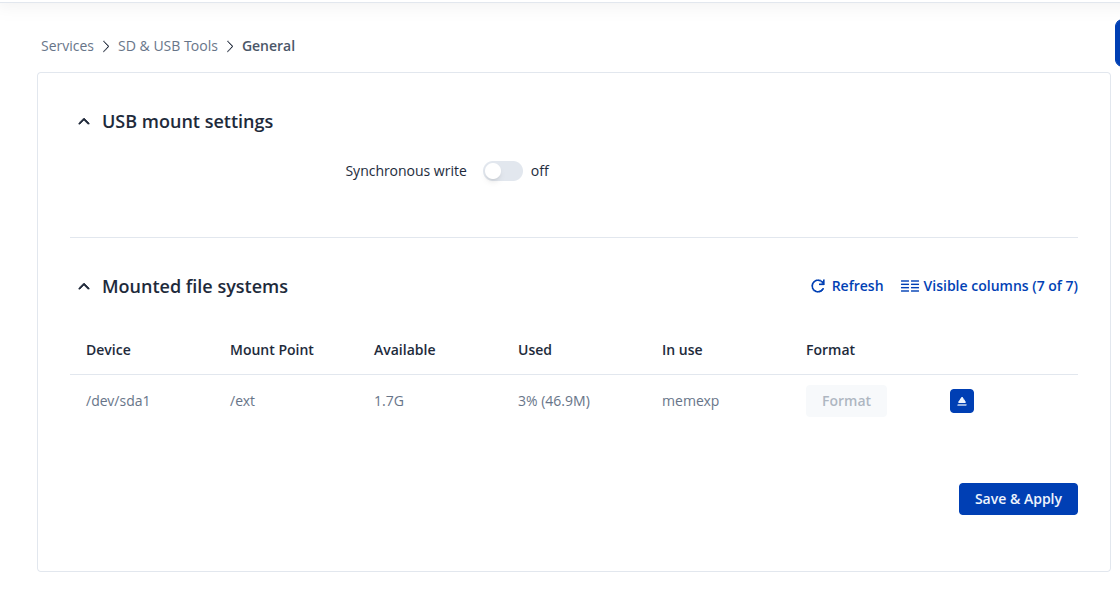
This can be simply avoided by unmounting the USB stick before a reset. You can either do this through the WebUI by heading to Services → SD & USB Tools and clicking on the arrow button as seen in the image below:
Thanks for the image. Looks like the directory for you is going to be /dev/sda1 - so the unmounting command is going to be umount /dev/sda1; Regarding re-enabling memory expansion & the contents being wiped, I’ll inquire about that with our R&D whether anything could be done. I’ll get back to you.
I believe the best approach would be to use third-party tools to automate the setup through the RutOS API (for example, using Ansible) or by executing the necessary SSH commands directly.
Regarding the SME (Storage Memory Expansion) feature, please note that it effectively merges the router’s internal storage with the USB stick. Once enabled, it’s not possible to separate the two or revert the storage contents afterward.
Our SDK could be a suitable solution for your needs. If you opt for the minimal build option, you can pre-compile Python directly into the firmware and include only the necessary services, excluding the WebUI. This approach would help save storage space, allowing you to rely on the device’s internal memory and use the USB stick primarily for storing log files or similar data.
Please note that this route requires a good level of technical knowledge, and support for such a customized setup would be limited - you would need to manage it independently.
 riku
riku