I have a RUT241 in my camper, usually i buy an eSim for each holiday. I watch television via the NLZiet app, which uses adaptive bitrate streaming, which could be HLS or MPEG-DASH. It is assumed NLZiet uses Europe CDN-providers like Jet-Stream (formerly StreamZilla) .
The NLZIet app on the Android TV has limited possibilities to limit the data used, effectively i can enable or disable ‘high quality video’, which comes down to choosing 720p (4mbps) or 1080 (8-10 mbps). But the app scales down to lower qualities when available bandwith is limited, it can go to 1mbps or even lower (providing a fuzzy stream but an uninterupted stream).
So i set SQM or QoS to limit download speed to something like 2000 kbit/s, but NLZiet starts buffering every now and then. After many many attempts, my conclusion is that SQM and QoS don’t play nice with the NLZiet app or the technique the NLZiet app uses. Right now i have a 4G connection which achievs 25 - 30mbps. If i set SQM or QoS to 2000kbit/s, NLZIet still buffers occasionally. It even buffers every now and then if i set SQM to 4000kbits. While there is plenty of headroom in the connection capabilities, and 4000kit/s is very much in the range of the qualities the NLZIet app can show.
When i ask ChatGPT it is suggested SQM or QoS throws the adaptive bitrate mechanism in the NLZIet app off, making the adaptive bitrate mechanism buffer when it’s not needed/ ChatGPT suggests QoS is beter that SQM in this scenario, it seems to perform somewhat better but still buffers occur every few minutes. If i disable SQM and QoS the video stream is flawless for hours.
I have experimented with every advanced setting of SQM and many settings of QoS, but i can’t get a reliable way to limit data bandwith to the NLZIet app without causing buffers in the video stream, does anyone have any advice.
Just to clarify - 2000 kbit/s translates to around 0.25 megabytes per second (MB/s), which is very limited and generally is bound to cause buffering and/or slow loading times for streaming services, especially. This is where my suggestion comes in - please try to increase the amount to, say, 10,000 or maybe a bit more, so it exceeds at least 1MB/s.
Let me know if, after trying the above setup, it improves the situation.
I also tried 5000kbit/s, but the problem stays the same.
By the way: 2000kbits/s is 2mbps, which is highly sufficient for basic streaming on say 480p. My goal is to limit the bandwith to the Android TV to force the streaming app to scale down the streaming quality to 480p or even 360p to save data. I do that al the time with my Jellyfin media server; 1 mbps provides adequate viewing quality on a small screen like a phone or small tv, so 2mbps shouldnt be a problem at all. But even if i set SQM to 5000kbits/s, frequent buffers occur. My question is: is the combination of SQM and an adaptive bitrate streaming app a known troublesome combination?
Yes, which translates to 0.25 megabytes per second, as mentioned - generally you’re right, it should be enough for ~360-480p streaming, buffers should be expected here and there still.
Interesting, is an option to manually set a certain quality preset that would apply to all of the videos you watch, not available? I believe YouTube has this implemented, where a setting you pick on a single video will then apply to all the other videos you watch afterward.
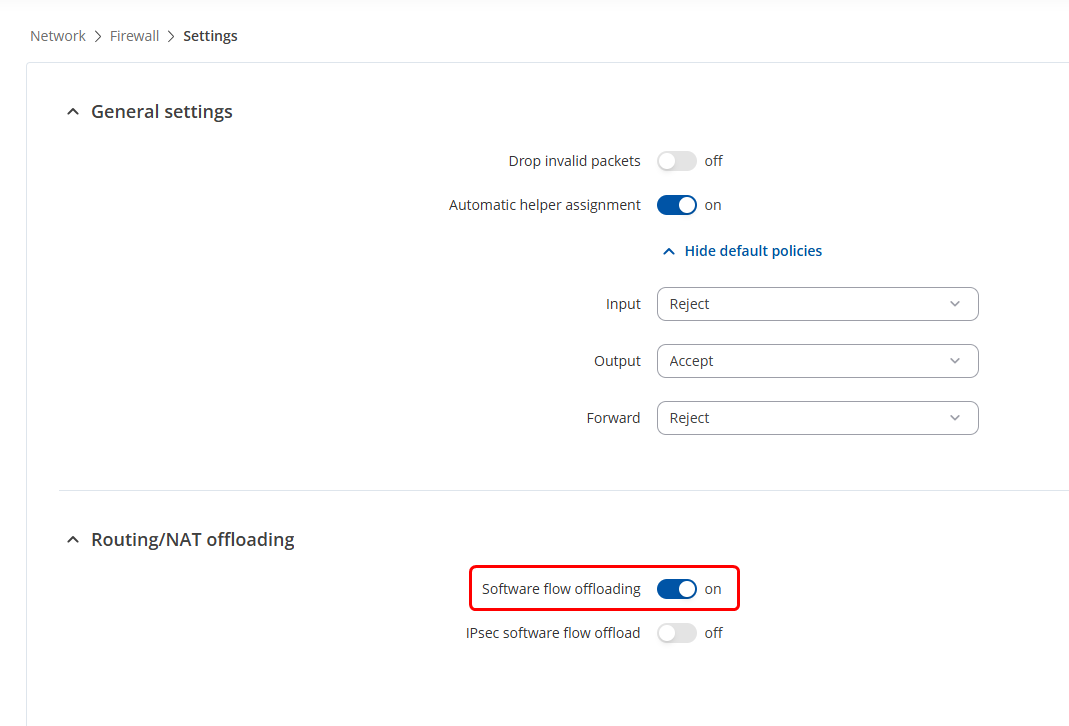
Not that we are aware of, at least. However, you could try disabling Software flow offloading, it might help. The setting can be found under WebUI → Network → Firewall → Settings:
That is a true statement but are you confusing your bits and bytes, when seeing if this figure is enough to stream? For a conversion of kbps to MBps … see here - mbps is not the same as MBps (MB/s).
I am pretty sure i am not confusing bits and bytes. 2000 kilobits/second is 2 megabits/second, plenty for streaming video at for instance 480p. 720p needs between 1 and 4 megabits per second.