Bug: RUTX50 DHCP Server - Unable to create static entry - 2

Hi,

I have a RUTX50 using the latest available firmware (RUTX50 RUTX_R_00.07.21.3).

I have connected a new device via Ethernet, and it has successfully been allocated an IPv4 address from the DHCP pool.

I want to a Static Address for this new device so using Network > DHCP > Static Leases have selected the new device, then the desired IP address.

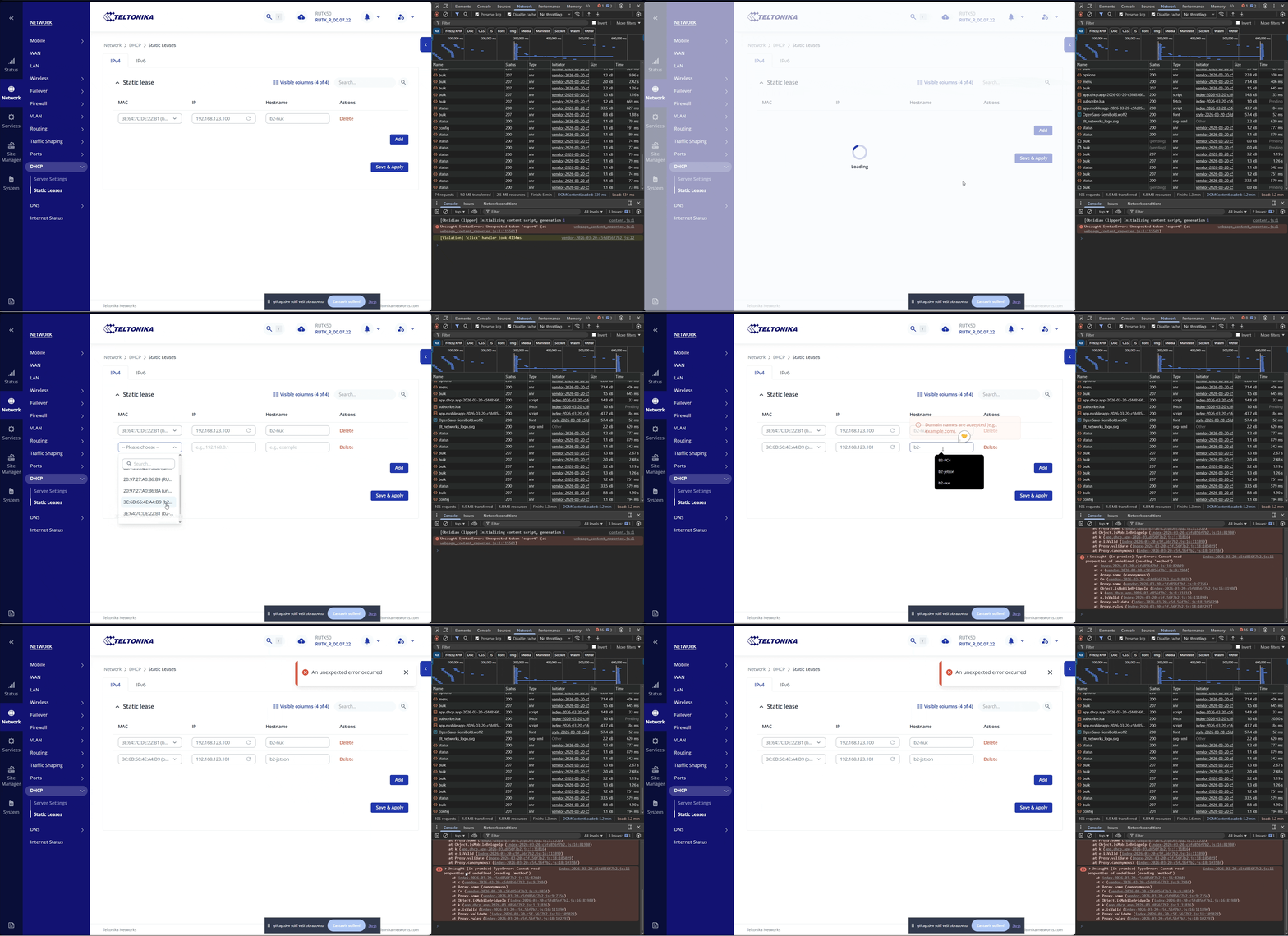
When I click ‘Save & Apply’ an “An unexpected error occurred” message is displayed and the new Static Lease doesn’t save.

This seems to be a bug…is anyone else experiencing the same issue with this firmwa

  1. How many static leases do you currently have configured? Is it possible you’ve hit a limit? 0

  2. Does the error occur when adding a lease manually (by typing the MAC address) rather than selecting from the dropdown? Yes

  3. Have you tried a different browser or cleared your cache before attempting to save? Yes

  4. Did a reboot resolve or change the behavior at all? No

  5. Could you share any relevant entries from System Logs (Status > System Logs) captured right after the error appears?

880 2026-04-02 12:12:56 DHCP Network Info Leased 192.168.123.97 IP address for client 3e:64:7c:de:22:b1 - b2-nuc in LAN

Was this working on a previous firmware version? Yes

Thanks in advance.

I have exactly the same problrm with my RUTX09. I have also seen another post with the same problem. It seems to be a problem in firmware for the two latest versions. Will this be fixed in the next firmware?

I have a RUTX50 with firmware version 07.21.3 and i’ve successfully created a static ip address for a new device without any issues.

I’m running firmware version 07.22 on a RUTX50, and can successfully add a Static Lease ….

Try reflashing your firmware.

If that doesn’t work, as a manual workaround, you can edit the /etc/config/dhcp file to add the static lease. So for the camera shown above, go to the end of the file and add the lines ….

config host
	option mac 'AC:CC:8E:58:30:45'
	option name 'AXIS-TEST-CAMERA'
	option ip '192.168.3.20'

is this a permissions problem on the dhcp file. My dhcp file permissions are -rw-rw—-

To find out i use putty to log in to the RUT and execute the following command:

root@RUTX50:/# ls -l /etc/config/dhcp

You should get the following result:
-rw-rw---- 1 uhttpd dnsmasq 1480 Apr 3 09:43 /etc/config/dhcp

-rw-rw---- permissions are sufficient

My thoughts were that those that are having problems may have a file permission problem and don’t for some reason have read and or write permission for the dhcp file.

-r– -r- — as an example, this would allow the system to read the file for existing config but not allow the system to write and or modify new and existing entries.

Save and apply would fail.

-rw-rw---- were my permissions so the problem is not there, probably firmware bug.

Many thanks for ypur tip. I have now edited the DHCP file manually as you mentioned.

root@RUTX50:~# ls -l /etc/config/dhcp
-rw-rw----    1 dnsmasq  dnsmasq        816 Apr  2 12:11 /etc/config/dhcp

The permission is not the cause.

Same erro after upgrade to latest firmware:

  • Firmware version RUTX_R_00.07.22

  • Firmware build date 2026-03-20

  • Kernel version 6.6.119

Hi,

First question: did you upgraded firmware with “keep settings”?

Could you do these steps to see why this happens:

  1. via F12 browser developer menu open network tab.
  2. Reproduce problem.
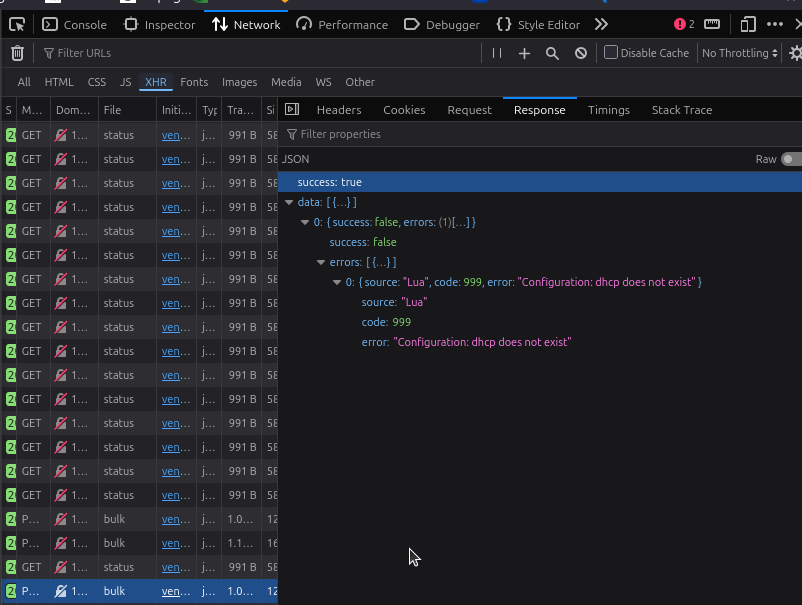
  3. Copy last bulk request’s response body from network tab (it might be malformed or response could include API error) (there is possibility that no bulk was sent due to error that should be shown in console)
e.g

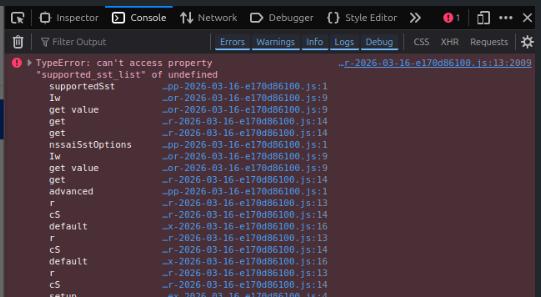
  1. open console tab and copy any error that happened during reproduction (the error can be very ugly as code is minified)
e.g.

  1. copy paste the whole /etc/config/dhcp file (remove or change any sensitive information) (the file could be malformed especially if it was updated from old FW with keep settings)

Hello @Dainius,

Yes I did upgrade with keep settings. I am not keen to setup all from the beginning.

Here is my `dhcp` file:

root@RUTX50:~# cat /etc/config/dhcp

config dnsmasq
        option domainneeded '1'
        option boguspriv '1'
        option filterwin2k '0'
        option localise_queries '1'
        option rebind_localhost '1'
        option local '/lan/'
        option domain 'lan'
        option expandhosts '1'
        option nonegcache '0'
        option authoritative '1'
        option readethers '1'
        option leasefile '/tmp/dhcp.leases'
        option nonwildcard '1'
        option ednspacket_max '1232'
        option dhcpscript '/usr/sbin/dhcpinfo.sh'
        option logqueries '0'
        option rebind_protection '0'
        option localservice '0'

config dhcp 'lan'
        option interface 'lan'
        option dhcpv6 'server'
        option ra 'server'
        option ra_slaac '1'
        list ra_flags 'managed-config'
        list ra_flags 'other-config'
        option ignore_ipv6 '1'
        option force '0'
        option leasetime '1h'
        option start '10'
        option limit '141'
        option netmask '255.255.255.0'

config host
        option mac '3E:64:7C:DE:22:B1'
        option name 'b2-nuc'
        option ip '192.168.123.100'

Note: The `host` option was added manually, as was suggested by @Mike The manual edit works and show the right content in the web GUI.

config host
        option mac '3E:64:7C:DE:22:B1'
        option name 'b2-nuc'
        option ip '192.168.123.100'

When I click the button, no network request is made; only the error message appears. Also, nothing logs to the console.

Recording 2026-04-07 at 14.27.49

When I change the MAC, it logs this error in function

isMobileBridgeIp(e, t) {
    return e.some(n => Ot.isMobileProto(n) && ["bridge", "passtrough"].includes(n.data.method) && n.data.bridge_ipaddr === t)
},
index-2026-03-20-c5fd856f7b2.js:16 Uncaught (in promise) TypeError: Cannot read properties of undefined (reading 'method')
    at index-2026-03-20-c5fd856f7b2.js:16:82049
    at c (vendor-2026-03-20-c5fd856f7b2.js:9:7984)
    at Array.some (<anonymous>)
    at Cn (vendor-2026-03-20-c5fd856f7b2.js:9:8074)
    at Proxy.some (vendor-2026-03-20-c5fd856f7b2.js:9:7356)
    at Object.isMobileBridgeIp (index-2026-03-20-c5fd856f7b2.js:16:81980)
    at k (app.dhcp.app-2026-03-20-c5fd856f7b2.js:1:31816)
    at e.isValid (index-2026-03-20-c5fd856f7b2.js:16:111890)
    at Proxy.validate (index-2026-03-20-c5fd856f7b2.js:18:105029)
    at Proxy.rules (index-2026-03-20-c5fd856f7b2.js:18:102297)

This is actually different but in an unexpected way.

The result that i get is: -rw-rw---- 1 uhttpd dnsmasq 1480 Apr 3 09:43 /etc/config/dhcp

so the user uhttpd has permision to read and write and all the users in group dnsmasq also have permission to read and write.

If user uhttpd is not in the user group dnsmasq then the user uhttpd cannot read or write to file.

The user uhttpd is the RUTS webserver and as i understand things the WEBUI cannot write to the file. It doesn’t have permission to do so from the system.

So i’m thinking that the user (NOT THE GROUP) needs changing to uhttpd.

This is what i’d do but i’d also want to have clarification that this a solution from a teltonika engineer before doing so, just in case.

chown uhttpd /etc/config/dhcp

I don’t think this is the issue. Since the `Save&Apply` button does not send a request to the server and displays the error immediately. I think the cause is in the frontend. Maybe @Dainius will know more.

Hi,

Thanks for detailed info.

I think that mobile status does not include “data” object if it is disabled. Although front-end expects it to be always be defined. If it is not it crashes.

For now either delete or enable disabled mobile interfaces in wan page and wait for 30secs

Yes! That did the trick. Enabled my second mobile interface (that is not used) and now I can save and apply the static leases in DHCP tab. I suppose this will be solved in a future firmware release?

Yes, internal issue was registered and it should be solved in the future.

Perfect. Thank you, I will use direct edits to the /etc/config/dhcp file and wait for the fixed version.

This topic was automatically closed 2 days after the last reply. New replies are no longer allowed.