After firmware update RUTX50 to RUTX_R_00.07.19.4 LAN ports drops off

I have updated remotely our devices to firmware RUTX_R_00.07.19.4, after the firmware update the devices shows the following issue;

3843 2026-02-16 16:11:24 DHCP Network Info Leased 192.168.171.221 IP address for client 20:97:27:3c:03:8e - TSW212 in LAN
3842 2026-02-16 16:11:15 Switch Events Network Notice Port link state of port LAN1 (1000 baseT) changed to UP
3841 2026-02-16 16:11:13 Switch Events Network Notice Port link state of port LAN1 changed to DOWN
3840 2026-02-16 16:11:12 Switch Events Network Notice Port link state of port LAN1 (1000 baseT) changed to UP
3839 2026-02-16 16:11:09 Switch Events Network Notice Port link state of port LAN1 changed to DOWN
3838 2026-02-16 16:10:48 Switch Events Network Notice Port link state of port LAN1 (1000 baseT) changed to UP
3837 2026-02-16 16:10:42 Switch Events Network Notice Port link state of port LAN1 changed to DOWN
3836 2026-02-16 16:10:37 Switch Events Network Notice Port link state of port LAN1 (1000 baseT) changed to UP
3835 2026-02-16 16:10:16 Switch Events Network Notice Port link state of port LAN1 changed to DOWN

Any Idea how we can solve this issue?

Greetings, @John_Verwoerd,

Welcome to Teltonika Community!

Could you please clarify the following:

  • Does this issue occur only with the LAN1 port?
  • Have you tested it with a different Ethernet cable?
  • Have you tried connecting a different device to the LAN1 port to see if the behavior remains the same?

This information will help me investigate the matter further.

Best regards,
V.

Thanks for your quick reply, really appreciated!

=> We’ve updated 15 devices, and all of them have the same problem. So it seems unlikely that the LAN cable is the problem.

=> Changing the LAN port to a different port isn’t easy at the moment. The devices are located in Southeast Asia, and we perform the updates from Europe.

=> Currently, we have a TSW212 connected to each LAN port. Here too, we can’t simply swap out a device.

Grt. John

Hello,

Could you please provide me with a scheme / topology of the network?

Additionally, for troubleshooting purposes, we will require more sensitive information from your end, such as the troubleshoot file, which may contain passwords, public IP addresses, serial numbers, and such. To avoid leaking this information, we have sent you a form to fill out, which you will receive in your e-mail inbox that you have registered your account with in the forums. In the Ticket ID field of the form, please enter the ID of this thread, which is 17796.
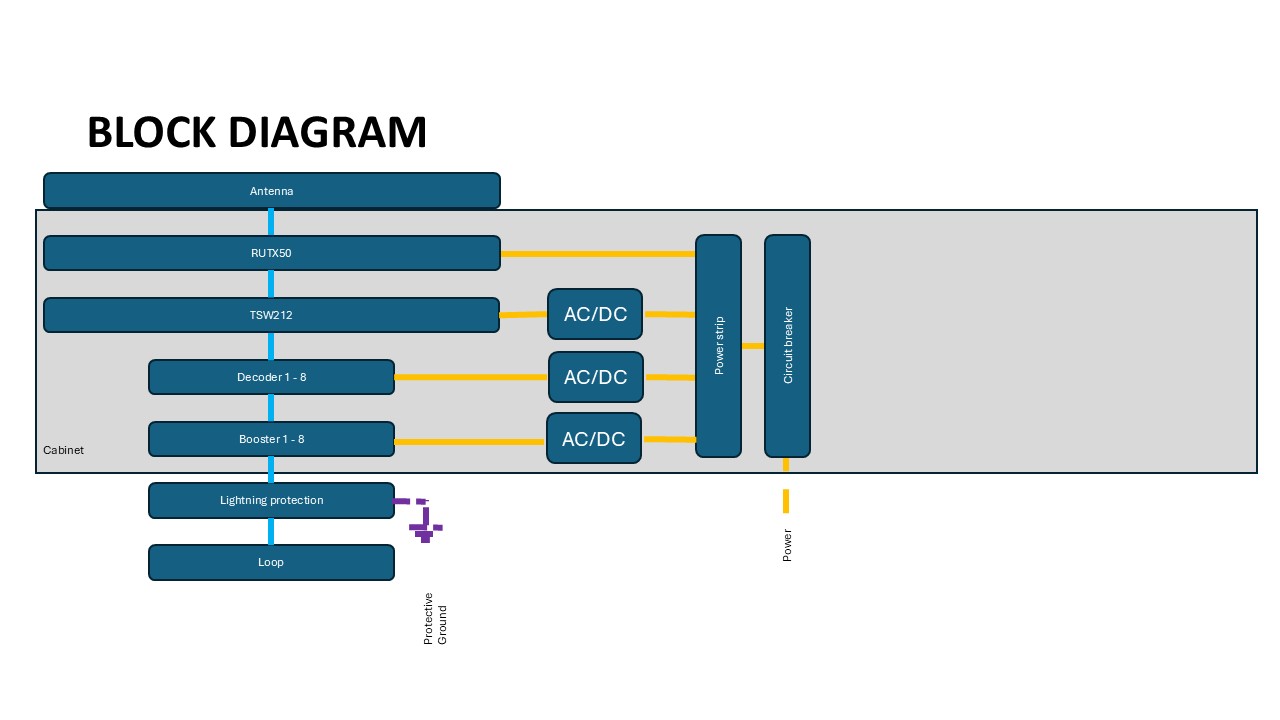
Thank you,
V.