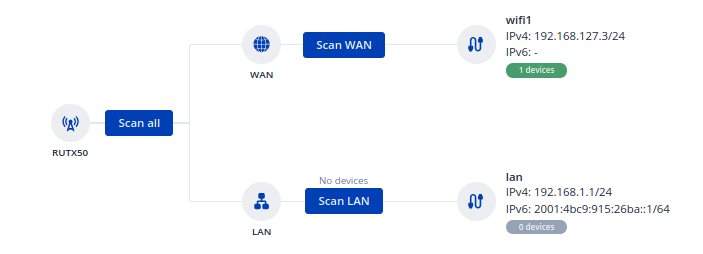
I want to add my airconditioner (Daikin) to my home network using a RUTX50. Previously (with my old router) I used WPS, but the RUTX50 does not have this option.
I know the SSID and KEY of the airconditioner. How can I add it to the WIFI Network using the webinterface of RUTX50?
Firstly, regarding WPS, there’s only a single one of our devices from the portfolio that supports that protocol, and that is the TCR100, which is an end-of-life device. You can find more information on it here: https://www.teltonika-networks.com/products/routers/tcr100
For RUTX50, it supports a lot of different protocols, but doesn’t support WPS. Perhaps there are some settings from the air conditioners control panel / configuration window (if it has one?) that would possibly allow you to change the protocols being used?
For example, I have an air conditioner myself, and the way my air conditioner had to be connected to the Wi-Fi network, was for me to simply hold down a few buttons for a couple of settings and I also had to input the password from the application that the manufacturer has provided me with.
I can reach the airconditioner from my laptop (192.168.1.230, NM: 255.255.255.0) via ping and even HTTP. But it seems to have no connection to the internet.
The airconditioner should be in the same network (LAN) as all other devices. 192.168.1.0/24
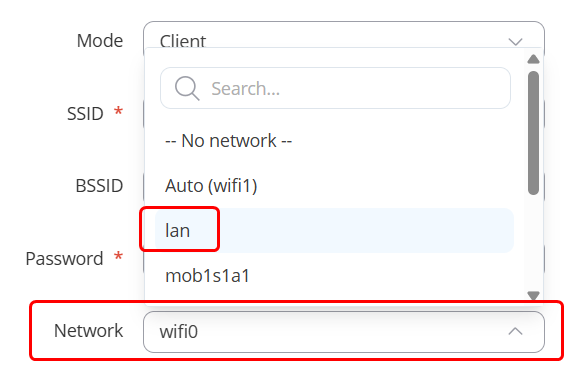
From what I’ve gathered, you’d like for it to be on the LAN network instead, then. Could you go ahead and click edit on the Wireless interface that you’ve provided an image of:
After doing so, the last option available should be “Network” → Click on it and select “LAN” instead of Wifi1 or Wifi0 or whatever the number you might have:
It is not possible. Error message: “Bridged networks cannot be used with regular clients. If bridged wireless network is needed, consider Mesh, WDS or Relayd”
Of course I am using the Onecta app. This is how I controlled the AC with my old router. The app doesn’t help, it just explains how to put the AC unit into either WPS or access point mode. Which actually worked, the unit is connected to the RUTX50. But it is linked to the WAN interface. I already deleted it, tried again, reset the router…