I am a first time user here i have just started using a Rut200 router for out security company, i currently have 8 units i have purchased 100 credits but no mater what i do i can not get them into my units and i have 3 units that will not connect to my RMs i can see them there but it says not NOT ACTIVATED CAN ANY ONE HELP PLEASE
Greetings, @Howardcctv,
Welcome to the Teltonika Community!
To better understand why some of your devices appear inactive, could you let me know if any specific error messages are shown next to the affected units?
Additionally, please access the device’s WebUI and navigate to Services → Cloud Solutions → RMS. If possible, share a screenshot of that page so I can review the RMS status. Just make sure to blur or cover any sensitive information such as serial numbers or email addresses before posting.
Also, you can refer to this wiki article for more detailed information why your device seems to be disconnected:
Looking forward to your update.
Kind regards,
V.
Hi Vilius, thank you for your response, my main problem is that i can not get to the gui as they show on the app as not connected so not sure how to get to it without driving all over the country to connect directly to each off the offline units
Greetings,
Thank you for a follow-up,
If your devices are using mobile WAN, and the SIM cards has SMS service enabled, additionally you can try initiating RMS connection using SMS commands. To re-initiate connection to RMS you can send an SMS message to the router’s SIM following this syntax:
<device_password> rms_connect
Once the device receives an SMS, it should force rms connection.
Additionally, if that’s not going to work, you can send SMS with the text:
<device_password> rms_status and <device_password> status
The responses should contain status of the RMS service and device’s connectivity.
For more SMS commands you can refer to this article:
Please let me know how it goes,
Warm regards,
V.
Hi thank you for your response unfortunately i do not think that the sim cards are sms enabled. I been on to our supplier of sim cards and getting no response as of yet. Also as a second question i have 3 rut 200 units out there that every morning my customer has to reboot as the routers are all showing with the lights on the unit showing 4g signal 2/4 bars and network connection flashing but no data can get in or out will setting auto reboot resolve this problem.
Thank in anticipation of your reply. i hope ?
Ps is there anyway i can get someone to get in to these units and make them work i am getting crucified every day
Hello,
Thank you for your message.
Could you please check whether any error messages appear on the devices marked as “Not activated”? You can verify this in Services → Cloud Solutions → RMS, under the Status section. There you’ll see the current connection state. If any warnings or errors are displayed, feel free to share a screenshot so I can help interpret them.
Regarding your second question: in some situations, mobile carriers may terminate a data session if the SIM card remains idle for a period of time. If the issue is resolved by rebooting the device, this behavior is a possible explanation.
As a workaround, you can configure the Ping Reboot function. This allows the router to automatically reboot if it cannot reach a specified host (for example, 8.8.8.8). This helps maintain connectivity without requiring manual intervention. You can follow this guide for detailed steps:
Let me know what you find, and I’ll be happy to assist further.
Warm regards,
V.
Thank you Villius i am trying to get to site to plug in to the router and hopefully set up the ping reboot command hopefully i can do it in the mean time here is a screen shot
Greetings,
Thank you for your follow-up,
I removed the screenshot as it contained personal information. To keep your data secure, please avoid posting details such as serial numbers or public IP addresses on the public forum.
If you are able to access the device’s WebUI, you can check for RMS-related errors by going to Services → Cloud Solutions → RMS. Any issues should appear in the section highlighted in red in the example below:
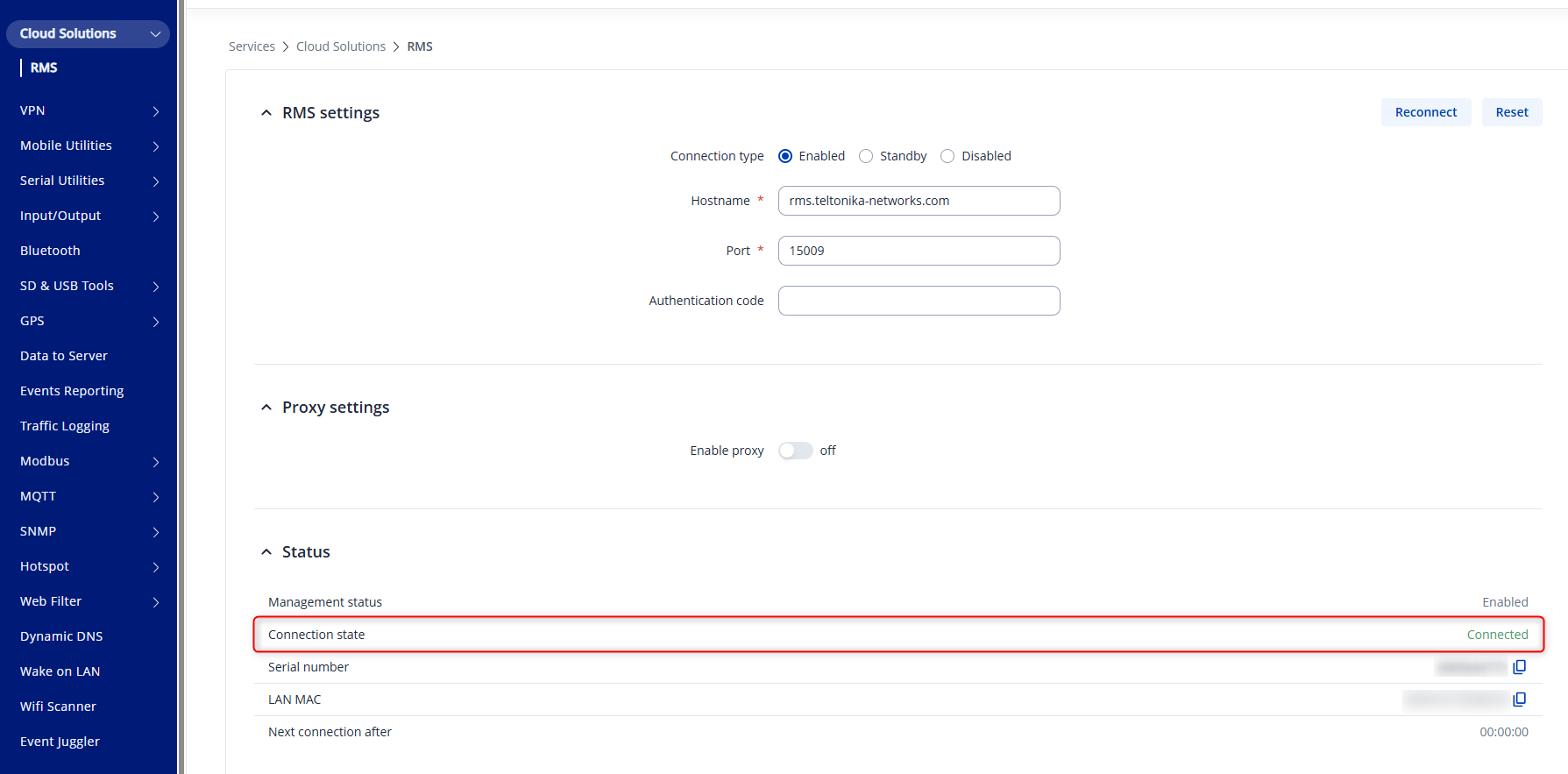
Best regards,
V.