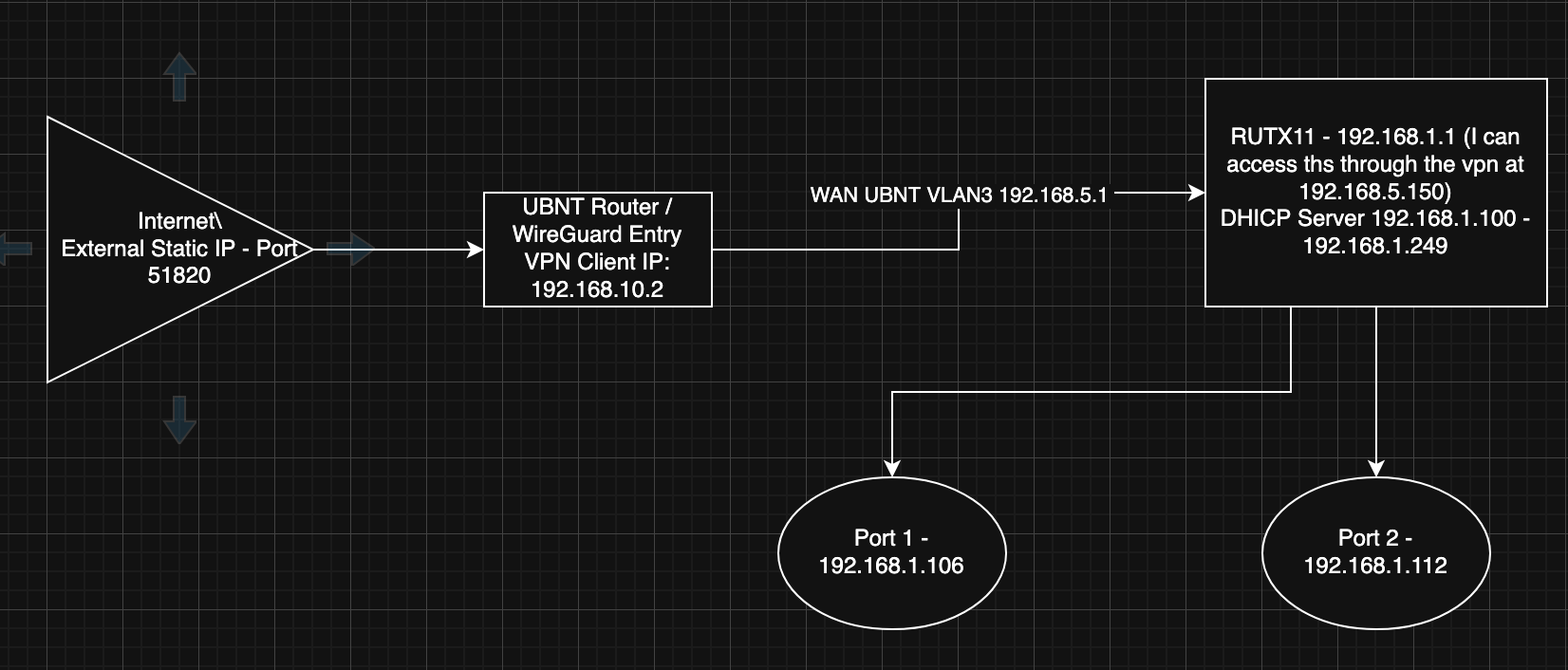
I’m struggling a bit to get access to the LAN ports via the WAN. I’ve included a diagram. The basics behind this are that the RUTX11 is actually behind another router (UBNT in this case) connected to the WAN. Hence the UBNT is providing internet in the typical situation to the RUT- However I need to be able to get to the LAN ports through wireguard which is running on the UBNT (NOT THE RUT).
So with the diagram below. And on WireGuard, externally, I can get to the RUTX UI via 192.168.5.150. (For some reason that’s the address the WAN port is getting from the UBNT DHCP). Thing is I can’t get to any of the DHCP devices at all on the LAN. Thats what I really need to get to. I also can’t rely on the edge devices on the LAN being the same IP address. They may change.
So my question - given this setup, what do I need to change to allow a client via wireguard from an external network to get to the pool of DHCP devices on the RUTX11?
Thanks for providing a bunch of information right off the bat. I have a few questions:
Have you added any static routes on the UBNT router? For example, to the 192.168.1.0/24 network?
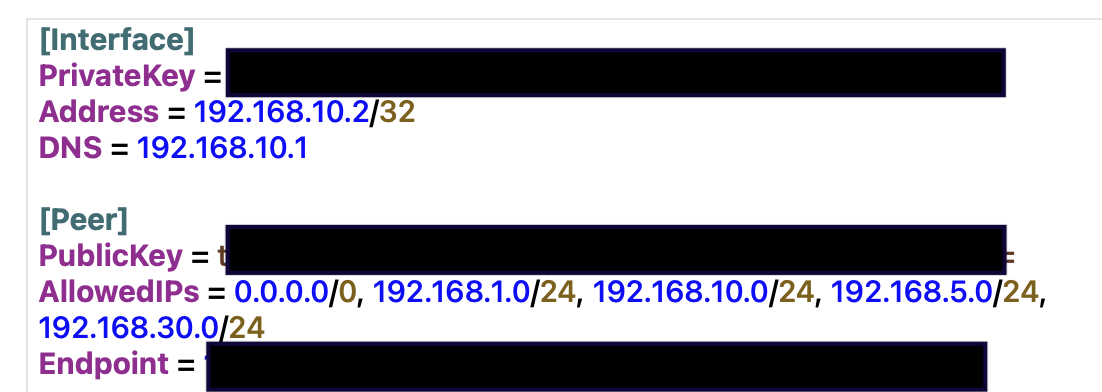
In the AllowedIPs list of your WireGuard config, have you also added the 10.0/24 and 1.0/24 networks?
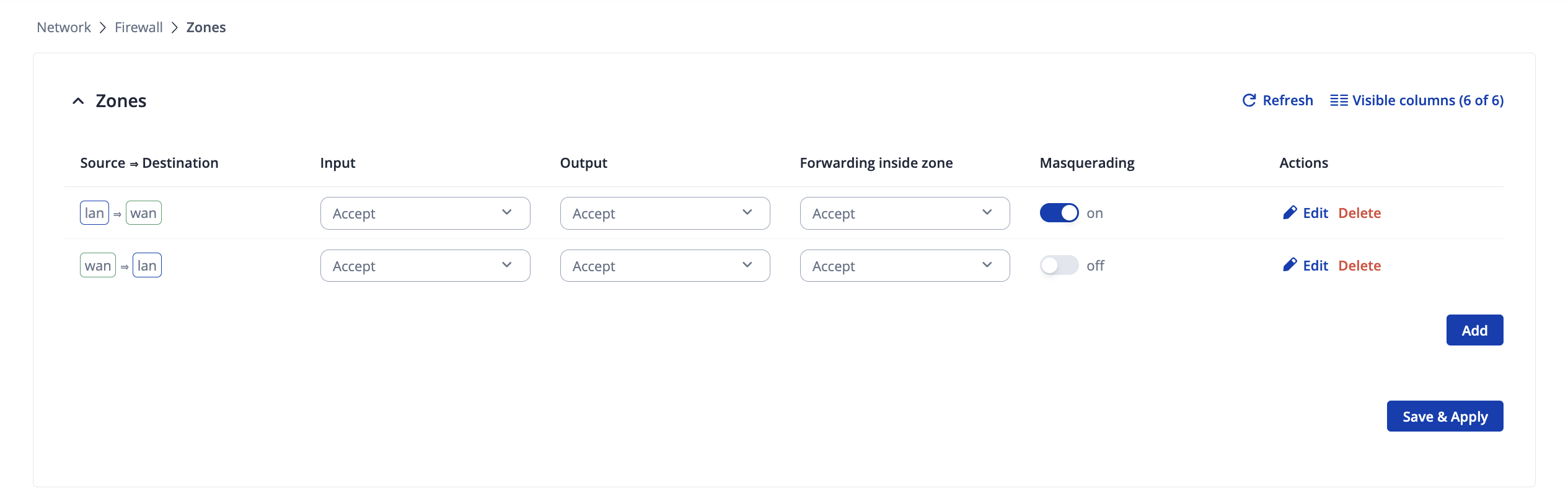
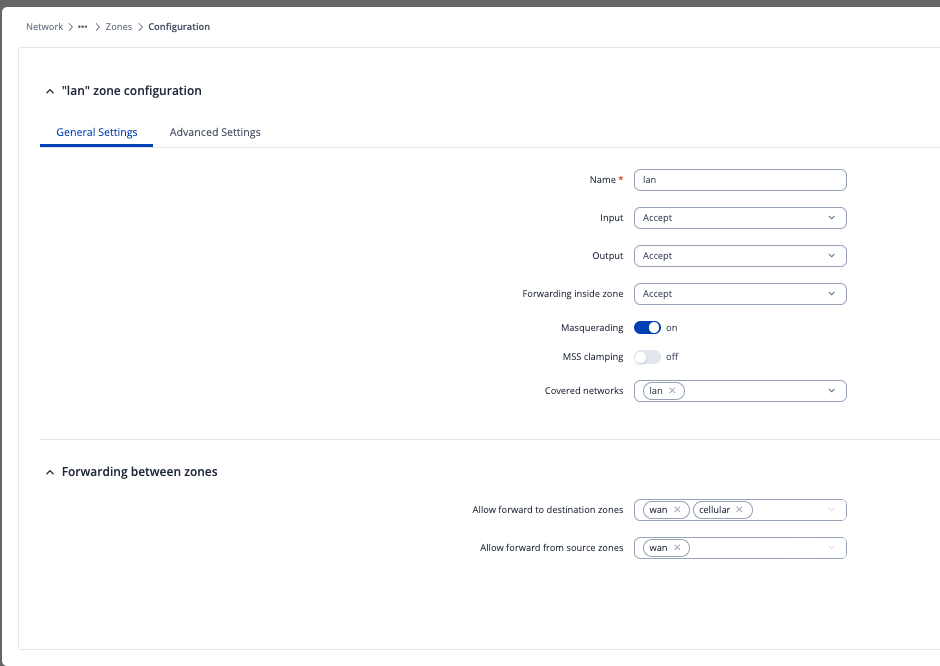
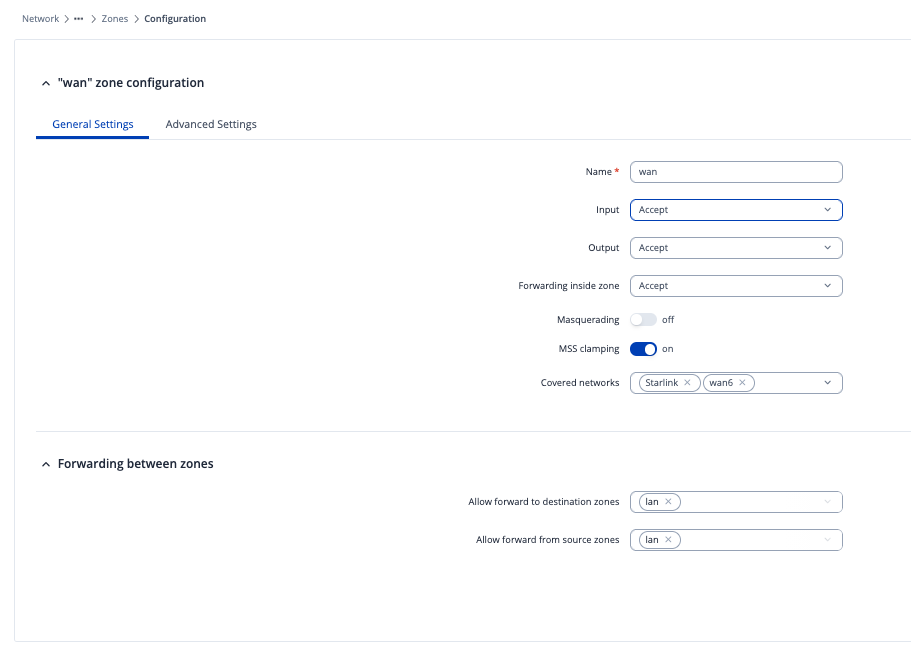
Does enabling the Masquerading option under Network → Firewall → Zones (or General Settings → Zones for older firmwares) helps you? If you haven’t tried already, please do. You should enable it on the first zone in the list, which generally is LAN => WAN
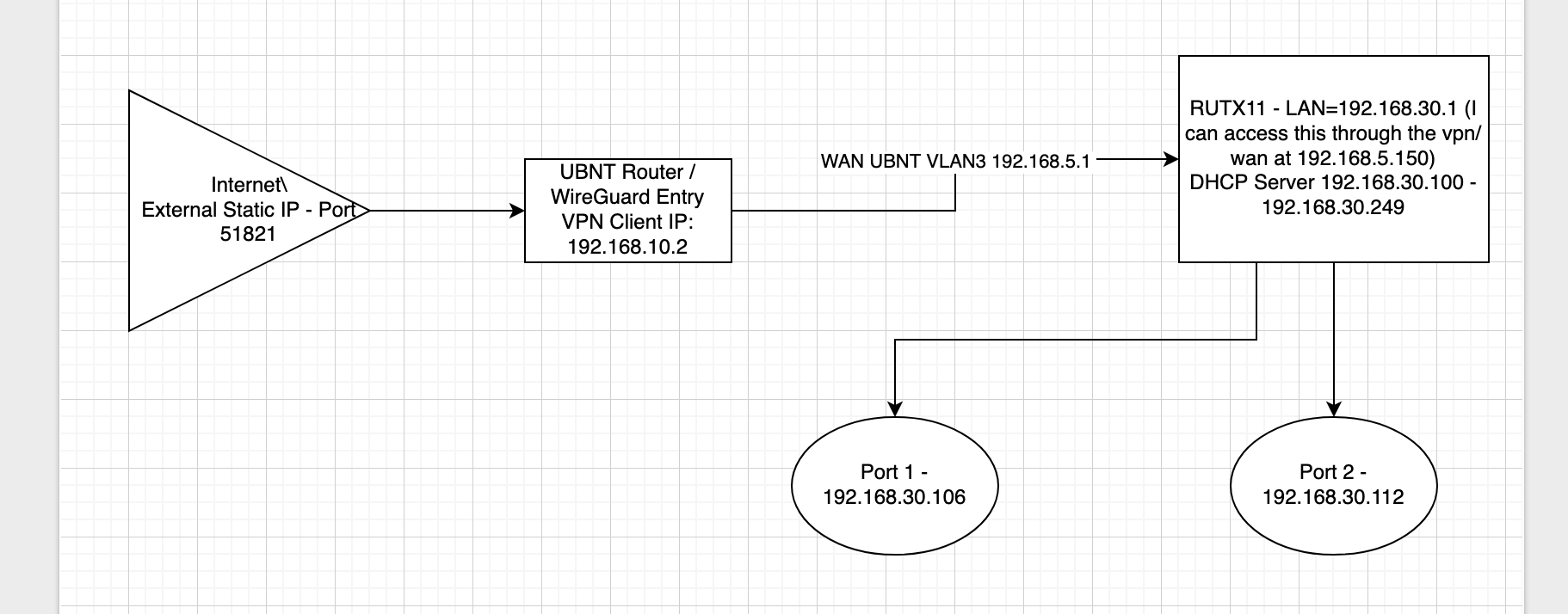
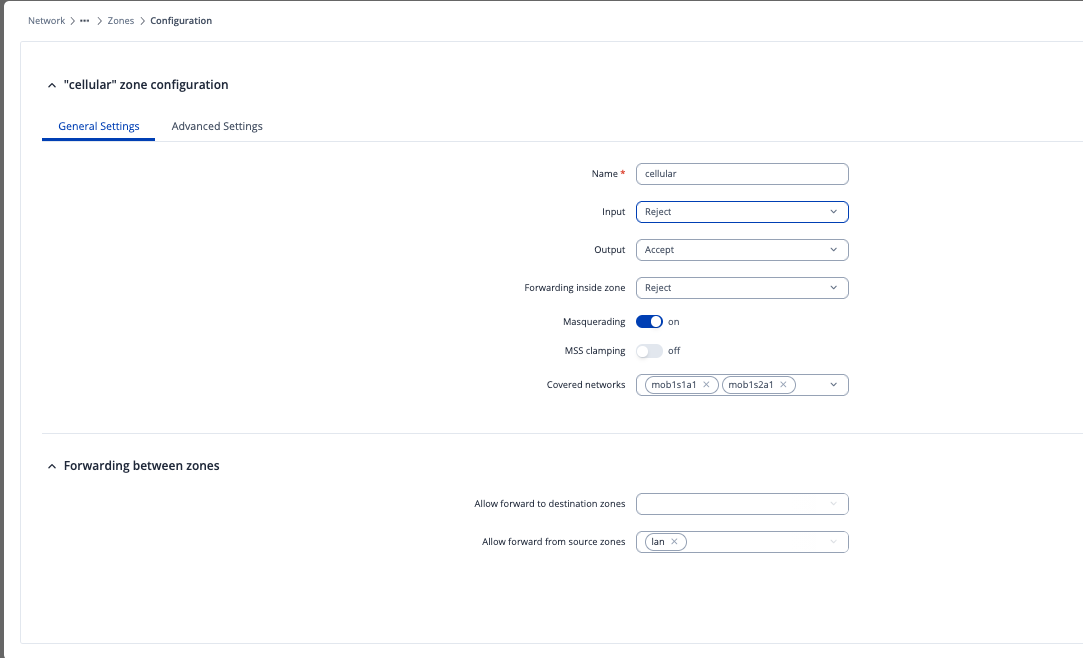
Hey. I really appreciate the response. Given what you discussed I have tried the following things, and I have included screenshots. A quick note, i did change the DHCP server and RUTX address to the 192.168.30.0/24 address range and included a new network drawing to reflect this. The reason for it was I wanted to make sure that none of the addresses were conflicting. Hence new chart:
In the AllowedIPs list of your WireGuard config, have you also added the 10.0/24 and 1.0/24 networks?
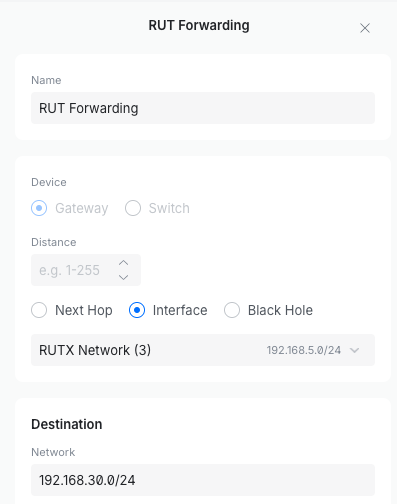
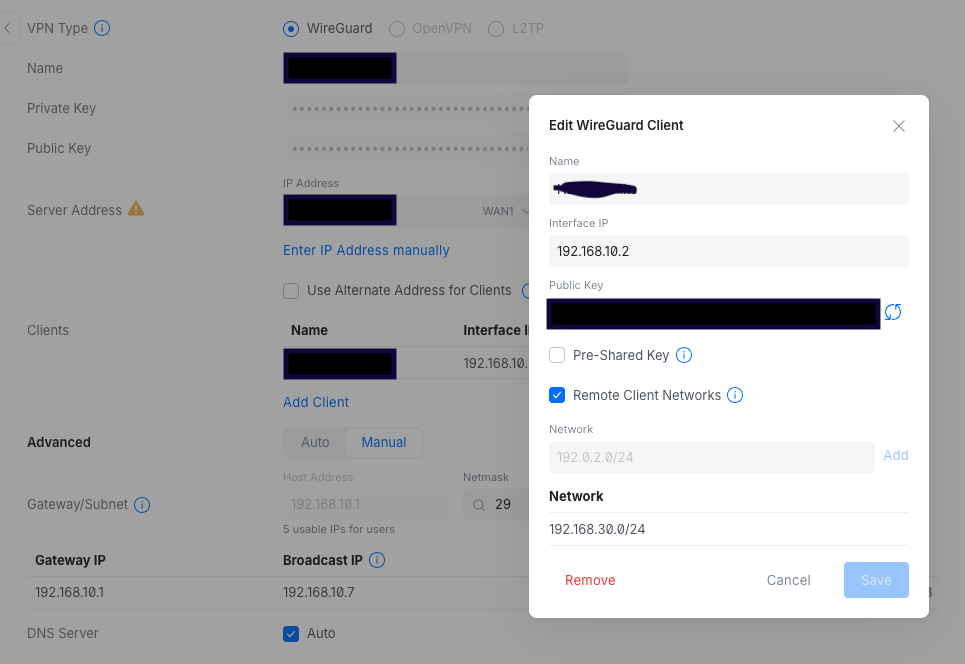
So on the server (UBNT Side I added the first picture for access to the network, then the second picture of the Client Config - which i know is VERY open at the moment, but I’m trying anything).
Does enabling the Masquerading option under Network → Firewall → Zones (or General Settings → Zones for older firmwares) helps you? If you haven’t tried already, please do. You should enable it on the first zone in the list, which generally is LAN => WAN
So one thing i should mention. Based on this configuration i can get to 192.158.5.150 via wireguard which is the RUTX11 WebIU. I just can’t get to the LAN DHCP addresses. I need access to the downstream devices which according to say the network chart is 192.168.30.106:22 (Yes I need to SSH to them)… These I can’t get to.
After consulting with one of my colleagues in regards to this, they’ve suggested that you add a route to the 1.0/24 network on the UBNT router, since currently, it is able to reach the 5.150 router due to the fact that it leased out the address to it from itself, the 1.0/24 network is not visible, so it doesn’t know how to reach it.
The gateway you’ll have to set will be the 5.150 address (our router). As we don’t work with UBNT products, nor we have any in the office, I’m unable to properly test or give you further instructions, but I’m sure you’ll be able to find those settings.
You may need to add a port forward rule as well on the UBNT device, if adding a route won’t be enough.
In essence - routing must be done from the UBNT device, not on our device.
Thanks for this. I wanted to give the solution for anyone else looking through this. There are several factors at play that lead to a solution.
First and formost, change, the Teltonika device to an IP range that is far outside of using 192.168.1.0/24 or 192.168.0.0/24. This seemed to confuse the UBNT router a ton. I went with changing the Teltonika router to 192.168.100.1 and subsequently it changed automatically the LAN DHCP pool to 192.168.100.0/24. This alone resolved a ton of issues.
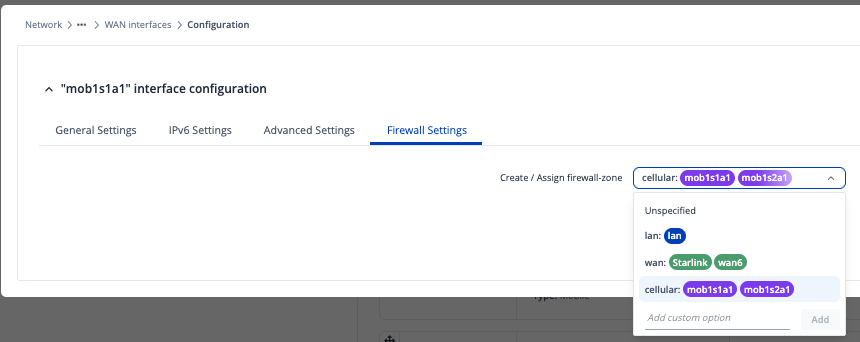
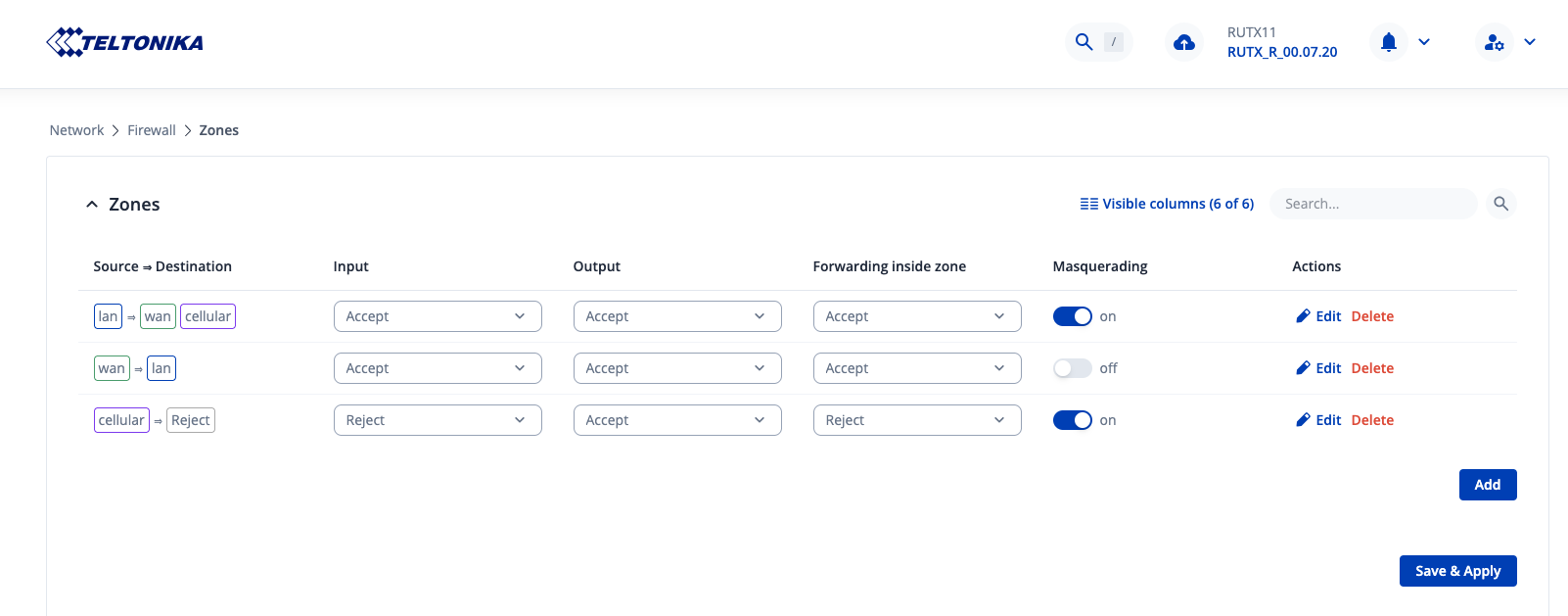
You are correct. The routing and firewall by default on the Telonika device just ‘work’. My recommendation is NOT to mess with Firewall/Traffic Rules, and focus on just using ZONE firewall rules to do everything. This makes things MUCH easier. To do this however, and to meet the requirements above of reaching into the device from the WAN port to hit the LAN ports (and not letting cellular also tunnel into the device), recommend setting up an alternative firewall zone and attaching both mobile devices to this new firewall zone. i did this in WAN settings (Make sure to do it for both mobile devices). I called it cellular. This allows you to configure wired-WAN rules differently from cellular adapters:
Finally, you are correct… 3 things need to exist on the upstream router connected to the wired-WAN port.
Assign a STATIC route of the teltonika router WAN IP address to the LAN Subnet range. Hence if your Teltonika WAN port has an address of 172.100.5.66 – That is the ‘NEXT HOP’ address for the LAN port subnet which would be 192.168.100.0/24 (Given my example in this reply above)
Open the firewall rules to allow the traffic on the upstream router.
Understand that Wireguard struggles with being in the same subnet as the WAN address (At least in Ubiquiti’s implementation). If this is the case, you will need to employ a a VLAN to seperate Wireguard and the Tetonika device and then allow firewall rules to allow crossed VLAN traffic.
A final note, make sure your wireguard (if your using wireguard), as the proper client configuration of ‘AllowIP=’ should include all the subnets you need access to including the LAN ports. For reasons i do not understand 0.0.0.0/24 will not work in many cases depending on the wireguard SERVER.
I hope this helps someone, and thanks for pointing me in the right direction.
A followup thread was created to verify that this is the most effective Teltonika firewall in this case, but that really is a different topic. Here is the link to that thread. Opinion of Most Secure Zone Firewall for multi-Wan Setup