I have extensively searched the community regarding this issue and found something similar but in all the threads I have examined there is no clear solution to the issue.
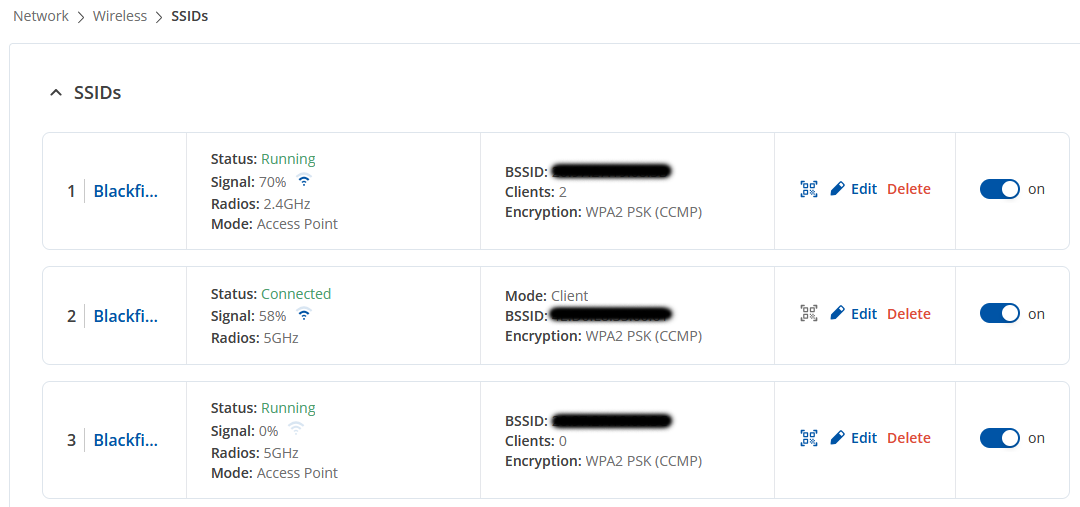
I have defined two access points with different SSIDs for 2.4 GHz and 5 GHz Wi-Fi and a third one as client to connect to a Starlink antenna on 5 GHz.
If the Starlink abtenna is powered on, the RUTX50 gives priority to this connection and puts the cellular connection in stand-by; if it is not powered on, the cellular connection is enabled.
So far so good, except for the fact that if the 5 GHz client is not active because the Starlink antenna is switched off, the 5 GHz access point disappears (the devices cannot locate it anymore). This below is the Wi-Fi configuration (the three names are all different even if in the screenshot they are not fully showed)
A single wireless radio cannot operate in Access Point and Client (Station) modes simultaneously on different channels. Both interfaces must use the same channel. If the client interface cannot connect to its network, the Access Point will not broadcast.
Please try to reconfigure the 5 GHz AP to 2.4 GHz. Use 5 GHz exclusively for Client (STA) to Starlink, and use 2.4 GHz for Access Point. Or lock the 5 GHz AP channel to match expected Starlink channel (not recommended due to Starlink’s dynamic DFS behavior). Radio settings can be found under Network → Wireless → Radio.
Hi MatasR, thank you for taking the time to reply, much appreciated.
I already have a 2.4 GHz AP defined.
Your answer clarifies why I cannot see the 5 GHz AP and I agree that it would be impossible to match the channel Starlink will works on time by time.