FMM650 - Deep sleep current consumption ~20mA@12 V

Hello,

Installing FMM650 in low-usage car (bench-tested OK).

Switzerland: 2G shutdown, Sunrise IoT SIM → 4G/LTE Cat M1 only.

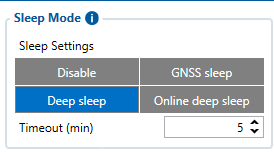
Sleep mode set to Deep Sleep.

Observed when stopped:

  • Current: ~20mA average, spikes ~30mA

  • GSM LED: 6 short flashes with 2s pause in between and 7th 1 long flash (and this sequence repeats)

  • GPS LED: Completely off

  • No server connection

  • No USB connection

  • GPS Fix available

Firmware: 03.01.00.Rev.14 (already tried multiple config reset).

Datasheet says Deep Sleep <4mA (GSM off), but with GPS off and ~20mA draw, it seems stuck in Online Deep Sleep.

Known issue on Cat M1-only networks (no 2G fallback)? Any way to get lower consumption?

Thanks for any help!

Hello

Good day, it is expected that GSM and GNSS signal is off during the deep sleep mode , this is to save power consumption

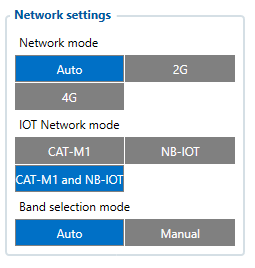
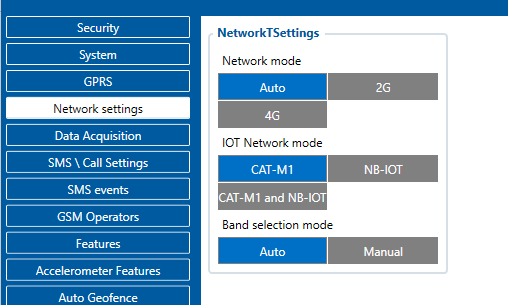
About the network settings you can select your preferred settings here, It can be 4g, 2g or auto

You can also specify if it is CAT M1 NB - IOT or boht

If you want to conserve more power, please use Ultra Deep Sleep mode but it will not report to your server unless, movement or ignition is detected.

Best Regards

Maynard C

Thanks for the reply.
I already have Deep Sleep selected (as shown in the attached screenshot, also my network settings are attached), but I’m still seeing ~20–27 mA average current consumption.
Ultra Deep Sleep isn’t available in my firmware options, and the wiki/datasheet mentions <4 mA for Deep Sleep.
Did I miss a setting, or is this expected on Cat M1-only networks (Switzerland, no 2G fallback)?
Firmware is 03.01.00.Rev.14. Thanks!

Hi,

Good Day,

As per the current consumption shared above, it appears that the device may not be entering completely into Deep Sleep mode.

We request you to please check and apply the following:

  • Set the time synchronization source to NTP only

  • Ensure all sleep entry conditions are met, including:

    • Ignition is OFF

    • No accelerometer movement

    • No BLE devices connected

    • No active peripherals keeping the device awake

Once these conditions are satisfied, please verify whether the device is successfully entering sleep mode and observe the current consumption again.

If the issue still persists after applying the above checks, we kindly request you to open a support ticket. We will then analyze the behavior in more detail and provide you with a relevant configuration to help achieve the expected current consumption.
Thanks

Ashutosh S.