Hi Community,
currently i try to use a FMM150 in a PoC. I cant set a can programnumber via sms command, it still fixed on number 0. and i can’t find any other way to setup a correct can configuration. Fota-Web access is difficult because Seller support (Jacob electronic) try to request a account for me but months later, no response from teltonika. the german sales accounts says, its working without Fota-Web, but how?
so, maybe the Community can help me. Thank you 
kr. Torsten
Hi,
Thank you for writing to us.
For device configuration, we have different methods available, such as USB or Bluetooth using the PC configuration tool. If the device is not physically available, configuration can only be done remotely via SMS commands, GPRS commands, or FOTA Web.
In your case, you need to upload the configuration file via FOTA Web. For this, your seller needs to have their own FOTA Web account, under which they can create sub-accounts. A sub-account can then be provided to you, allowing you to access the devices and upload the OEM configuration file remotely.
Thanks
hi @Ashutosh.Singh ,
thank you for ur response.
im aware about the possibilities, but the they are not working for any Model as i discovered.
FMM150:
PC Configuration Tool = no CAN Adapter Menu point to configure CAN Program Number
SMS / GPRS commands = cool feature to remote configure, but the command is not working and at the command list, the model FMM150 is not listed to configure remote via lvcan commands.
Fota Web = i understand the reason, why the way goes with the Seller and so on but im currently waiting months for account, i wrote the German Sales Manager (response, why you need this? please contact seller, use SMS commands (which are not working because of…). I contacted the seller he is working with his Contacts to Teltonika.
At the end, maybe i miss some way to configure the correct settings because im using teltonika device for telematics the first time. but on the other hand, the customer expirence for the part from 0 to working PoC is a littlebit difficult to put it mildly.
greetings,
torsten
Hi,
For offline CAN OEM files for your FMM150 devices, you can select the appropriate CAN OEM file based on the vehicle’s make and model. For this purpose, you may need access to the FOTA API so for the that you need FOTA access which you dont have so you need to need to check with the seller to provide FOTA access.
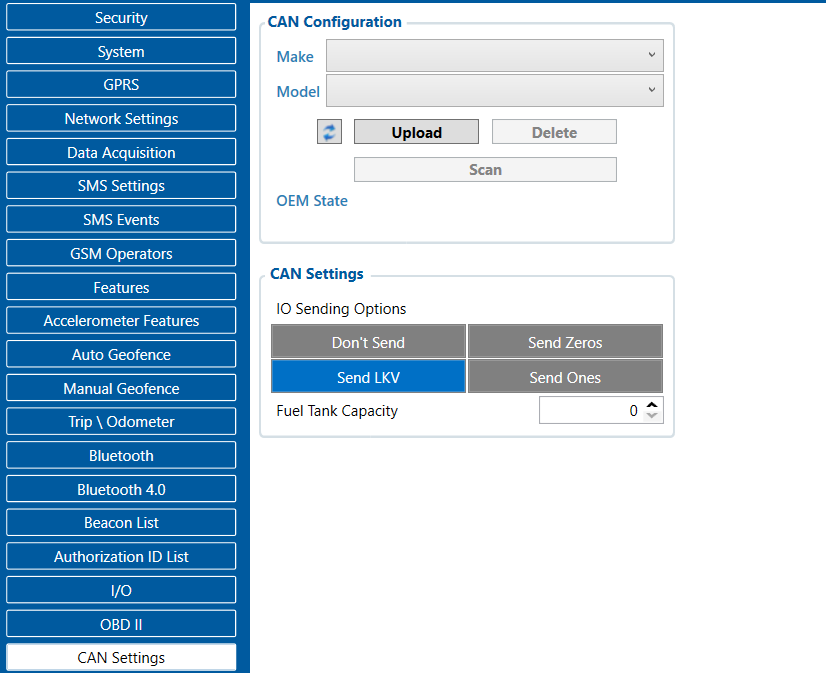
Alternatively, when the device is connected to the vehicle via the CAN lines and is running the latest firmware, there is a Scan option available under the CAN settings. By clicking the Scan button, the device will scan the CAN database via FOTA and identify the most suitable CAN configuration for the connected vehicle.
Please note that, for this feature to work, the FOTA IP addresses and ports must be whitelisted by the SIM operator. Otherwise, the scan may not execute successfully. Alternatively, you can use a regular SIM card without such network restrictions.
The following FOTA IP address and ports need to be whitelisted:
IP Address: 35.156.7.140
Ports: 2000, 3000, 4000, 5000, 6000, 7000
Here is the link to the latest firmware and Configurator, along with a screenshot/snippet from the Configurator for reference.
Thanks