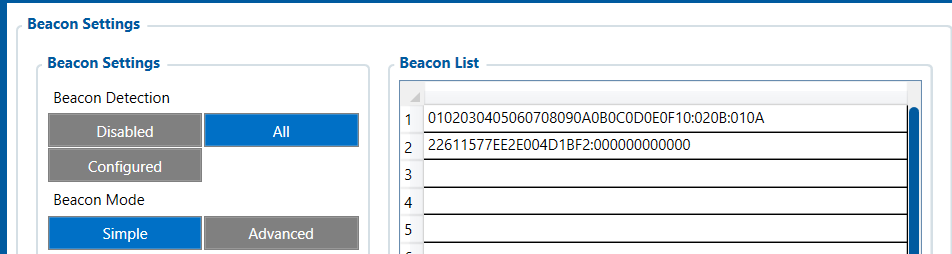
I would like to ask Your help regarding my FMC920 + eye beacon.
Devices are brand new, and I configured quickly a free ruhavik acc before starting my own traccar server. SIM also present in the device, and I have connection to the server as well, device send all of the status messages, so apn and server connection is fine.
I would like to use the immobilizer function, but does not matter what I try, no success yet.
My first issue, I don’t have “beacon info” tab under the status.
Of course I activated bluetooth and Bluetooth 4.0 as well. Tried non stop scan or periodic scan. Set up the eye beacon with an eye app, added the eddystone ID to the Beacon list in the specified namespace:mac_id format, tried the Eye beacon Name list too
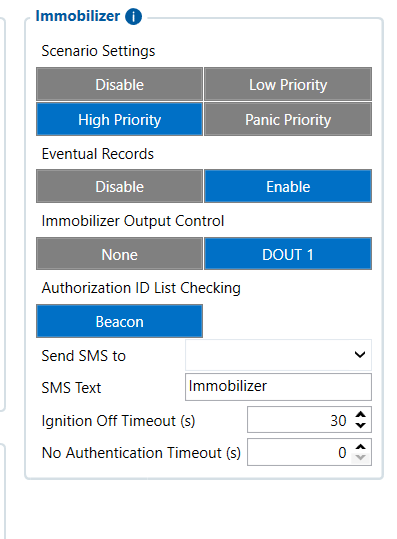
Under “Features” the immobilizer scenario is set to low priority (or high), immo output DOUT1, and authorization ID list is set to Beacon (only option). DOUT1 assigned only to this immo function.
Of course I can see the eye beacon device In BLE discovery.
Let me know if I should post some screens about my config, or anything what can help.
You mentioned adding the Eddystone ID in “namespace:mac_id” format. Just for the clarification:The MAC address is NOT the Instance ID. These are completely separate identifiers: MAC address-6 bytes (e.g., 7CD9F414C50A)-Hardware Bluetooth address printed on the casing Eddystone UID-16 bytes-Software-defined: Namespace (10 bytes) + Instance ID (6 bytes)
How to get the correct Eddystone UID:
Open the Teltonika EYE App on your phone
Connect to the beacon (default PIN: 123456)
Go to Configure → Advanced settings → Beacon information
Note the Namespace ID (20 hex chars) and Instance ID (12 hex chars)
Then enter it in the Beacon List as: NAMESPACE-INSTANCE or NAMESPACE:INSTANCE
Example: 00112233445566778899:ABCDE0810047
Now enter it in slot 1 of the authorized beacons list.
The “Beacon info” section in the Configurator Status only appears when beacon data is actively being received and stored.
The immobilizer works opposite to what most people expect:
Ignition ON + no authorized beacon detected → DOUT1 = ON (vehicle blocked)
Authorized beacon detected → DOUT1 = OFF (vehicle unblocked)
Ignition must be ON to trigger the authorization process
Enable Bluetooth Bluetooth 4.0-Non-Stop Scan: Enabled
Scan Duration: 30s
Power Level: 5
Beacon Settings
Detection: ALL (use this for testing; switch to “Configured” later if needed)
Record: Periodic
Goto Features tab-Immobilizer
Priority: High
Output control: Dout 1
List check: Beacon
Ignition OFF timeout: 30 seconds (so quick ignition cycles don’t require re-authorization)
Thank You for the reply!
The immo functionality is clear, how the output (and “unauthorized timeout”) works.
System tab, codec 8 extended was already selected.
It is clear, the eddystone identifier should not be the mac_id, but it was configured that way by default, so I just kept it.
It seems, my problem was the default namespace in the beacon.
When I reconfigured the beacon in eye app to iBeacon mode, it worked immediatelly.
Switched back to eddystone, configured a new namespace, and kept the MAC_ID as an instance ID, and put this into Beacon list. Removed any other from “Eye beacon name list”, I have only one entry in the Beacon list now.
Now I see the Beacon info tab, and the immo is working well.
Thanks again, have a nice day!