FMC650 stuck on 03.01.00.Rev.34_1666 – Configurator shows "Not supported" over USB

Hello,

I am trying to update an FMC650 device to firmware 03.01.01.Rev.15 using a USB connection.

The device originally had the following firmware:

03.01.00.Rev.14

I followed the recommended firmware update sequence:

03.01.00.Rev.14
→ 03.01.00.Rev.28
→ 03.01.00.Rev.34_1666
→ 03.01.01.Rev.15

The updates from Rev.14 to Rev.28 and then from Rev.28 to Rev.34_1666 were completed through USB.

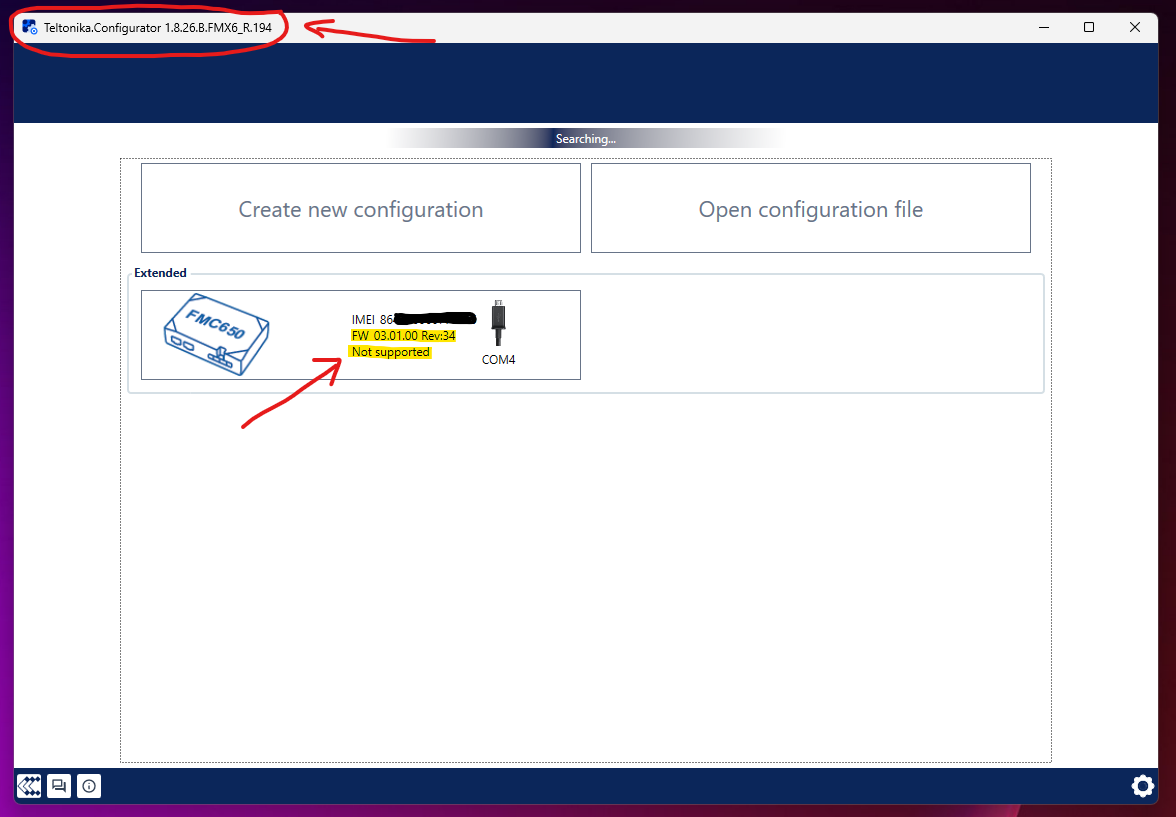
The device is now detected by Teltonika Configurator and the following information is displayed:

Device: FMC650
Current firmware shown by Configurator: 03.01.00 Rev.34
Connection: USB virtual COM port
IMEI: 86****************

However, the device tile now displays:

“Not supported”

Clicking the device tile does nothing. The login/configuration window does not open, so I cannot access the device or continue the USB firmware update to 03.01.01.Rev.15.

I also tested the Configurator version listed for FMC650 firmware 03.01.01.Rev.15:

Teltonika Configurator 1.8.26_B.FMX6_R.194

The problem remains the same. The FMC650 is detected, but it cannot be opened because the Configurator shows “Not supported”.

I understand that Rev.34_1666 is an intermediate bootloader-patch firmware and is not intended to be used as a standalone firmware. I therefore need to continue immediately to 03.01.01.Rev.15.

I need to complete the update locally through USB only.

Could you please clarify:

  1. Is it expected for an FMC650 running Rev.34_1666 to appear as “Not supported” in the standard Configurator?

  2. Which exact Configurator version or USB firmware-updater tool must be used to upgrade from Rev.34_1666 to 03.01.01.Rev.15?

  3. Is there a separate offline USB updater or recovery utility for this intermediate firmware?

  4. Is there a specific USB recovery procedure, power-cycle sequence, or boot mode required before loading Rev.15?

  5. Could you please provide the correct official USB tool, Configurator build, or detailed procedure for completing this update?

The device is still detected over USB, and its IMEI, firmware version, and COM port are displayed correctly. The only problem is that the Configurator does not allow me to open the device or proceed with the next firmware update.

Additional technical details:

  • Both intermediate firmware updates were performed locally over USB.
  • The update from Rev.14 to Rev.28 completed without any error message.
  • The update from Rev.28 to Rev.34_1666 also completed without any error message.
  • After installing Rev.34_1666, the device rebooted and was detected again on COM4.
  • The Configurator can read the device model, IMEI, firmware version and COM port.
  • No login or configuration-keyword dialog appears.
  • Clicking the device tile produces no response.

Could you also please advise how I can verify the current bootloader version locally over USB while the device cannot be opened in Configurator?

Thank you.

Dear @bmehrabani,

Thank you for the detailed information.

Could you please confirm whether 03.01.00 Rev.34_1666 was installed via USB using Configurator or through FOTA WEB?

Please note that 03.01.00 Rev.34_1666 is an intermediate firmware intended to update the device bootloader and is not meant to be used as a standalone firmware version.

After installing this intermediate version, the device should be updated to the target firmware (for example, 03.01.01 Rev.15) via FOTA WEB. Once the device has been successfully updated to the target firmware, you can use the corresponding Configurator version for 03.01.01 Rev.15 to access and configure the device.

If the issue persists after updating through FOTA WEB, please create a ticket through the Partner Portal so our technical team can investigate further.

Kind regards,
Amalnath.

Dear @amalnath

Thank you for your response.

I confirm that 03.01.00 Rev.34_1666 was installed locally via USB using Teltonika Configurator, not through FOTA WEB.

The complete update sequence performed over USB was:

03.01.00 Rev.14
→ 03.01.00 Rev.28
→ 03.01.00 Rev.34_1666

Both USB update operations completed successfully without any error message.

The device is also operating normally after the update. It has connected to our server and continues to send AVL data packets without any issue. Therefore, the device itself is functional and the intermediate firmware appears to be running correctly.

The problem is specifically with:

Teltonika.Configurator_1.8.26_B.FMX6_R.194.exe

This Configurator build does not recognize or support the publicly released intermediate firmware:

FMX65.Ver.03.01.00.Rev.34_ID1666.e.xim

Although the Configurator can read the device model, IMEI, firmware version and COM port, it displays “Not supported” and does not allow the device to be opened. As a result, it is not possible to continue the USB update to 03.01.01 Rev.15.

This strongly indicates a compatibility issue or bug in the current Configurator build, because the device is fully operational and only the Configurator fails to recognize the officially released intermediate firmware.

I must complete the update locally through USB.

Please investigate this compatibility issue and provide a corrected Configurator version that supports Rev.34_1666 and allows the USB firmware update to continue.

Since both the intermediate firmware and the Configurator are publicly available, I also request that the corrected Configurator build or the required USB update tool be published publicly for other users who may encounter the same situation.

If a corrected build already exists, please provide its exact version and official download location.

Kind regards,

Dear @bmehrabani,

Thank you for the additional information and for confirming the update sequence.

Based on the information provided, the behavior you are experiencing is related to the firmware type being used. The 03.01.00 Rev.34_1666 firmware is a Spec ID firmware (not a standard ID 1 firmware). Therefore, when using a Spec ID firmware, the corresponding compatible Configurator or an appropriate Spec ID key generated for that firmware version is required.

Please note that 03.01.00 Rev.34_1666 is an intermediate firmware intended for bootloader migration and is not designed to be used as a standalone firmware version.

The recommended next step is to update the device to the target firmware (for example, 03.01.01 Rev.15) via FOTA WEB. Once the device has been successfully updated to the target firmware, you can use the corresponding Configurator version for that firmware to access and configure the device normally.

Regarding your request for a different Configurator build or a dedicated USB update tool, we are unable to provide or publish internal tools through the Community platform.

If updating via FOTA WEB is not possible for your use case, or if you require further assistance with the migration procedure, kindly create a ticket through the Partner Portal (VIP Helpdesk) or coordinate with your Teltonika Sales Manager to obtain access. Our technical support team will review your case and provide guidance regarding the supported update procedure.

If you do not have access to the Partner Portal, please contact us through the Teltonika GPS Contact Us page:

Thank you for your understanding.

Kind regards,
Amalnath

Dear @amalnath

Thank you for clarifying that 03.01.00 Rev.34_1666 is a Spec ID firmware.

However, your explanation confirms that the issue originates from the official firmware package and update procedure published by Teltonika, not from the device, the update method, or the use of any unofficial firmware.

I am an experienced technical user, and I followed the files and instructions published by Teltonika exactly.

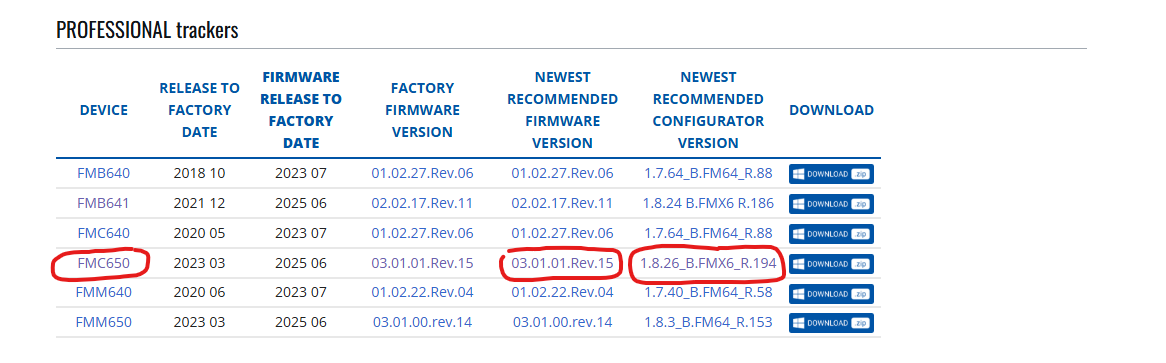
According to Teltonika’s official Firmware Versions page, the latest recommended versions for FMC650 are:

Firmware:
03.01.01.Rev.15

Configurator:
1.8.26_B.FMX6_R.194

Official references:

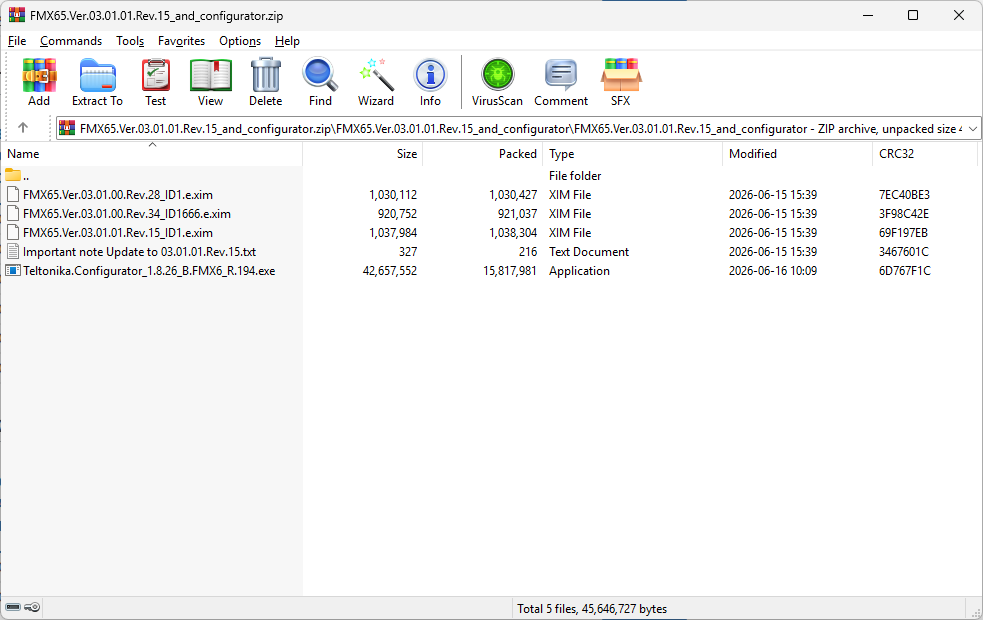
The official download button on the Firmware Versions page provides the following public package directly from Teltonika:

https://wiki.teltonika-gps.com/view/Special:Redirect/file/FMX65.Ver.03.01.01.Rev.15_and_configurator.zip

This official package contains:

  • FMX65.Ver.03.01.00.Rev.28_ID1.e.xim
  • FMX65.Ver.03.01.00.Rev.34_ID1666.e.xim
  • FMX65.Ver.03.01.01.Rev.15_ID1.e.xim
  • Important note Update to 03.01.01.Rev.15.txt
  • Teltonika.Configurator_1.8.26_B.FMX6_R.194.exe

Therefore, I did not use any custom, private, modified or third-party firmware.

The Rev.34_ID1666 firmware was included by Teltonika in the official and publicly downloadable Rev.15 update package.

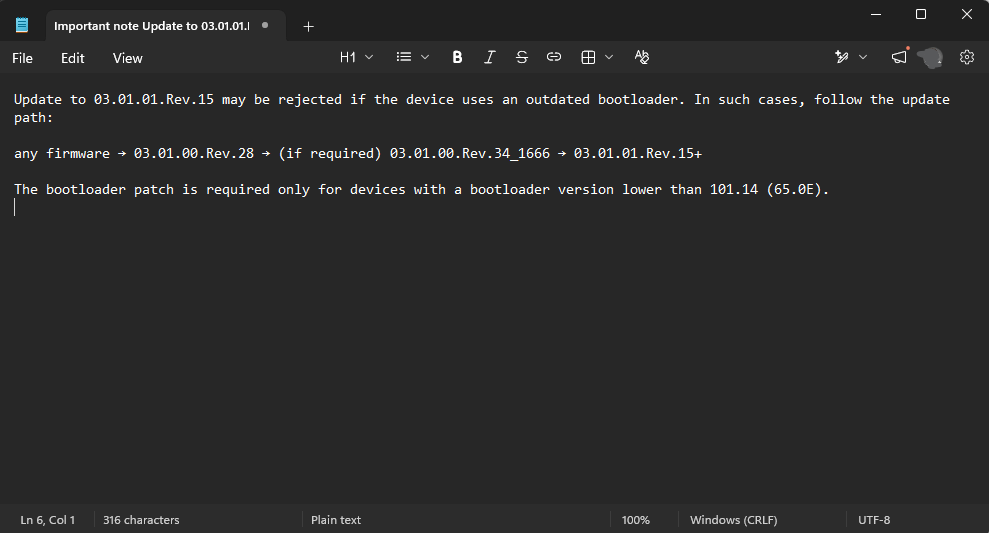
More importantly, the instruction file included in the same package explicitly states:

“Update to 03.01.01.Rev.15 may be rejected if the device uses an outdated bootloader. In such cases, follow the update path:

any firmware → 03.01.00.Rev.28 → (if required) 03.01.00.Rev.34_1666 → 03.01.01.Rev.15+

The bootloader patch is required only for devices with a bootloader version lower than 101.14 (65.0E).”

This instruction explicitly directs the user to install Rev.34_1666 as an intermediate step and then continue to Rev.15.

However, the instruction does not state anywhere that:

  • Rev.34_1666 must only be installed or continued through FOTA WEB.
  • Installing Rev.34_ID1666 through USB will cause the Configurator included in the same package to display “Not supported”.
  • A private Spec ID key is required to continue the USB update.
  • The Configurator included in the package is incompatible with one of the firmware files contained in that same package.
  • Following the published update sequence may leave the user dependent on a Sales Manager, VIP Helpdesk or an internal tool to complete the update.

I followed the published USB update path exactly:

03.01.00 Rev.14
→ 03.01.00 Rev.28
→ 03.01.00 Rev.34_1666

Both update operations completed successfully without any error message.

The device also remains fully operational after installing Rev.34_1666. It connects to our server and continues to transmit packets normally.

Therefore:

  • The device is operational.
  • The intermediate firmware is running.
  • The USB connection is working.
  • The model, IMEI, firmware version and COM port are correctly detected.

The failure occurs specifically in the official update workflow provided in the package.

The included Configurator:

Teltonika.Configurator_1.8.26_B.FMX6_R.194.exe

does not support the following official firmware file included in the same public package:

FMX65.Ver.03.01.00.Rev.34_ID1666.e.xim

After installing it, the Configurator displays:

“Not supported”

and prevents the device from being opened or updated to Rev.15 through USB.

As a result, a user who follows Teltonika’s official package and instructions exactly is placed in a state where the USB update cannot be completed using the software supplied in that same package.

This cannot reasonably be classified as a user-specific issue or an unsupported custom use case.

It is a reproducible defect or omission in one or more of the following:

  • The official firmware release package
  • Configurator compatibility
  • Spec ID handling
  • The published firmware migration procedure
  • The documentation supplied with the package

Whether the internal cause is a Configurator bug, a missing Spec ID key, an omitted utility or an intentional migration limitation is not the user’s responsibility.

Teltonika placed the Spec ID firmware inside a publicly distributed firmware-and-Configurator package and explicitly instructed users to install it, but did not provide the required software, key, warning or documented USB procedure needed to continue afterward.

Referring me to FOTA WEB, a Sales Manager or the VIP Helpdesk may provide a private workaround for this particular device, but it does not correct the defect in the publicly distributed package and does not prevent other users from encountering the same situation.

I therefore expect Teltonika to address this publicly by:

  1. Confirming that the current public package can leave a device on Rev.34_ID1666 with the Configurator displaying “Not supported”.

  2. Escalating the issue to the responsible Firmware and Configurator development teams.

  3. Publishing a corrected Configurator, compatible public update method or other official solution that allows the USB migration to continue.

  4. Correcting the official ZIP package so that it contains every component required to complete the update path described in its own instruction file.

  5. Clearly stating in both the download page and instruction file if Rev.34_ID1666 is intended to be continued exclusively through FOTA WEB.

  6. Publishing a safe and documented USB recovery or migration procedure for devices that have already reached Rev.34_ID1666 by following the official public instructions.

I am not requesting the publication of unrelated internal tools.

I am requesting that Teltonika correct a defect in its publicly distributed firmware package and documentation, which currently directs users into a USB update dead end.

Please do not close this matter merely by redirecting it to a private support channel.

Please confirm that the public package, documentation and Configurator compatibility will be reviewed and corrected by the responsible Teltonika team.

Kind regards
Dear @bmehrabani,

Thank you for your detailed explanation and for sharing your observations.

Before we proceed further, could you please confirm whether you have access to FOTA WEB?

Based on the information you have provided, we would like to clarify that 03.01.00 Rev.34_1666 is a Spec ID firmware. When a device is running a Spec ID firmware, it must be accessed using the corresponding compatible Configurator together with the appropriate Spec ID key. Otherwise, the Configurator will display “Not supported”, which is the expected behavior for this firmware type.

For this reason, we recommend updating the device to 03.01.01 Rev.15 (Spec ID 1) via FOTA WEB. After the device has been successfully updated, you should be able to access it using the corresponding public Configurator for 03.01.01 Rev.15, and no additional Spec ID key or special Configurator will be required.

If you do not have access to FOTA WEB, the migration would require the appropriate Spec ID key. Unfortunately, we are unable to provide Spec ID keys or internal tools through the Community platform.

If FOTA WEB is not available in your case, we kindly ask you to create a ticket through the Partner Portal (VIP Helpdesk) or coordinate with your Teltonika Sales Manager so the appropriate team can assist you. If you do not have access to the Partner Portal, please contact us through the Contact Us page:

We appreciate the time and effort you have taken to provide such a detailed description of your findings, and we hope the above information helps clarify the expected migration process.

Kind regards,
Amalnath

Dear @amalnath

No, I do not have access to FOTA WEB.

This was already stated clearly in my original post and in my previous replies: the migration must be completed locally through USB.

Your latest response now confirms the exact issue:

  • Rev.34_ID1666 is a Spec ID firmware included in Teltonika’s publicly distributed firmware-and-Configurator package.
  • The instruction file in that package explicitly directs users to install Rev.34_1666 when the bootloader patch is required.
  • After installing it through USB, the public Configurator displays “Not supported”.
  • Completing the USB migration then requires a Spec ID key that is not included in the package and is not mentioned in the instruction file.

I understand that the Spec ID key cannot be published through the Community. I will contact the Partner Portal or Sales Manager separately to obtain the required solution for this particular device.

However, a private resolution for my device does not address the public release issue.

The official package and its instruction file currently direct USB users into a migration step without warning them that:

  • The included Configurator will no longer be able to access the device.
  • A private Spec ID key will be required to continue through USB.
  • FOTA WEB or private support access will be required after installing Rev.34_ID1666.

At minimum, this is a material omission in the publicly distributed package and documentation.

Please answer the public issue directly:

  1. Will this matter be escalated to the responsible Firmware and Configurator teams?

  2. Will the ZIP package and its instruction file be corrected to clearly disclose the Spec ID and FOTA WEB/private-key requirement before users install Rev.34_ID1666?

  3. Will the official download page be updated so that USB-only users are not directed into the same situation?

I am not requesting that an internal key be posted publicly. I am requesting that the publicly distributed package and documentation be corrected.

Please do not consider the public issue resolved solely by referring this individual device to a private support channel.

Kind regards

Dear @bmehrabani,

Thank you for your detailed feedback and for taking the time to share your observations.

We understand your concerns regarding the public firmware package and the accompanying documentation.

Thank you for sharing your observations regarding the firmware package, Configurator, and documentation. They will be reviewed by the responsible teams.

We appreciate the time and effort you have taken to document your findings and share your feedback.

Kind regards,
Amalnath

Dear @amalnath

Thank you for confirming that the firmware package, Configurator compatibility, and documentation will be reviewed by the responsible teams.

However, your response does not address the three specific questions raised in my previous message.

For transparency and proper closure of this public issue, please confirm:

  1. Has this issue been formally escalated to the responsible Firmware and Configurator teams?

  2. Is there an internal issue, case, or reference number associated with this review?

  3. Will the outcome of the review be posted publicly in this thread, including whether the ZIP package, instruction file, or download page will be corrected?

In the meantime, I strongly recommend adding an immediate warning to the official download page and the instruction file stating that:

  • Rev.34_ID1666 is a Spec ID firmware.
  • The public Configurator will display “Not supported” after it is installed.
  • Continuing the migration through USB requires an appropriate Spec ID key.
  • Without that key, the user must have access to FOTA WEB or private Teltonika support.

This temporary warning would prevent other USB-only users from entering the same situation while the technical review is pending.

I will pursue the private migration solution for my individual device separately. However, the public package and documentation issue should remain open until the responsible team has completed its review and published the outcome.

Please do not mark this topic as solved solely because the individual device has been redirected to a private support channel.

Kind regards