FMC640 - Teltonika application require .NET

Hello,

For a profesionnal use, I’m using Teltonika FMC640 in several of our vehicule (trains).

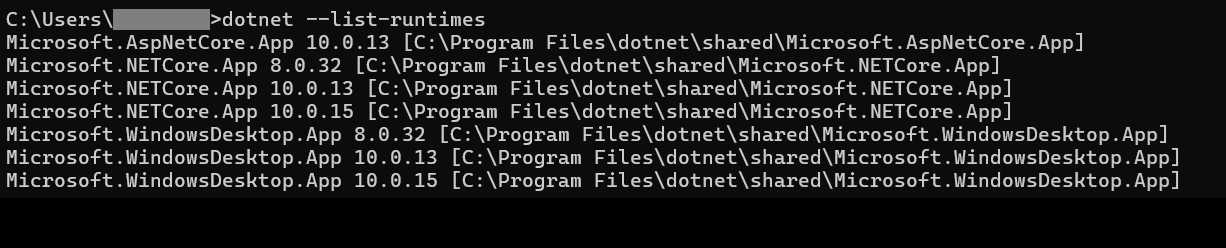
On my computer, I try to run “Teltonika.Configurator_1.7.64_B.FM64_R.88.exe” but this pop-up appears:

After cliking on “Oui”, nothing happens.

So I install SDK 10.0.402 and also .NET Framework 4.8.1

After that, nothing change.

I tried to reboot my computer, to run the .exe in admin mode.

I tried this on a computer with Windows 11 Entreprise processor x64 and on a computer with Windows 10 Entreprise 2016 LTSB.

Which exact version of .NET do I need to run the configurator properly ?

Thanks in advance for your help :slight_smile:

Good day,

Thank you for your inquiry.

Based on the error message, it appears that the required Microsoft .NET Windows Desktop Runtime is missing from your computer.

Please follow the steps below:

  1. Open the Microsoft .NET download page using the link provided in the error message.

  2. Once the page opens, locate the Run desktop apps section.

  3. Under this section, select Download x86.

  4. Run the downloaded installer and complete the installation.

  5. Once the installation is complete, try launching the Teltonika Configurator again.

Please note that the .NET SDK and .NET Framework are different from the .NET Desktop Runtime required by the Configurator.

If the issue persists after installation, please share the updated error message so we can investigate further.

Installing .NET 10 and Framework 4.8.1 may not resolve a missing runtime dependency. I’d check the exact error message and whether the Configurator requires a specific .NET Desktop Runtime rather than just the SDK. Have you checked the installed runtimes using dotnet --list-runtimes?

Hello Wasiq, thanks for your answer.

As I wrote it previously, the error message provide nothing neither open any web page or installer when I click “yes”.

I had installed SDK 10.0.404 beacause it’s written the desktop runtime is included.

Today, I’ve installed “.NET Desktop Runtime 10.0.15” separatly. I took the x64 version, according to my Window’s system type, and I also try the x86 version, but the error message is still here and it’s the same.

Hello Julia, thanks for your answer,

You can see the exact error message in my 1st post. I would like too to know which specific .NET Desktop Runtime my program need. But the error message I have don’t specify it -_-"
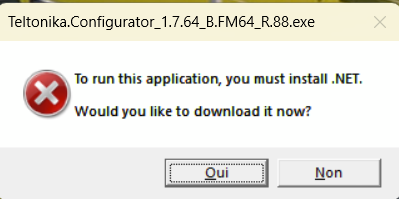
The command display this: