Hello,
I have a Teltonika FMC234 running the latest available firmware version, 04.00.00.Rev.13, and I am experiencing problems with the GNSS signal.
During the initial tests performed in a vehicle, I noticed numerous sudden position jumps on the server where I receive the telemetry data. It seemed as though the device was losing its position fix and continued reporting the last known position for some time.
Initially, I had configured the GNSS combination that, in theory, should provide the best accuracy in my area, Spain:
GPS + GLONASS + Galileo
After the device had been powered on for a while, I would normally see approximately:
- Between 7 and 9 GPS satellites
- Between 7 and 8 GLONASS satellites
- Between 1 and 3 Galileo satellites
The problem is that, although the satellites appeared as visible, the number of satellites in use was usually zero. Whenever any of them changed to “in use,” they would remain in that state for only about one second, which is approximately one update cycle in the application. The device would acquire the satellite and immediately lose it again, or at least that is the behavior shown in Teltonika Configurator.
I also found it unusual that, despite having a higher number of GPS satellites available, the device seemed to be trying to obtain its position mainly through GLONASS. I understand that the receiver may internally select the satellites with the best signal quality or strength, but I do not understand why it appears to prioritize GLONASS when more GPS satellites are available.
By chance, during one of the tests, I configured the device to use GPS only. At that point, it obtained a stable position and stopped losing the fix. The satellites remained continuously in use, and the reported location was correct and stable.
However, when I enabled any of the following combinations, the problem returned:
- GPS + GLONASS
- GPS + GLONASS + Galileo
- GPS + BeiDou
With any of these configurations, the device once again had difficulty obtaining and maintaining a stable GNSS fix.
I have also observed another unusual behavior. Sometimes, after changing the GNSS mode, the change does not appear to be applied correctly. For example, the device sometimes continues to display or use GLONASS satellites even when it is configured for GPS only or GPS + BeiDou. Satellites from other constellations that should theoretically be disabled also continue to appear as visible.
I have even restarted the device with only the GPS constellation enabled, but after startup, Teltonika Configurator once again shows both GPS and GLONASS satellites. I do not understand whether this means that the configuration is not being applied correctly, whether the module continues to detect other constellations even when they are disabled, or whether this is simply an issue with how the information is displayed in Teltonika Configurator.
This image was taken immediately after powering on the device. As shown, although the device is configured to use GPS only, Teltonika Configurator displays both GPS and GLONASS satellites. In this state, the device is unable to obtain a position fix.
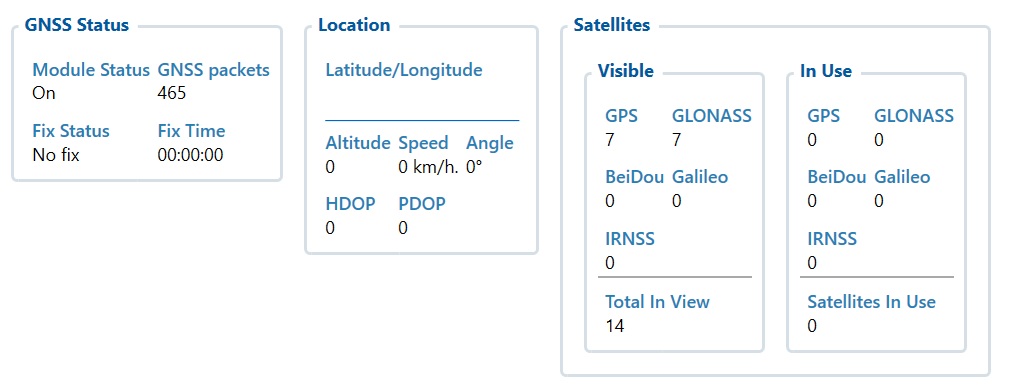
This image was taken immediately after the first one. Without restarting the device, I enabled GLONASS and then disabled it again, leaving only GPS selected. After making this change, the device successfully obtained a position fix, as shown in the image.

All tests were performed under the following conditions:
- Outdoors
- With a completely unobstructed view of the sky
- With the device installed in the orientation recommended by the manufacturer, with the logo facing upward as indicated in the manual
- A-GPS enabled
- A-GPS updates configured every six hours
- All power-saving modes disabled
Initially, I thought that the device might be defective or that there could be a problem with the GNSS antenna. However, after performing numerous tests using GPS only, the device worked perfectly. Even after returning from a test route and entering a garage, the device continued receiving satellite signals.
So far, I have carried out the following actions:
- Restored the device to factory settings
- Reinstalled the firmware in case the previous installation was corrupted
- Tested different GNSS constellation combinations
- Saved the configuration and restarted the device after changing the GNSS mode
- Reviewed all the information available in Teltonika Configurator
- Attempted to analyze the dump files to determine whether I could extract any useful information from them
- Performed outdoor tests with the vehicle both stationary and in motion
Despite all these steps, the behavior has not changed. The information provided by Teltonika Configurator has not allowed me to investigate the issue any further, and I have also been unable to draw any clear conclusions from the dump files.
Has anyone experienced a similar problem with this model or this firmware version?
Is there any way to determine whether the problem is caused by the firmware, the configuration, or the GNSS module itself? I would also appreciate any advice regarding which logs, parameters, or files I should review to obtain more detailed diagnostic information.
Thank you in advance.