ECAN01 and FMB140 can bus data

Hi.

Please bare with me as I am a hobbiest trying to work on a software solution.

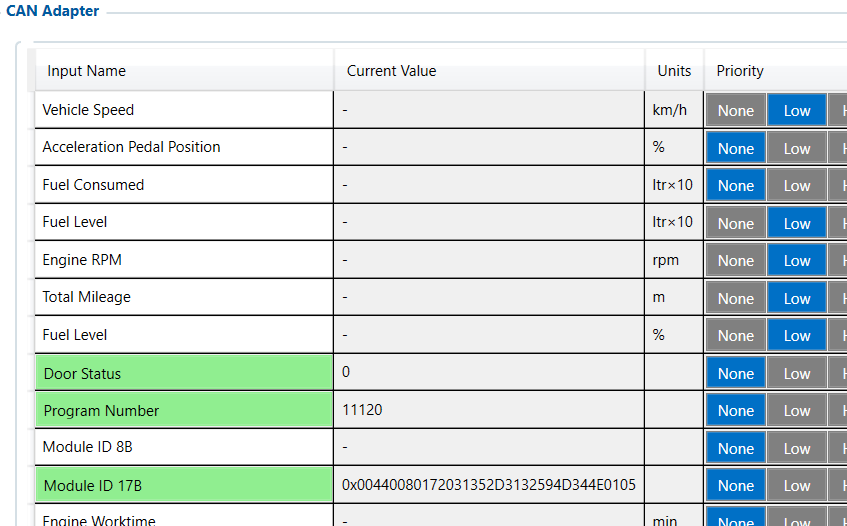
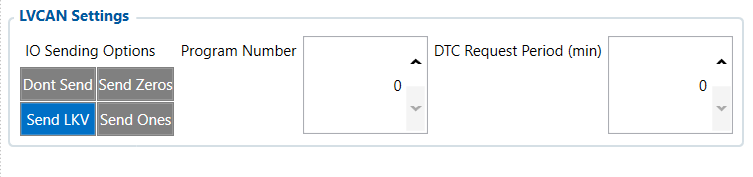
I am using a ECAN01 contactless adapter that I clipped on just before the OBD2 port, tripple checked H/L positions. In FMB140 configuration CAN adapter I set a few values of interest to priority LOW which come through as 0. Referencing LV-CAN200_List sheet, I should be able to get these values. I checked the seating of the CAN H/L within the ECAN01, and they seem fine. Is there more configuration I am missing ? I do not see any program number in the LV-CAN200_List sheet so I have left it as is. Please see attached JSON and some screenshots as reference. Any assistance would be much appreciated.

I am testing this on a FORD RANGER (T6) 2019>

{
“battery.current”: 0,
“battery.voltage”: 0,
“can.engine.oil.level”: 0,
“can.engine.rpm”: 0,
“can.engine.temperature”: 0,
“can.fuel.level”: 0,
“can.fuel.volume”: 0,
“can.vehicle.mileage”: 0,
“can.vehicle.speed”: 0,
“channel.id”: 1356120,
“codec.id”: 142,
“engine.ignition.status”: false,
“event.priority.enum”: 0,
“external.powersource.voltage”: 12.754,
“gnss.state.enum”: 1,
“gnss.status”: true,
“gsm.mcc”: 655,
“gsm.mnc”: 1,
“gsm.operator.code”: “65501”,
“gsm.signal.level”: 60,
“ident”: “357073291824908”,
“movement.status”: false,
“peer”: “105.245.114.247:58908”,
“position.altitude”: 1470,
“position.direction”: 0,
“position.hdop”: 0.6,
“position.latitude”: -25.801193,
“position.longitude”: 28.317313,
“position.pdop”: 0.9,
“position.satellites”: 15,
“position.speed”: 0,
“position.valid”: true,
“protocol.id”: 14,
“server.timestamp”: 1777226200.071497,
“sleep.mode.enum”: 0,
“timestamp”: 1777226192,
“vehicle.mileage”: 1.53
}
Good Day,

Thank you for your query.

For the Ford Ranger T6 (2019), the CAN lines are typically located under the Driver-side lower dash (kick panel) near the fuse box/OBD port:

  • CAN H → White-Blue

  • CAN L → White

For the exact wiring schematics, kindly contact your Sales Manager, who can assist in creating a Partner Portal ticket.

Once the connections are completed, please use the AutoScan feature on the Teltonika FMB140 to detect the appropriate CAN configuration. Detailed instructions can be found in the link below:

FMB140 autoscan feature instructions - Teltonika Telematics Wiki

The data should be received via ECAN01. If no data is observed, the most likely cause would be incorrect CAN wiring.

Thanks, and best regards,
Imran S

Hi @Imran.S

Thanks for the reply.

I am going to attach an AI generated image of how I have wired things up. I am getting some values that are highlighed as green, so is this not an indicator that the wiring is correct? I have requested for an invitation to FOTA WEB so that I can update myFMB140 CAN adapter firmware. I have clipped over the can bus wires just before the OBD2 port - which could also be incorrect ? Should I be clipping can bus wires in a different location ?

The other problem I see is that when I do an auto scan on the program number, and set. It does not seem to persist and use the number. Its sticking to the number seen in the screenshots.

But please see the images I will attach for a clearer picture of my setup.

Your assistance is much appreciated.

Hi @Claude ,

The CAN lines on which the data is received can vary from vehicle to vehicle. Based on the screenshots provided, the connection between the device and the ECAN-02 appears to be correct. However, the ECAN-02 must also be connected to the correct CAN lines of the vehicle in order to receive the required data.

For the exact wiring schematics for your vehicle, kindly contact your sales manager so that they can assist you in creating a Partner Portal ticket for further investigation.

At the moment, the issue appears to be related to the ECAN-02 being connected to incorrect CAN lines on the vehicle side rather than an issue with the device or adapter itself.

Thanks, and best regards,
Imran S.

Hi @Imran.S ,

I have had some success. I clipped over the can wires behind the glove box and am getting more real live data. This was just a test vehicle, so I am not too concerned, I just wanted confirmation that the rest of my setup works correct. I now understand the full flow.

I have requested for an invitation to FOTA WEB for the CAN adapter SW updated, then I will run a few more tests to see what data I get. But all in all I am sorted for now.

Thanks for your responses, much appreciated.

Cheers,
Claude