Can FMB140 CAN-BUS work on mitsubishi F1 canter
Dear @CANON
Good day!
The device should support the vehicle; however, compatibility may depend on the manufacturing country and year. Kindly share the manufacturing year and country so we can confirm accordingly.
In these vehicles, in most cases, the CAN lines are located behind the instrument cluster. The CAN wires should be twisted together.
To verify CAN availability, start the vehicle and measure the CAN line voltage using a multimeter. Typically, CAN H voltage is around 2.5–2.7V, and CAN L voltage is around 2.1–2.3V.
Once the connection is completed, open the Configurator, go to the CAN Adapter tab, and run the Auto Scan feature. After the scan, you should receive around nine program numbers. Please test each program number and use the one that provides the maximum number of parameters.
Kind regards,
Amalnath
It’s a mitsubishi fuso F1 year of manufacture is 2022
It’s only showing the RPM
Dear @CANON
Could you please confirm where the CAN connection has been made? Also, have you performed the Auto Scan feature?
If possible, kindly share a picture of the CAN connection. This will be helpful for verification.
Kind regards,
Amalnath
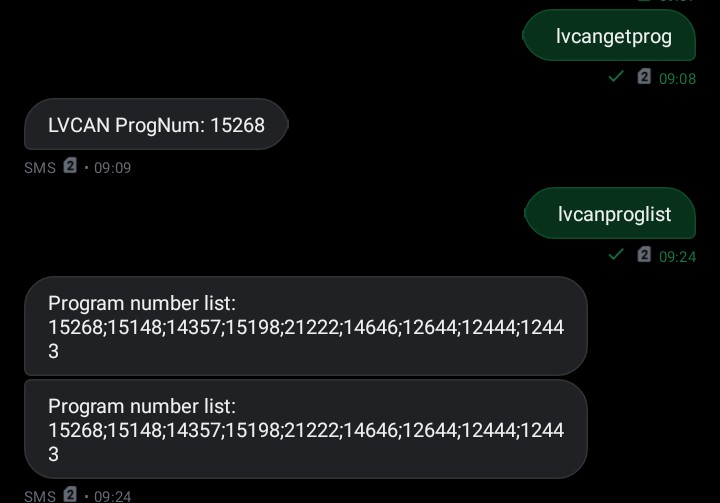
Dear @CANON
Could you please explain where you have currently connected the CAN wires? Sharing a picture of the CAN connection would also be very helpful for verifying the connection. If you require the wiring connection scheme, kindly coordinate with your Sales Manager or create a VIP ticket through the Partner Portal.
Kind regards,
Amalnath
Used pin connection from OBD port the CAN H and CAN L
Dear @CANON
follow the steps below:
CAN Connection:
-
Locate the CAN wires in the vehicle (The CAN connection is typically found behind the instrument cluster, at the OBDII port, or near the ECM module and fuse box.).
-
The CAN wires should be twisted together.
-
Connect CAN H from the device to CAN H of the vehicle, and CAN L to CAN L.
-
Start the vehicle engine and verify the voltage using a multimeter:
-
CAN H: approximately 2.5–2.7V
-
CAN L: approximately 2.1–2.3V
-
Auto Scan Steps:
-
Connect the device to the Configurator.
-
Open the CAN Adapter tab.
-
Click on the Auto Scan option.
-
Wait until the scan is completed.
-
You should receive several program numbers (usually around 9).
-
Test each program number and select the one that provides the maximum number of parameters.
Kindly ensure the connection is correct and the vehicle engine is running before performing Auto Scan.
Kind regards,
Amalnath