I’ve been using the Fota Web for quite some time, and I was wondering if there’s any way that I can do a multi-search, like I have 100 IMEI, then like I can just paste the 100 IMEI with separators (, or for example (123123, 123321, 1233321, 6161231, …) on the search bar cause pasting one by one takes a long time just looking for a workaround to make things faster on my end.
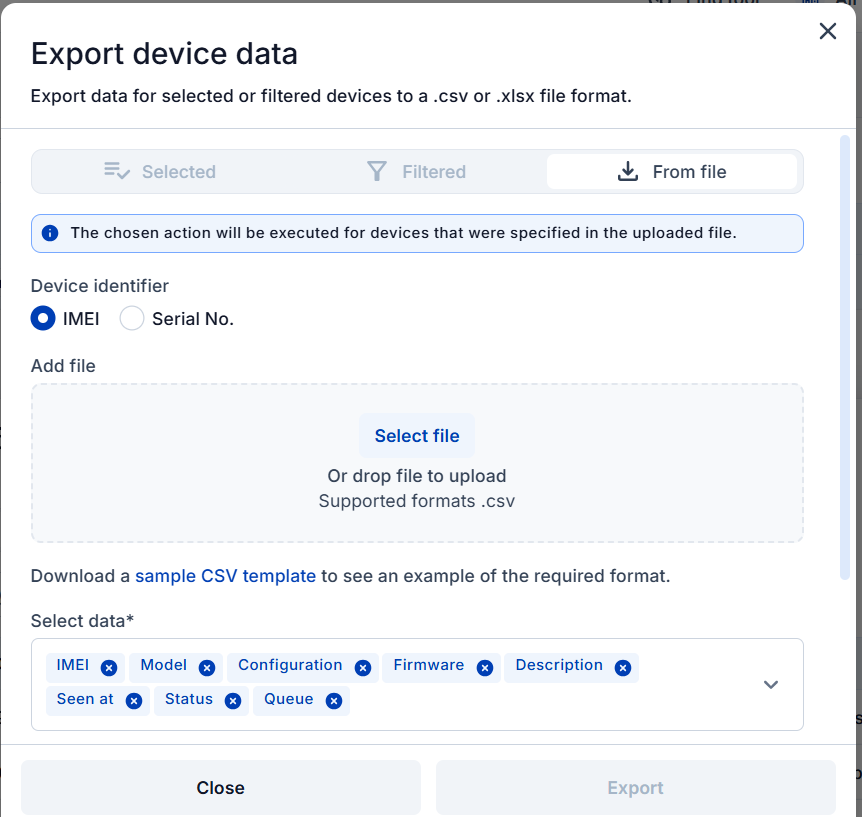
To search or export values for multiple IMEIs, you can use the CSV upload option. First, select the columns containing the information you want to check, then click the Export button. Download the sample CSV file, enter the required IMEIs in the specified format, and upload it. This allows you to search for 100 or more IMEIs in a single operation.
A bulk IMEI search feature would be a real time-saver! With 100+ devices, searching one by one is quite tedious. Could Teltonika add a multi-search option that accepts comma-separated IMEIs or a CSV upload? Would love to hear if anyone has found a workaround for this. Has the team considered adding this feature?
This is good, but not for my use-case scenario, since what I need is a live result and what I am looking for is realtime results like once a device has updated I can see that at x:xx:xxx the device updated.
I cannot export every second just to look at the status of the 100 devices or more.
I hope you got my point and I hope my username makes a point as well.
I understand the requirement. However, for now, you can search for multiple devices using the Export feature.
Before exporting, select the required columns, such as Last Seen, to ensure this information is included in the file. Please keep the IMEIs of the devices on your portal handy so you can search for them in bulk.
 for example (123123, 123321, 1233321, 6161231, …) on the search bar cause pasting one by one takes a long time just looking for a workaround to make things faster on my end.